Best LinkedIn Automation Tools for Agencies in 2026
On this page
- What agencies need from LinkedIn automation tools
- Whose LinkedIn account is it when you run outreach for clients
- The 9 best LinkedIn automation tools for agencies
- LinkedIn automation tools for agencies compared
- Running many client accounts with LinkedIn automation
- How to choose a LinkedIn automation tool for your agency
- Questions about LinkedIn automation tools for agencies
If you run an agency, your LinkedIn outreach happens in two places: inside your clients' accounts, and inside your own, where you win the next client. Eight of the nine LinkedIn automation tools for agencies below are built for the first job, with client workspaces or an agency plan. Omniscient, the one we make, fits the second.
We built the LinkedIn sending engine inside Omniscient, so we judged each tool by the settings we had to get right ourselves, such as each account's own working hours and warmup.
Here's the short version, sorted by the agency work you do:
- Your agency's own new business, with the CRM and proposals in one place: Omniscient.
- Many client senders with a flat agency price and white label: HeyReach.
- Client campaigns that mix LinkedIn with cold email: Skylead or GetSales.io.
- Clients who want their own branded logins and reports: Expandi or Meet Alfred.
- The lowest starting price per client account, if you can keep a server running: Linked Helper.
| Tool | What it is | Starting price | Best for |
|---|---|---|---|
 Omniscient | LinkedIn outreach you approve, inside a CRM that fills itself in | $19 per seat a month, billed yearly | An agency's own new business |
| Cloud LinkedIn automation that runs many senders from one login | $79 per sender a month | Agencies with many client senders | |
| Cloud LinkedIn and email sequences, one IP per account | $99 a month, Agency on request | Clients who want a branded dashboard | |
| LinkedIn automation and cold email with an agency dashboard | $999 a month for 25 seats, first year | Agencies selling LinkedIn and email together | |
| LinkedIn and email outreach priced by account and inbox | $69 a month for 1 LinkedIn account | Agencies that give each client its own workspace and inbox | |
| LinkedIn, email and X sequences with a workspace per client | $39 per user a month, billed yearly | Small agencies that want white label from 3 seats | |
| Cloud LinkedIn and cold email outreach with AI replies | $59 per LinkedIn account a month | Agencies that resell under their own brand | |
| Multichannel sequences on LinkedIn, email, calls and X | €60 per identity a month | Agencies that add calls to LinkedIn and email | |
| Desktop LinkedIn automation for your own computer or server | $15 per LinkedIn account a month | The lowest starting price per account |
What agencies need from LinkedIn automation tools
A sales team usually runs a handful of LinkedIn accounts. An agency runs at least one for every client, so a setting you get wrong is wrong on every account at once.
Before you compare prices, check that a tool covers these:
- A separate space for each client, so leads, campaigns and replies never mix.
- Pacing that belongs to each LinkedIn account, with that account's own time zone and working hours.
- One inbox where you can filter replies by client and by sender.
- A way for clients to connect their own accounts without handing you a password.
- White label and client reports, if clients log in or you resell the tool.
- A pricing model that still makes sense at 10, 25 or 50 senders.
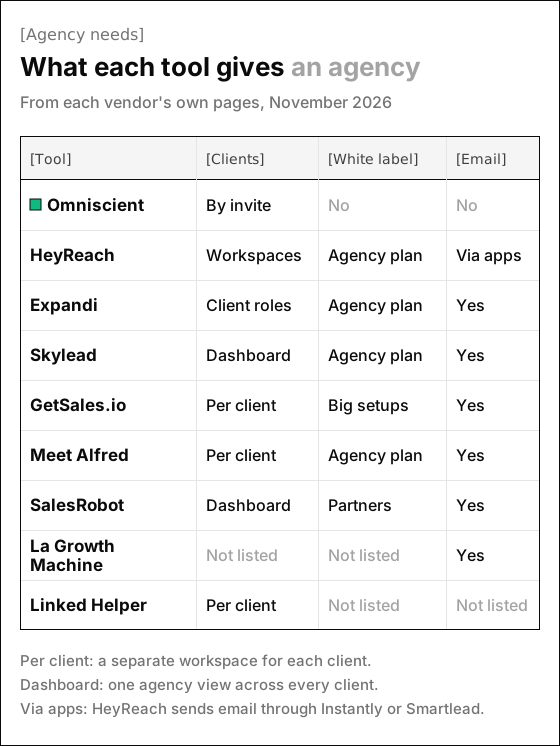
Frankly, white label is the easiest item to spot on agency pricing pages, but it only changes what clients see, while pacing and client separation protect each account.
Whose LinkedIn account is it when you run outreach for clients
We'd settle this before any trial, since it shapes your client contract. LinkedIn's User Agreement says in section 2.2 that "You will not share your account with anyone else."
Section 8.2 adds that members agree not to "use or attempt to use another's account (such as sharing log-in credentials or copying cookies)." The same section bans "bots or other unauthorized automated methods" for adding contacts and sending messages.
Every tool on this list automates the actions that rule covers, ours included, and the account at risk belongs to your client. Honestly, no setting removes the risk, so the best you can do is keep it small and agreed in writing:
- Ask each client to connect their own account through the tool's sign in link, so the password never passes through your team.
- Get a written OK that names the account, the daily limits and who answers replies.
- Agree on what happens when the contract ends, including who keeps the conversations.
- Keep each client's sender in that client's own space, so their leads never land in another client's lists.
In Omniscient, the connect link works once, expires after 15 minutes and is tied to one workspace and one person. Disconnecting a sender cancels its queued invitations and messages, and its conversations stay in the Inbox.
The 9 best LinkedIn automation tools for agencies
1. Omniscient
Omniscient is a CRM and LinkedIn outreach software that writes a message for each lead and sends only text your team has approved. For an agency, it fits the outreach that wins your own clients.
Each connected LinkedIn account, which we call a sender, keeps its own settings:
- Its own time zone and working hours, with a lunch break and start and end times that move by up to 20 minutes a day.
- A pace of Careful, Normal, Fast or Custom, capped at 40 invitations a day and 200 a week.
- A warmup that starts a new or reconnected account at 5 invitations a day and adds 2 a day.
- A manual mode that turns its queue into a list you send by hand.
- A choice of who sees its conversations: only the owner and admins, or everyone in the workspace.
 Connect LinkedIn
 Sam Carter
 Leo Novak
 Amara Osei
Replies from every sender land in one Inbox, which you can filter by sender and by campaign, with the person's CRM record beside the thread. A reply stops that person's outreach in every campaign, and an opt out keeps them out of later imports too.
When a reply turns into a deal, Otto, our AI agent, can write the proposal in Deal Room from your Library and the deal, dressed like your own website.
Omniscient sends on LinkedIn only and has no agency dashboard, white label or client reports. You can belong to several workspaces and switch between them in the sidebar, but a client's workspace comes from that client inviting you. For outreach on behalf of 20 clients, HeyReach, Skylead or GetSales.io will suit you better.
Paid seats start at $19 per seat a month, billed yearly, and the free trial lasts 14 days with no credit card. The LinkedIn Outbound page has the full tour.
2. HeyReach
HeyReach is a LinkedIn automation software that runs outreach from many LinkedIn accounts at once and rotates sending between them. Its pricing FAQ says you pay for senders, while teammates, VAs and clients aren't charged.
- Growth costs $79 per sender a month and includes workspaces and permissions, so each client's data stays separate under one login.
- Agency costs $999 a month for 25 senders or $1,399 for 50, and adds white label with your own domain and branding.
- Unlimited costs $2,999 a month for up to 300 senders.
- Growth includes a residential proxy per sender, while Agency and Unlimited ask you to bring your own.
- Email runs through native integrations with Instantly and Smartlead.
Thankfully, you can test it on real accounts first. The Growth trial covers up to 3 LinkedIn accounts for 14 days with no card, and the FAQ describes a trial of 30 days for Agency and Unlimited on request. Our HeyReach alternatives guide compares it with the rest.
3. Expandi
Expandi is a LinkedIn automation software that runs outreach sequences from the cloud, with a dedicated, country based IP address for each account. Business costs $99 a month, or $79 a month billed yearly, and the free trial lasts 7 days. New profiles warm up automatically at a pace you can set.
Its Agency plan starts at 10 seats and is priced on request. The pricing page lists "Use Expandi under your own brand" and "Transparent reports for clients," and its agency page adds custom roles and permissions "for co-workers and clients."
4. Skylead
Skylead is a LinkedIn automation and cold email software that builds sequences across both channels, with unlimited email accounts on every seat. Its Agency plan costs $999 a month for 25 seats or $1,999 for unlimited seats, listed as a promotion for the first year.
- Agency adds one dashboard for every client and seat, plus a Unibox for all client conversations.
- It also lists client roles and permissions, risk alerts, unlimited agency teammates and a white label option.
- A single seat costs $100 a month and includes up to 100,000 emails a month, with a free trial of 7 days.
5. GetSales.io
GetSales.io is a LinkedIn and email outreach software for agencies and GTM teams, priced per LinkedIn account and per inbox. LinkedIn costs $69 a month for 1 account or $195 a month for 5, and the page says the price falls to "$39 to $10 per account at scale."
- Its homepage describes each client getting "Its own workspace, its own LinkedIn and email accounts, and its own inbox."
- Each LinkedIn account runs on a managed ISP proxy with a gradual ramp, and the email module gives each client a dedicated server and IP.
- White label is included in the Business setup, which the page prices from $500 a month in resources, and the trial lasts 7 days.
Interestingly, the pricing page lists no fee per user, only per LinkedIn account and per email inbox.
6. Meet Alfred
Meet Alfred is a LinkedIn automation software that runs sequences on LinkedIn, email and X from the cloud. Its Agency plan (Teams in one comparison table) starts at 3 seats and gives you "Separate workspaces per client or squad, with their own leads and campaigns."
- It costs $39 per user a month, billed yearly, and includes email steps.
- A shared inbox lets your team assign threads and leave internal notes.
- White label lets you "Run several client brands from one account, each with its own look and domain."
- The homepage advertises a free trial of 7 days with no credit card to sign up.
7. SalesRobot
SalesRobot is a LinkedIn and cold email outreach software that runs in the cloud with a dedicated IP for each LinkedIn account, and it charges per account:
- Basic costs $59 a month, or $39 billed yearly, with one active campaign.
- Advanced costs $79, or $59 billed yearly, and adds unlimited campaigns, A/B testing and an inbox.
- Professional costs $99, or $79 billed yearly, and adds team management.
- Its agency page describes one dashboard where you run every client's campaigns and inboxes.
- White label runs through its partner program, and the free trial lasts 14 days with no credit card.
Its homepage says "Our AI replies on your behalf instantly." If you switch that on for a client, agree first on which replies a person reads before anything goes out, since every answer carries your client's name.
8. La Growth Machine
La Growth Machine is a sales automation software that runs sequences on LinkedIn, email, calls and X, billed per identity. On monthly billing, Basic costs €60 per identity a month for up to 3 identities, and Pro costs €120 with no limit on identities.
Its Agency plan needs at least 6 identities, is priced through sales and adds onboarding sessions and discounted plans. The pricing page doesn't mention white label or separate client workspaces, and the free trial covers one identity for 14 days with no card.
9. Linked Helper
Linked Helper is a LinkedIn automation software that runs as a desktop app on your own computer or on a server you control. Standard costs $15 per LinkedIn account a month, less on 3, 6 or 12 month terms, and volume discounts start at 10 licenses.
- Each client can have a separate workspace with its own data, accounts and permissions, and clients can join as view only guests.
- One license runs one LinkedIn account, and every extra workspace needs at least one license.
- Automation runs only while that computer or rented server is on.
- The trial gives 14 days of Pro with no card.
Luckily for agencies watching their margins, it has the lowest starting price per account on this list.
LinkedIn automation tools for agencies compared
Billing and trial terms differ more than the feature lists suggest, so here they are side by side.
| Tool | How it charges | Where it runs | Free trial |
|---|---|---|---|
| Omniscient | Per seat | Cloud | 14 days, no card |
| HeyReach | Per sender, or agency bundles | Cloud | 14 days, no card |
| Expandi | Business plan, or Agency from 10 seats | Cloud | 7 days |
| Skylead | Per seat, or agency bundles | Cloud | 7 days |
| GetSales.io | Per LinkedIn account and inbox | Cloud | 7 days |
| Meet Alfred | Per seat, Agency from 3 seats | Cloud | 7 days, no card |
| SalesRobot | Per LinkedIn account | Cloud | 14 days, no card |
| La Growth Machine | Per identity, Agency from 6 | Cloud | 14 days, no card |
| Linked Helper | Per LinkedIn account | Your computer or server | 14 days, no card |
Running many client accounts with LinkedIn automation
LinkedIn doesn't publish its invitation limit, and its help page says only that an account that reaches it "may be temporarily restricted from sending invitations." That restriction "typically lasts one week," which for a client means a week of paused outreach you'll need to explain.
Across 20 client accounts, small settings add up, so we built these lessons into Omniscient's engine and would look for each one in any trial:
- Warm up every new or reconnected account. Ours starts at 5 invitations a day and adds 2 a day until it reaches that account's limit.
- Let each day's cap move. Ours draws it fresh every day between 80% and 100% of the limit, so no two days look alike.
- Send in the client's hours and time zone, even when your team works from another one.
- Slow down when the signals turn. Ours runs at half pace for 3 days, then eases back over 3 more, when LinkedIn rate limits the account or fewer than 20% of last week's invitations were accepted. It judges acceptance only after 20 invitations, so a few ignored invites on day one never slow a new account.
- View the profile 1 to 4 hours before inviting, as a person would.
- Never retry a send that may have gone through. A missing message is easy to fix by hand, and a doubled one can't be taken back.
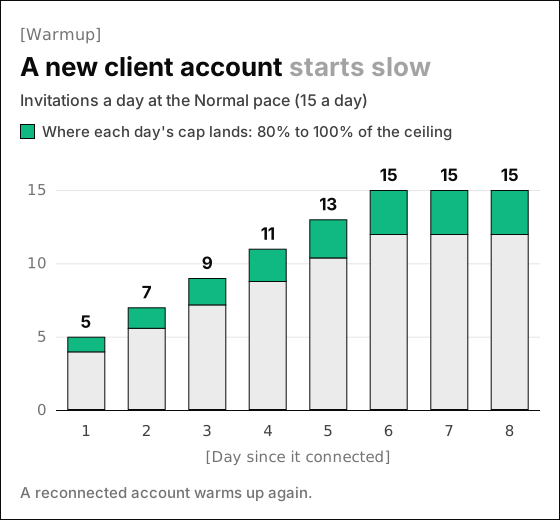
Understandably, the warmup matters more in agency work, because you rarely know how a client's account was used before it reached you.
If two clients sell to the same buyers, watch for overlap between them. Two of your senders can invite the same person in the same week, since each client's workspace keeps its own lists.
For more on pacing, read how to automate LinkedIn outreach without getting restricted and our guide to the LinkedIn connection request limit.
How to choose a LinkedIn automation tool for your agency
First decide whether clients will log in or only see your reports. If they log in, white label and client roles move up your list, and if not, spend your trial on pacing and the inbox.
Then run these checks in the first week of any trial:
- 01Count your senders
Estimate how many client accounts you'll run in six months, and price each tool at that number.
- 02Connect a real client account
Go through the flow from the client's side and confirm no password changes hands.
- 03Set two time zones
Give two senders different working hours and confirm each one sends only in its own.
- 04Reply from a test account
Check that a reply stops the sequence in every campaign and shows up under the right client.
- 05Log in as a client
See what a client user or guest can view and what stays hidden.
- 06Disconnect a sender
Check what happens to its queued messages and to its conversations.
Happily, none of these checks needs your full lead list, so you can finish them before a client campaign goes live. If a client would rather run outreach on their own, our list of the best LinkedIn automation tools covers sales teams and solo sellers.
Questions about LinkedIn automation tools for agencies
What is the best LinkedIn automation tool for agencies?
HeyReach, Skylead and GetSales.io suit many client senders, and Expandi and Meet Alfred add branded client access. Omniscient fits your agency's own new business, with the CRM and proposals in one place.
Can an agency run LinkedIn outreach from a client's account?
LinkedIn's User Agreement says members shouldn't share their account or use someone else's, so the risk is real. Have the client connect their own account through the tool, and agree on limits in writing.
Which LinkedIn automation tools have white label for agencies?
HeyReach, Expandi, Skylead and Meet Alfred list it on their agency plans, GetSales.io lists it for larger setups, and SalesRobot sells it through its partner program. Omniscient, La Growth Machine and Linked Helper don't list it.
How many LinkedIn accounts can an agency run at once?
HeyReach's Unlimited plan covers up to 300 senders, but LinkedIn's limits apply to each account, so pacing every sender on its own matters more than the total.
How do LinkedIn automation tools for agencies charge?
Linked Helper, SalesRobot and GetSales.io charge per LinkedIn account, with Linked Helper from $15 a month. HeyReach and Skylead sell agency plans from $999 a month, and Omniscient charges per seat from $19 a month, billed yearly.