Best Dripify Alternatives in 2026
On this page
Dripify is a LinkedIn automation software that runs drip campaigns of LinkedIn and email steps from its own servers, with a drag and drop builder. If you're comparing Dripify alternatives, you probably like how fast it gets a campaign live.
You may still need something its plans leave out, like a CRM that keeps every reply or a native Salesforce sync. Below, we match eight tools to the reason you're leaving.
We spent this year building the LinkedIn sending engine inside Omniscient, so we read Dripify's pricing page and help center line by line, with our own limits open beside them.
| Tool | What it is | Starting price | Best for |
|---|---|---|---|
 Omniscient | LinkedIn outreach you approve, inside a CRM that fills itself in | $19 per seat a month, billed yearly | Small B2B teams that want outreach and CRM together |
| Cloud LinkedIn sequences with email steps and a dedicated IP in your country | $99 a month | Teams on Salesforce or Pipedrive that want a native sync | |
| LinkedIn outreach from many accounts with one unified inbox | $79 per sender a month | Agencies with many client senders | |
| Simple LinkedIn outreach with monthly invitation quotas | €19 per user a month, billed yearly | Founders doing outreach on their own | |
| Multichannel sequences on LinkedIn, email, calls and X | €60 per identity a month, billed yearly | Reps who call as often as they message | |
| Sales engagement across email, LinkedIn and calls | $87 per user a month, billed yearly | Email teams adding LinkedIn steps | |
| LinkedIn automation and cold email with unlimited email accounts | $100 per seat a month | Teams that send cold email at volume | |
| Desktop LinkedIn automation that runs on your own computer | $15 per LinkedIn account a month | The lowest price per account |
What Dripify does well
Here's what Dripify's pricing page lists today, and what you'd leave behind:
- Pro costs $79 per user a month, or $59 billed yearly, with unlimited drip campaigns, LinkedIn and email steps, a dedicated inbox and a native HubSpot integration.
- Advanced costs $99 per user a month, or $79 billed yearly. It adds team management, A/B tests, step analytics, lead tagging and Activity Control, which adjusts your daily limits on its own.
- Both plans list a dedicated IP tied to your account and location, and campaigns run on Dripify's servers while your computer is off.
- The free trial lasts 7 days with Advanced features and no card, and nothing is charged when it ends.
Honestly, email steps on the entry plan are a real plus, since our own tool has none and Waalaxy saves cold email for Business. If each rep runs LinkedIn and email drips from one account, staying with Dripify is a fair choice.
Why teams look for a Dripify alternative
Each reason comes from Dripify's own pages, so you can check it against your setup:
- Each seat covers one LinkedIn account, and the pricing FAQ says it plainly: "A team of five reps needs five seats."
- Team management, A/B tests and Activity Control come only with Advanced, so a growing team pays the Advanced price.
- HubSpot is the one native CRM on its integrations page, and that sync runs one way. Salesforce, Pipedrive and the rest connect through Zapier, Make or webhooks.
- Sequences cover LinkedIn and email, and we didn't find calls, SMS, X or WhatsApp steps on its pages.
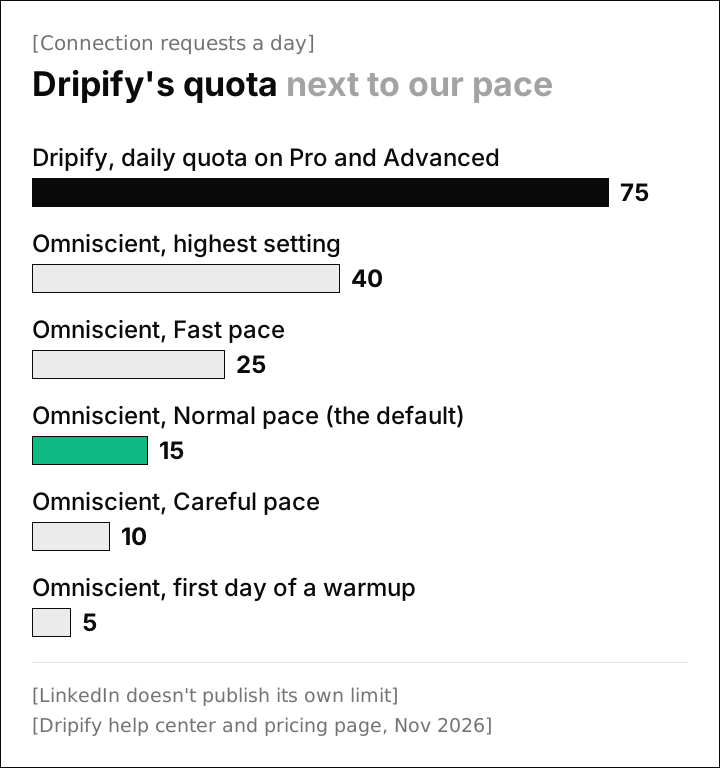
- Its daily quota of up to 75 connection requests sits well above the 40 our own engine allows at its highest setting.
This chart points each reason to the tools we'd look at first:
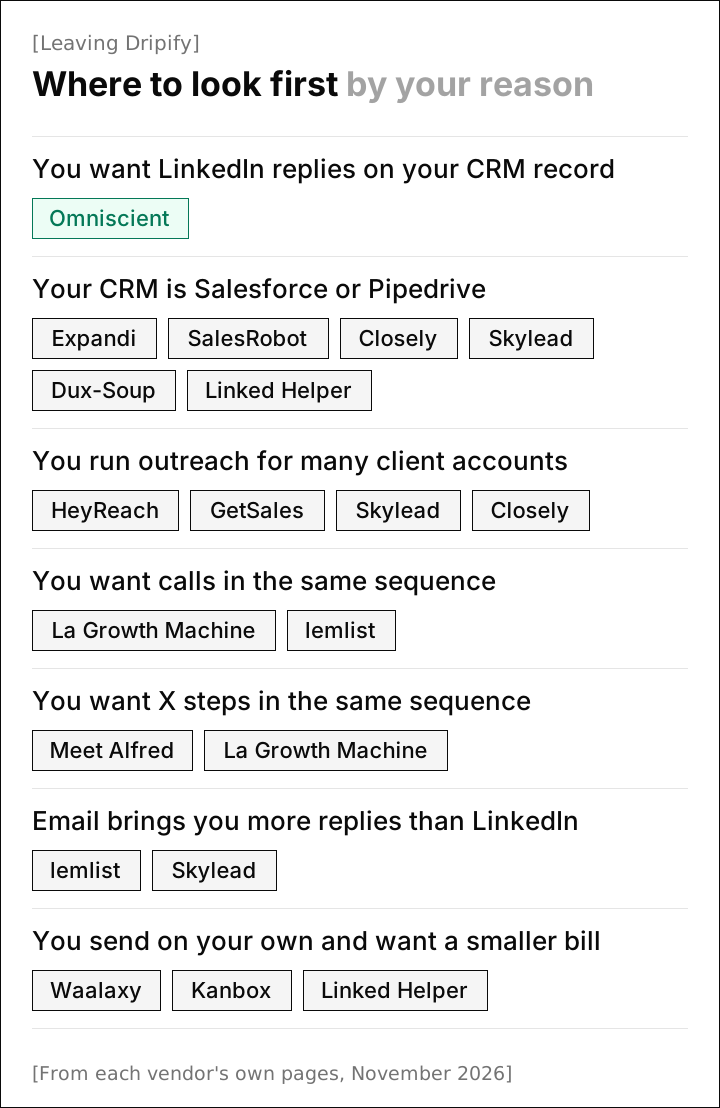
Dripify's daily limits next to ours
Dripify's help center publishes its daily limits for each LinkedIn account type, and you move them with sliders. Here they are beside ours:
| Setting | Dripify, from its own pages | Omniscient, from our engine |
|---|---|---|
| Connection requests a day | Up to 75 on every plan and LinkedIn account type | 15 at the Normal pace, 40 at the highest setting |
| Invitations a week | No number listed; its help center suggests keeping pending invitations under 800 | 80 at the Normal pace, never more than 200 over a rolling 7 days |
| Timing | Random delays between actions | Your hours, with start and end moved up to 20 minutes each day, a lunch break and 3 to 12 minute gaps at the Normal pace |
| Day to day totals | A range of 1 to 10 around your setting, so 60 with a range of 5 sends 55 to 65 | Between 80% and 100% of your limit, drawn fresh each day |
| A new account | Activity Control, on Advanced, adjusts limits for "a gradual growth" | Starts at 5 invitations a day and adds 2 a day |
| Slowing down on its own | Activity Control weighs your connections, pending invitations, account type and past activity | Half pace for 3 days after a rate limit, or when under 20% of a week's invitations are accepted once 20 have gone out, then back to full over 3 more days |
LinkedIn doesn't publish its invitation limit, and its help page says only that reaching it may restrict your invitations. That restriction "typically lasts one week." Every number above is a vendor's own ceiling, ours included.
That week is why we default to 15 a day. A restriction stops every invitation until it lifts, and a slower day costs you far less than a lost week. We also capped our sliders at 40 a day and 200 a week, the top of the range our app suggests for Sales Navigator accounts.
Thankfully, Dripify's sliders go down as easily as they go up. If you stay, these are the changes we'd make first:
- Move the connection request slider well below 75, closer to a pace you'd keep by hand.
- Set lower limits yourself during the 7 day trial, since Dripify says the trial "doesn't have any restrictions on daily processing limits."
- Turn on Activity Control if you're on Advanced, which Dripify recommends "for the best account safety."
- Keep pending invitations under 800, as Dripify's weekly limit article advises.
Our LinkedIn connection request limit guide explains where the common numbers come from.
The 8 best Dripify alternatives in 2026
1. Omniscient
Omniscient is a CRM and LinkedIn outreach software that drafts a message for each lead and sends only what your team approves. Replies land in one Inbox next to the person's CRM record, and the CRM fills itself in from your email and calendar.
Dripify fills messages with variables from each lead's profile, such as company and time in the current role. In Omniscient, Otto, our agent, writes up to three versions of your own pitch for each kind of signal, such as a job opening or a comment the person left.
Language models sometimes add a customer name or a result you never gave them. So Otto holds any version that adds a number, a name, customers or a result you didn't write. A held version never sends until someone on your team edits or approves it.
Pacing is on for every sender from day one, whatever your plan:
- A new account starts at 5 invitations a day and adds 2 a day, and the warmup starts again after a reconnect or a restriction.
- A profile view goes out 1 to 4 hours before each invitation, unless you turn that setting off.
- A reply stops that person's outreach in every campaign, and a person can be in only one live campaign at a time.
- Before a campaign goes live, Omniscient shows who it goes out to, who's left out and why.
You approve each person's messages, or everyone ready at once when you go live, and editing a message after approval clears that approval.
Admittedly, Omniscient isn't the right fit if your sequences need email steps, since it sends on LinkedIn only. Each campaign also sends from one LinkedIn account, and we don't list a dedicated IP or white label. An agency rotating dozens of client senders is better served by HeyReach.
Paid seats start at $19 per seat a month, billed yearly, and monthly billing costs 20% more. See the LinkedIn Outbound and CRM pages for the rest.
2. Expandi
Expandi is a LinkedIn automation software that runs outreach sequences from the cloud, with a dedicated IP address in your country. Business costs $99 a month, or $79 billed yearly, with an automatic profile warmup and email follow ups in the same sequence.
- Its integrations page lists native HubSpot, Salesforce and Pipedrive integrations, plus Zapier, webhooks and an API.
- The Agency plan starts at 10 seats and is priced through sales. It adds white label, client reports and roles with permissions.
- The free trial lasts 7 days.
Business costs the same as Dripify Advanced, so the move is mostly about your CRM. If your team works in Salesforce or Pipedrive, a native sync saves you from keeping a Zapier chain in working order.
3. HeyReach
HeyReach is a LinkedIn automation software that runs outreach from many LinkedIn accounts at once, with every reply in one unified inbox. Growth costs $79 per sender a month, or $64 billed yearly, with the API, webhooks, an MCP server and 100 enrichment credits per sender.
- Agency costs $999 a month as one flat price, with white label and your own proxies, and its card shows options for 25 and 50 senders.
- Unlimited costs $2,999 a month, with a fair use cap of 300 senders.
- Email runs through native Instantly and Smartlead integrations, and the integrations page lists HubSpot, Attio and Breakcold.
- The pricing FAQ lists a 14 day free trial with no card for up to 3 LinkedIn accounts.
Growth's monthly price per sender matches Dripify Pro, so your bill changes most on the flat Agency and Unlimited plans.
4. Waalaxy
Waalaxy is a LinkedIn outreach software that sends invitations and follow ups from simple campaigns with monthly quotas. Pro costs €19 per user a month, billed yearly, for 300 invitations a month, and Advanced costs €49 for 800.
- Business, at €69, adds cold email sequences and 500 email finder credits a month.
- The LinkedIn inbox is an optional extra at €20 a month.
- Every plan lists CRM sync and a 14 day free trial, and Advanced adds the API with Make, Zapier and n8n modules.
For founders, a monthly quota sets a gentle pace with no sliders to tune. If Dripify felt like more than you needed, Waalaxy Pro costs less, though email waits for Business.
5. La Growth Machine
La Growth Machine is a sales automation software that runs multichannel sequences on LinkedIn, email, calls and X. Personally, we'd look here first if your reps pick up the phone as often as they send a LinkedIn message, since Dripify's sequences stop at LinkedIn and email.
Basic costs €60 per identity a month, billed yearly, for LinkedIn and email. Pro costs €120 per identity and adds calls and one inbox for LinkedIn and email.
- An identity is one profile running campaigns, and you don't need one to answer replies.
- The Ultimate plan adds X and a native HubSpot and Pipedrive sync that logs sent and replied messages in your CRM.
- The Agency plan asks for at least 6 identities, and the free trial covers 1 identity for 14 days with no card.
6. lemlist
lemlist is a sales engagement software that runs sequences across email, LinkedIn and calls from one workspace. Multichannel costs $109 a month, or $87 billed yearly, and the FAQ says pricing depends on the number of users.
- Multichannel adds LinkedIn automation, a built in call dialer, SMS steps and 5 senders per user to the Email plan, and WhatsApp is an optional extra.
- The Email plan costs $69 a month, or $55 billed yearly, and has no LinkedIn steps.
- The pricing page names HubSpot, Salesforce and Pipedrive among its CRM integrations.
- The FAQ lists a 14 day free trial with Multichannel features and 200 credits.
lemlist suits a team whose outreach starts in email, so if most of your replies come from email today, you keep that channel first and add LinkedIn steps around it.
7. Skylead
Skylead is a LinkedIn automation and cold email software that builds sequences with conditions across both channels. The All-in-one plan costs $100 per seat a month, with unlimited email accounts, 100,000 emails a month, email warmup and an API.
- Agency costs $999 a month for 25 seats or $1,999 for unlimited seats, under a first year promotion. It adds one inbox for all client conversations and white label.
- The pricing page lists real time sync with HubSpot, Pipedrive and Salesforce, plus a free trial of 7 days.
Each Skylead seat brings its own email volume and warmup, which suits a team where cold email carries as much weight as LinkedIn.
8. Linked Helper
Linked Helper is a LinkedIn automation software that runs as a desktop app on your own computer or on a server you control. Its base price is $15 per LinkedIn account a month, with up to 45% off on a 12 month term.
- The machine has to be on, with the app running, to send.
- Native integrations include HubSpot, Salesforce, Pipedrive, Zoho CRM and Close.
- Standard caps a set of advanced actions at 20 a day, including sends to your CRM, and Pro lifts those caps.
- The trial gives 14 days of full Pro access with no card, and nothing renews on its own.
Luckily for tight budgets, Linked Helper has the lowest price per account on this list, and for email it hands each lead to a tool like Instantly.
Dripify alternatives compared
Channels and CRM syncs are where these tools differ most:
| Tool | Billed per | Steps besides LinkedIn | CRM | Free trial |
|---|---|---|---|---|
| Dripify | User, one LinkedIn account each | HubSpot, others through Zapier or Make | 7 days, no card | |
| Omniscient | Seat | None | Built in | 14 days, no card |
| Expandi | check | HubSpot, Salesforce, Pipedrive | 7 days | |
| HeyReach | Sender, or flat on Agency | Email through Instantly or Smartlead | HubSpot, Attio, Breakcold listed | 14 days, no card |
| Waalaxy | User | Email on Business | Sync on every plan | 14 days |
| La Growth Machine | Identity | Email, calls on Pro, X on Ultimate | HubSpot, Pipedrive on Ultimate | 14 days, no card |
| lemlist | User | Email, calls, SMS | HubSpot, Salesforce, Pipedrive | 14 days |
| Skylead | Seat, or flat on Agency | HubSpot, Pipedrive, Salesforce | 7 days | |
| Linked Helper | LinkedIn account | None, hands leads to Instantly | HubSpot, Salesforce, Pipedrive and more | 14 days, no card |
If your reason for leaving is the CRM, our roundup of LinkedIn outreach tools with a CRM goes deeper on where each tool's replies end up.
How to move off Dripify without risking your account
A LinkedIn account carries its pending invitations and recent pace into the new tool, so the first week after a switch needs the most care. Here's the order we'd follow:
- 01Pause every Dripify campaign
Your plan stays active until the end of the period you've paid for, so stop campaigns yourself before you cancel from Billing.
- 02Save who you've contacted
Keep a list of everyone in your Dripify campaigns, so the new tool can skip people who already heard from you.
- 03Load your do not contact list
Add customers and anyone who asked not to hear from you before the first campaign.
- 04Withdraw only what you've given up on
Dripify suggests keeping pending invitations under 800, and LinkedIn says a withdrawn invitation can't go to the same person again for up to three weeks.
- 05Restart slower than you ended
Treat the first week like a warmup even on an old account, and raise limits only once acceptance holds above 20%.
- 06Test the reply path
Ask a colleague to answer a test message and check that it lands on the right CRM record.
Fortunately, a careful tool covers part of step 2. Our engine checks the relationship on LinkedIn before every invitation, so someone still holding your old Dripify request isn't sent a second one.
LinkedIn's page on invitation restrictions names invitations left pending or ignored as one cause. It also names suspected use of an automation tool, which covers every tool on this list, ours included. Our guide to the safest LinkedIn automation tools covers what else to check in your first month.
Questions about Dripify alternatives
What is the best alternative to Dripify?
It depends on why you're leaving. Omniscient fits small teams that want outreach and a CRM together, and Expandi fits teams on Salesforce or Pipedrive. HeyReach suits agencies with many senders, and Linked Helper costs the least per account.
Is there a cheaper alternative to Dripify?
Yes. Dripify Pro costs $79 per user a month, or $59 billed yearly. Linked Helper starts at $15 per LinkedIn account a month, Waalaxy at €19 per user a month billed yearly, and Omniscient at $19 per seat a month billed yearly.
How many connection requests does Dripify send per day?
Dripify's pricing page lists up to 75 connection requests a day on every plan, and a slider sets it lower. LinkedIn doesn't publish its own limit, and our engine's default is 15 a day.
Does Dripify integrate with Salesforce?
Dripify's integrations page lists HubSpot as its one native CRM integration. Salesforce and other CRMs connect through Zapier, Make or webhooks.
Can I run Dripify and another LinkedIn tool on the same account?
We'd avoid it, since two tools add up actions neither one can see. Dripify's help center also suggests using a single tool after a weekly limit notice.