The Safest LinkedIn Automation Tools in 2026
On this page
- What LinkedIn says about automation tools
- What makes a LinkedIn automation tool safe
- The 7 safest LinkedIn automation tools in 2026
- Safest LinkedIn automation tools compared
- What a safe tool does when LinkedIn pushes back
- How to choose the safest LinkedIn automation tool for you
- Questions about safe LinkedIn automation
No LinkedIn automation tool is risk free, because LinkedIn's User Agreement bans bots that add contacts or send messages. So the safest LinkedIn automation tool is the one that keeps that risk low and slows down before LinkedIn has to step in.
We built the LinkedIn sending engine inside Omniscient this year, and much of that work went into the rules around each send. Below are the seven tools we'd trust most with your account in 2026, ranked by how much of that safety work each one does for you.
If you're short on time, here's where we'd start:
- Pick Omniscient if you want the warmup and slowdowns handled for you, with every message approved by your team.
- Pick Expandi if a dedicated IP in your country and an automatic warmup matter most to you.
- Pick La Growth Machine if you want a mobile proxy for each account and email steps in the same sequence.
- Pick Dripify if you want a dedicated IP and, on its Advanced plan, a pace that adapts to your account.
- Pick HeyReach if you run many senders and want a hard weekly cap on each one.
- Pick Linked Helper if you'd like everything to run from your own computer and network.
- Pick Waalaxy if you're new to automation and want small monthly quotas.
| Tool | What it is | Starting price | Best for |
|---|---|---|---|
 Omniscient | LinkedIn outreach you approve, with pacing and slowdowns on by default | $19 per seat a month, billed yearly | Teams that want the safety work done for them |
| Cloud LinkedIn sequences with a dedicated IP in your country | $99 a month | Sales teams that want an IP and warmup included | |
| Multichannel sequences with a mobile proxy for each LinkedIn account | €60 per identity a month | Teams running LinkedIn and email together | |
| Cloud drip campaigns with a dedicated IP and working hours | $79 per user a month | Small teams on LinkedIn and email | |
| Cloud LinkedIn automation that rotates sending across many accounts | $79 per sender a month | Agencies with many senders | |
| Desktop LinkedIn automation that runs on your own computer or server | $15 per LinkedIn account a month | Anyone who wants to send from their own network | |
| Simple LinkedIn outreach with monthly invitation quotas | €19 per user a month | Solo sellers starting out |
What LinkedIn says about automation tools
Section 8.2 of the LinkedIn User Agreement bans "bots or other unauthorized automated methods" used to "add or download contacts, send or redirect messages." Its prohibited software page names "browser plug-ins, or browser extensions" too, and says members who use them risk having "their accounts restricted or shut down."
LinkedIn's page on invitation restrictions lists what usually leads to one:
- You've sent many invitations in a short amount of time.
- Many of your invitations were ignored, left pending or marked as spam.
- LinkedIn suspects you're using an automation tool.
LinkedIn acts against vendors too: HeyReach writes that on March 25, 2026, LinkedIn removed its company page and restricted the profiles of four of its leaders, while customer campaigns kept running.
Honestly, that's why we read "safest" as "lowest risk." No tool can hide automation from LinkedIn for certain, so the best ones make your account act like a careful person at work and back off early when the signs turn bad.
What makes a LinkedIn automation tool safe
We judged each tool on five checks, most of them settings we had to decide for our own engine.
| Safety check | Why it matters | How Omniscient handles it |
|---|---|---|
| Sends with your laptop closed | Actions follow your hours even when your computer is asleep | Cloud sending in each sender's own time zone |
| Its own IP or proxy | Logins from one steady place look like one person | Not listed |
| Automatic warmup | A new account at full speed on day one stands out | 5 invitations on day one, then 2 more each day |
| Daily totals that vary | The same 15 invitations every day is a pattern | Each day's cap lands between 80% and 100% of your limit |
| Backs off on its own | Falling acceptance is the earliest warning you get | Half pace for 3 days, then back up over 3 more |
Every tool on this list lets you set the hours it sends in, and most say they space actions out at random, so we didn't score those two. We also skipped tools built mainly for scraping, since LinkedIn's rules name scraping on its own.
We left lemlist off the list for a different reason. Its help center says its Chrome extension "is required for LinkedIn automation," and LinkedIn names extensions directly.
The 7 safest LinkedIn automation tools in 2026
1. Omniscient
Omniscient is a CRM and LinkedIn outreach software that paces every sender like a person at work and sends only the messages your team approves. We built the safety rules into the engine itself, so they're running before anyone opens a settings page.
Here's what runs for every sender from its first day:
- A new account starts at 5 invitations a day and adds 2 a day until it reaches your limit, and the warmup starts over after a reconnect or a restriction.
- Each day's cap lands somewhere between 80% and 100% of your limit. Sending stays inside your working hours, with a lunch break and random gaps of 3 to 12 minutes at the Normal pace.
- The start and end of each working day move by up to 20 minutes, so your first invitation doesn't land at 9:00 sharp every morning.
- Once a sender has sent 20 invitations in a week, an acceptance rate under 20% drops it to half pace for 3 days.
- Each account does one thing at a time, so two campaigns on the same sender can't double its pace.
Approval is the other half of safety for us. You approve each person's messages, or approve everyone who's ready when the campaign goes live, and editing a message after approval clears it. A reply stops that person in every campaign at once.
Admittedly, Omniscient doesn't list a dedicated IP or proxy for each account, and it caps every sender at 40 invitations a day and 200 a week. It sends on LinkedIn only, so if you need email steps or rotate dozens of client accounts, La Growth Machine or HeyReach will suit you better.
Paid seats start at $19 per seat a month, billed yearly, and the free trial lasts 14 days with no credit card. The LinkedIn Outbound page walks through campaigns and approvals in more detail.
2. Expandi
Expandi is a LinkedIn automation software that runs outreach sequences from the cloud for sales teams, lead generation agencies and recruiters. Its Business plan costs $99 a month, or $79 a month billed yearly, and the free trial lasts 7 days.
Its pricing page groups these under "Account Safety":
- A dedicated IP address based in your country for each account.
- An automatic profile warmup with a growth rate you can adjust.
- Daily limit ranges for invitations, messages, InMails and event invites.
Its help center adds active times in your own time zone and suggests "varying your hours each day." Expandi's safety list reads a lot like ours and adds a dedicated IP, something Omniscient doesn't mention. We didn't find an automatic slowdown for low acceptance on its pages, so keep an eye on that number yourself.
3. La Growth Machine
La Growth Machine is a sales automation software that runs multichannel sequences on LinkedIn, email, calls and X. Basic costs €60 per identity a month for LinkedIn and email, and the free trial lasts 14 days with no card.
Its LinkedIn automation page spells out more safety behavior than most vendor pages we read:
- Campaigns run on its servers with "a dedicated mobile proxy for each LinkedIn identity."
- Daily limits, sending days, hours and time zone are set for each identity.
- Invitations pause for 24 hours when LinkedIn caps them, and you're told.
- Pending invitations are withdrawn after 4 weeks by default.
The warmup is up to you, since the page says to "start low on a new or quiet account and go up step by step." Thankfully, it's also candid that "no tool can rule it out: LinkedIn doesn't allow automation."
4. Dripify
Dripify is a LinkedIn automation software that runs drip campaigns of LinkedIn and email steps from its own servers. Pro costs $79 per user a month, or $59 billed yearly, and Advanced costs $99, or $79 billed yearly, with a 7 day trial that needs no credit card.
Both plans list a dedicated IP, "a consistent IP address tied to your account, in your location," and actions "spaced with randomised timing" inside your working hours. Advanced adds activity control, where "your sending pace adjusts to your account's own activity and history."
Two things we'd check in a trial:
- The daily quotas go up to 75 connection requests, well above the 15 a day our Normal pace uses, so pick your own lower number.
- We didn't find a warmup on the pricing page, so ramp a new account up by hand.
5. HeyReach
HeyReach is a LinkedIn automation software that connects many LinkedIn accounts and rotates sending between them. The Growth plan costs $79 per sender a month, and Agency costs $999 a month for 25 senders.
Its help article on connection limits is the clearest one we read:
- Each sender stops at 40 invitations a day and 200 a week, with 25 a day suggested once warmed up.
- When LinkedIn's weekly limit is hit, Cooldown Mode stops invitations until the following Monday.
- It asks you to keep your acceptance rate above 20%.
- It suggests 8 to 12 working hours a day, since its randomized delays can stop a 3 hour window from reaching the daily limit.
Growth gives each sender a dedicated residential proxy, while Agency and Unlimited ask you to bring your own. A new account needs warming up by hand to at least 100 connections before you connect it. Our HeyReach alternatives guide puts its limits next to ours line by line.
6. Linked Helper
Linked Helper is a LinkedIn automation software that runs as a desktop app on your own computer or on a server you control. Standard costs $15 per LinkedIn account a month on a monthly term, and the 14 day trial gives full Pro access with no card.
Its safety kit page explains how the desktop approach works:
- Outreach "originates naturally from your real computer and network," and you can bind a residential, mobile or ISP proxy to each profile.
- It types and clicks at varied speeds and adds variance to your daily targets.
- You set daily limits and hourly pacing, such as 6 actions an hour at most.
Interestingly, its pricing page also says "LinkedIn may still impose account-specific limits or restrictions," which holds for every tool here, ours included. The warmup is a guideline of 10 to 15 actions a day for the first two weeks, and the computer or server has to stay on during your working hours.
7. Waalaxy
Waalaxy is a LinkedIn outreach software that sends invitations and follow ups automatically, with monthly invitation quotas on every plan. Pro costs €19 per user a month for 300 invitations a month, and Advanced costs €49 for 800.
Its quotas article says each day's cap is "a random daily quota, ranging between 80% and 100% of your maximum limit," the same band we picked for Omniscient. Its help center also says the Chrome extension is gone and Waalaxy now runs fully in the cloud.
Fortunately for first timers, the quotas keep you in a modest range from the start, and its help center says Pro allows 11 invitations a day at most. We didn't find details on IP addresses, warmup or slowdowns on its pages, so ask support about those before you scale up.
Safest LinkedIn automation tools compared
The scorecard shows which safety jobs each vendor says its tool does for you. A blank square means we didn't find it on the pages we read, so it's worth asking that vendor directly.

| Tool | Where it runs | IP or proxy | Warmup | Free trial |
|---|---|---|---|---|
| Omniscient | Cloud | Not listed | Automatic, restarts after a restriction | 14 days, no card |
| Expandi | Cloud | Dedicated IP in your country | Automatic | 7 days |
| La Growth Machine | Cloud | Dedicated mobile proxy | By hand | 14 days, no card |
| Dripify | Cloud | Dedicated IP | Not listed | 7 days, no card |
| HeyReach | Cloud | Residential proxy on Growth, your own on Agency | By hand, to 100 connections | 14 days, no card |
| Linked Helper | Your computer or server | Your own IP or a proxy | By hand | 14 days, no card |
| Waalaxy | Cloud | Not listed | Not listed | 14 days |
What a safe tool does when LinkedIn pushes back
In our own engine, the rules that matter most cover the moments when something goes wrong. That's where an account gets hurt, and those moments rarely show up on a pricing page.
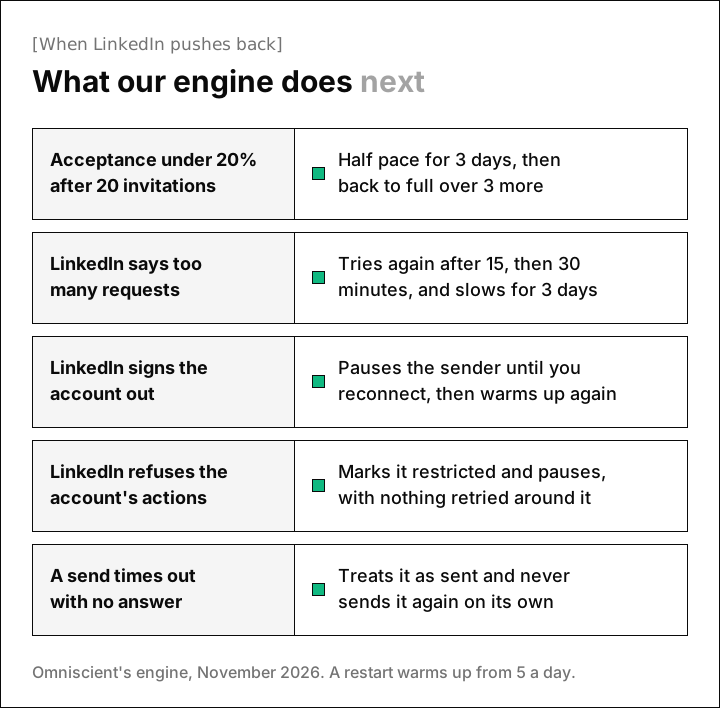
Here's what we chose for each one, and the reasoning behind it:
- Low acceptance only counts after 20 invitations in a week, because two ignored invitations on a quiet Monday shouldn't slow an account for six days.
- A rate limit sends the action back to the queue for 15 minutes, then 30, and also slows the sender for the next 3 days.
- A sign out or a refusal pauses the sender with nothing retried around it, and the warmup starts again from 5 a day when it comes back.
- A send that times out is treated as sent and never goes again on its own. A missing message is easy to fix by hand, while a doubled one can't be taken back.
- Work held overnight goes out at random times in the first 2 hours of the next working slot, so mornings don't open with a burst.
The random daily totals cost you some volume, since a sender's cap averages about 90% of your setting. We took that trade because identical totals every day look like a machine.
Ask any vendor how its tool handles these moments before you connect an account. The answers tell you how much of the safety work you'll be doing yourself.
How to choose the safest LinkedIn automation tool for you
Start from how you work, then test the settings in the first week of a trial, before you load your full list:
- Decide where it runs: cloud tools keep your hours with your laptop closed, and Linked Helper keeps every action on your own network.
- Connect one account first, set a careful pace and watch the acceptance rate for a week, slowing down if fewer than 1 in 5 people accept.
- Check whether the warmup is automatic, and when it's by hand, start near 5 invitations a day and add a couple each day.
- Keep the weekly cap at 100 or fewer, as our own settings recommend, and confirm the tool treats it as a hard stop.
- Run one tool per LinkedIn account, since two tools each keep their own pace and together can send twice as much.
- Decide who reads messages before they go, because LinkedIn counts invitations marked as spam against you.
Happily, who you invite is one safety lever every tool leaves in your hands. A shorter list of people with a real reason to hear from you leaves fewer invitations ignored, and ignored invitations are on LinkedIn's own list of triggers.
For the full pacing playbook, read how to automate LinkedIn outreach without getting banned and our guide to the LinkedIn connection request limit.
Questions about safe LinkedIn automation
What is the safest LinkedIn automation tool in 2026?
The safest tool is the one that does the safety work for you: an automatic warmup, daily totals that vary, working hours and a slowdown when acceptance drops. Omniscient and Expandi cover most of that on their own, and Linked Helper suits teams that want everything on their own network.
Can LinkedIn detect automation tools?
LinkedIn lists suspected use of an automation tool among the reasons it restricts invitations, so it does look for them. Careful pacing lowers the risk, and no vendor can promise your account will never be restricted.
Are cloud LinkedIn automation tools safer than Chrome extensions?
We think so, since LinkedIn's prohibited software page names browser extensions directly and a cloud tool keeps your working hours with your computer off. Both still fall under LinkedIn's ban on bots, so your limits and pacing matter most.
Does a dedicated IP make LinkedIn automation safe?
Not on its own, though it helps: a steady IP or proxy keeps your logins in one place, and Expandi, Dripify, La Growth Machine and HeyReach's Growth plan all list one. It doesn't change how fast you send or how people respond, so limits and acceptance still decide most of the risk.
How many LinkedIn connection requests a day is safe?
LinkedIn doesn't publish a number, so every figure is an estimate. Omniscient defaults to 15 a day and 80 a week, and HeyReach suggests 25 a day once an account is warmed up, with a hard cap of 200 a week.
What should I do if LinkedIn restricts my account?
Stop all automated sending, wait for the restriction to lift and restart with a warmup. Luckily, LinkedIn says most invitation restrictions lift within a week, and one for too many pending invitations can last up to a month.