Best LinkedIn Outreach Tools With a CRM in 2026
On this page
- Three kinds of LinkedIn outreach tool with a CRM
- How we chose these LinkedIn outreach tools
- The 7 best LinkedIn outreach tools with a CRM in 2026
- LinkedIn outreach tools with a CRM compared
- How a LinkedIn lead becomes one CRM record
- When to keep your CRM and add a LinkedIn outreach tool
- How to choose a LinkedIn outreach tool with a CRM
- Questions about LinkedIn outreach tools with a CRM
You run outreach on LinkedIn, and someone on your team still copies every reply that matters into the CRM by hand. A LinkedIn outreach tool with a CRM inside promises to end that, so the LinkedIn conversation and the deal sit on one record.
We build Omniscient, which does both, so we've spent a lot of time on the join between sending a message and remembering what came of it. Below are the seven tools we'd shortlist in 2026, with today's prices and a plain note on how much CRM each one really includes.
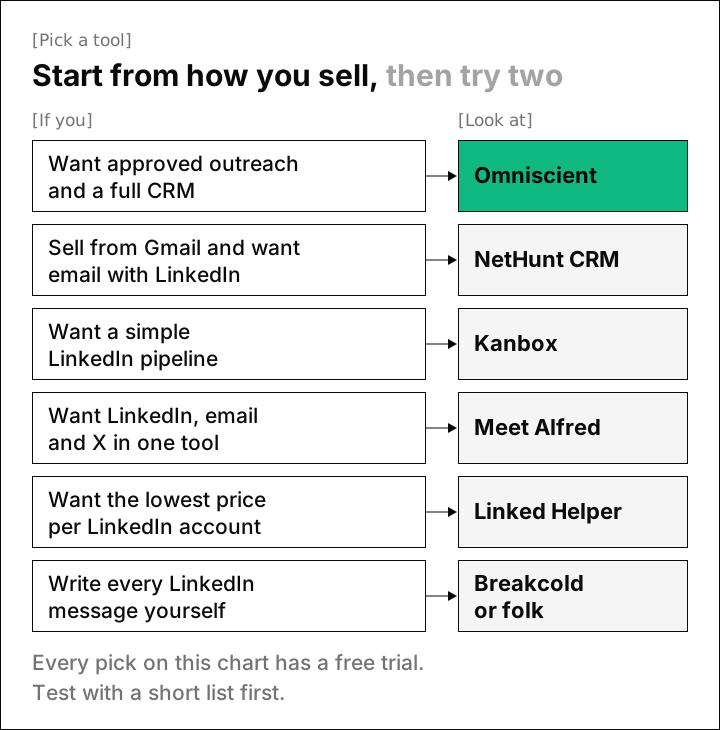
If you're short on time, here's where we'd start:
- Pick Omniscient if you want LinkedIn outreach you approve and a CRM that fills itself in from email and calendar.
- Pick NetHunt CRM if your team works in Gmail and wants email and LinkedIn steps in one sequence.
- Pick Kanbox if you want a simple LinkedIn pipeline that moves leads along as your campaign runs.
- Pick Meet Alfred if you want LinkedIn, email and X sequences with pipeline stages on every connection.
- Pick Linked Helper if you want the lowest price per LinkedIn account and don't mind a desktop app.
- Pick Breakcold or folk if your team writes its LinkedIn messages by hand and wants the CRM to keep up.
| Tool | What it is | Starting price | Best for |
|---|---|---|---|
 Omniscient | LinkedIn outreach you approve, inside a CRM that fills itself in | $19 per seat a month, billed yearly | Small B2B teams that want outreach and CRM together |
| A CRM inside Gmail with sequences of email and LinkedIn steps | $60 per user a month on Business, billed monthly | Teams that sell from Gmail | |
| LinkedIn automation with Kanban pipelines and a smart inbox | $12 a month, billed yearly | Solo sellers who want a simple LinkedIn pipeline | |
| Cloud sequences on LinkedIn, email and X with tags, notes and stages | $29 per user a month, billed yearly | Small teams that want several channels | |
| Desktop LinkedIn automation with a CRM of tags and notes | $15 per account a month on a monthly term | The lowest price per LinkedIn account | |
| An AI CRM that syncs LinkedIn, email, WhatsApp and Telegram conversations | $99 a month, billed monthly | Teams that write LinkedIn messages themselves | |
| A simple CRM that captures LinkedIn contacts with its Chrome extension | $24 per member a month, billed yearly | Small teams that prospect by hand |
Three kinds of LinkedIn outreach tool with a CRM
Every tool here mentions a CRM, and the word covers very different things. Reading the vendors' pages side by side, we sorted them into three kinds.
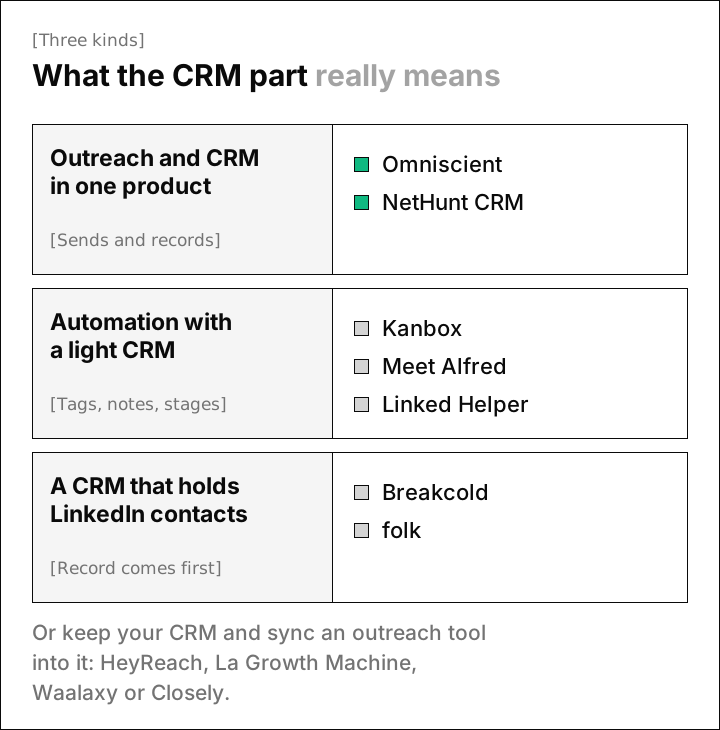
- Outreach and CRM in one product. The tool sends your invitations and messages, and the same record holds deals, email and meetings. Omniscient and NetHunt CRM work this way.
- LinkedIn automation with a light CRM. You get tags, notes or pipeline stages on each LinkedIn contact, and a full deal pipeline with email history usually lives in another tool. Kanbox, Meet Alfred and Linked Helper sit here.
- A CRM that holds LinkedIn contacts. The record comes first, and LinkedIn contacts or conversations flow into it. Neither Breakcold's nor folk's pricing page lists automated invitation sequences.
Which kind you need depends on where your deals close. When most deals close in LinkedIn messages and one call, a light CRM can be enough. When buyers move on to email and meetings, you'll want the first kind, or a full CRM with an outreach tool synced into it.
How we chose these LinkedIn outreach tools
A LinkedIn outreach tool sends invitations and messages from your account and follows up when people accept. For this list we kept only tools that also store contacts, notes or deals inside the product, then read each one's homepage, pricing page and help pages.
We judged the CRM part on the questions we had to answer when we joined our own sending engine to our CRM:
- Does a LinkedIn lead become one record, or a second copy of someone you already know?
- Does a reply stop that person's outreach in every campaign?
- Do email and meetings land on the same record as the LinkedIn thread?
- Is there a pipeline with deals and stages?
- How is sending paced, and who approves what goes out?
Honestly, every tool here carries some risk on LinkedIn, ours included. Section 8.2 of the LinkedIn User Agreement bans "bots or other unauthorized automated methods," and LinkedIn's prohibited software page says members who use them "risk having their accounts restricted or shut down."
The 7 best LinkedIn outreach tools with a CRM in 2026
1. Omniscient
Omniscient is a CRM and LinkedIn outreach software that writes a message for each lead and sends only text your team has approved. The CRM fills itself in from Gmail or Outlook and your calendar, and once a lead's email address is on the record, the LinkedIn thread sits next to their emails and meetings.
We built both halves around one record, so when you save a Scout lead to a list or add it to a campaign, Omniscient looks for that person first. It creates a new record only when there's no match.

Jordan Blake
Head of Sales, TallyfinThe outreach side works like this:
- Scout builds a lead list from a sentence you type and scores each lead out of 100. Up to 60 points come from fit and 40 from signals that it's a good time to reach out.
- Otto, our AI agent, drafts each person's messages from your template, and you approve them person by person or all at once when you launch.
- A reply stops that person in every campaign, and an opt out keeps them out of later imports too.
- The Inbox shows each thread with the person's company, how Scout found them and their campaign, plus a button that creates an opportunity at the stage you pick.
Sending follows the pacing we describe in how to automate LinkedIn outreach without getting restricted:
- A new account starts at 5 invitations a day and adds 2 a day until it reaches your limit.
- Each day's total lands somewhere between 80% and 100% of that limit.
- If fewer than 1 in 5 of a week's invitations get accepted, counted once at least 20 have gone out, the account drops to half pace for 3 days.
- A rate limit from LinkedIn does the same, and either way the account eases back to full speed over the next 3 days.
LinkedIn doesn't publish its invitation limit, and its help page only says that reaching it may restrict your invitations, typically for one week. That's why new senders start at 15 invitations a day and 80 a week, and the settings stop at 40 a day and 200 a week.
Omniscient is LinkedIn only, with no cold email steps, so a team that wants email and LinkedIn in one sequence will do better with NetHunt CRM or Meet Alfred. If you rotate dozens of accounts for clients, an agency tool such as HeyReach will suit you better.
Paid seats start at $19 per seat a month, billed yearly, and the pipeline board and forecast come with Pro at $49. Teammates who only view or log data are free, and the trial lasts 14 days with no credit card. The CRM page and the LinkedIn Outbound page show both halves.
2. NetHunt CRM
NetHunt CRM is a sales CRM software that works inside Gmail and Google Workspace and runs sequences that mix email with LinkedIn steps. Its sequences page lists connecting with prospects, withdrawing connection requests and sending messages on the "Professional Network," with delays you set between actions.
- Basic costs $24 per user a month, billed yearly, or $30 billed monthly, and covers leads, deals and multiple pipelines.
- Multichannel sequences and the Professional Network integration come with Business, at $60 per user a month billed monthly, with yearly pricing on request.
- The free trial lasts 14 days with every feature except custom SMTP.
Interestingly, NetHunt's pages say "Professional Network" where you'd expect the word LinkedIn, and they let you choose which actions run automatically. Before you plan a campaign around it, confirm in the trial exactly which LinkedIn steps send on their own. NetHunt fits a team that already sells from Gmail and wants a full pipeline next to its outreach.
3. Kanbox
Kanbox is a LinkedIn automation software that combines lead imports, automated sequences, a smart inbox and Kanban pipelines. Its pricing FAQ says leads move between pipeline columns on their own as they progress through a campaign.
- Starter costs $12 a month, billed yearly, with one campaign running at a time and 300 lead imports a month.
- Pro costs $50 per LinkedIn account a month billed yearly, with 5 campaigns at once, several accounts in one team, and webhooks and an API.
- The free trial lasts 15 days, needs no credit card and includes Starter's features.
Its pricing page says campaigns run in the cloud around the clock without your computer, and the site also offers a browser extension to download. We didn't find named CRM integrations on its site, so Kanbox fits best when it's the only pipeline you plan to keep.
4. Meet Alfred
Meet Alfred is a LinkedIn automation software that runs sequences across LinkedIn, email and X from the cloud. Its pricing page lists an Advanced CRM with "tags, notes and pipeline stages on every connection, synced with your inbox."
- Individual covers LinkedIn only and costs $29 per user a month, billed yearly, and Business adds email and X at $49.
- Teams costs $39 per user a month billed yearly and adds native Salesforce and HubSpot, which Individual and Business leave out.
- Its homepage offers a 7 day free trial with no credit card.
Thankfully, the FAQ on Meet Alfred's homepage says outreach runs from its cloud with no browser extension, and you can adjust daily limits and activity windows. It suits a small team that wants a pipeline view of its LinkedIn contacts before paying for a separate CRM.
5. Linked Helper
Linked Helper is a LinkedIn automation software that runs as a desktop app on your own computer or a VPS. Its Standard plan includes the Linked Helper CRM, with custom notes and tagging, plus an inbox "for managing chats without switching to LinkedIn."
- Standard costs $15 per LinkedIn account a month on a monthly term, and the pricing page shows the local version from $8.25 a month on longer terms.
- Native integrations include HubSpot, Salesforce and Pipedrive, though Standard caps sending contacts to your CRM at 20 a day and sending message history needs Pro.
- The trial gives 14 days of full Pro access with no card, and a license simply runs out unless you turn on auto renewal yourself.
Luckily for anyone on a tight budget, it has the lowest price per account on this list. Its pricing page doesn't mention a deal pipeline, so you'd likely pair it with a CRM through those integrations.
6. Breakcold
Breakcold is a CRM software that syncs LinkedIn, email, WhatsApp and Telegram conversations into one inbox and pipeline. Its pricing page says every plan has the full CRM and its AI assistant, Chief of Staff, and plans differ only by how much AI work is included.
- X1 costs $99 a month, billed monthly, for 1 seat and 2 connected accounts, and each extra seat or account costs $10 a month.
- Every plan lists reply drafts on every channel and a tasks queue where "you approve every send."
- The trial lasts 14 days, and Breakcold asks for a card up front.
Its pricing page doesn't list automated LinkedIn invitation sequences. Breakcold fits a founder or small team who writes LinkedIn messages by hand and wants the pipeline to update itself afterwards.
7. folk
folk is a CRM software for small teams that captures contacts from LinkedIn and Sales Navigator with its folkX Chrome extension. Standard costs $24 per member a month, billed yearly, or $30 billed monthly, and includes LinkedIn and Gmail templates.
- Standard also syncs email, calendar and WhatsApp, with an allowance of 2,000 messages per member a month.
- Email sequences start on Premium, at $48 per member a month billed yearly.
- The free trial lasts 2 weeks with no credit card.
Frankly, folk is the gentlest step up from a spreadsheet on this list. Its pricing page doesn't list automated LinkedIn invitations, so your team sends those by hand and folk keeps the record.
LinkedIn outreach tools with a CRM compared
This table sets each tool's CRM next to how it sends, using each vendor's own pages in November 2026. "None listed" means we didn't find the feature on the vendor's site, so ask about it during the trial.
| Tool | Sends invitations for you | CRM you get | Email on the same record | Free trial |
|---|---|---|---|---|
| Omniscient | Yes, after approval | Records, deals, pipeline and forecast on Pro | Yes, Gmail and Outlook | 14 days, no card |
| NetHunt CRM | Sequences on Business | Leads, deals and pipelines | Yes, inside Gmail | 14 days |
| Kanbox | Yes | Kanban pipelines | Email finder only | 15 days, no card |
| Meet Alfred | Yes | Tags, notes and pipeline stages | Email steps on Business | 7 days, no card |
| Linked Helper | Yes, from a desktop app | Tags and notes | Not listed | 14 days, no card |
| Breakcold | None listed | Full CRM with pipelines | Yes, synced | 14 days, card required |
| folk | None listed | Contacts and pipelines | Yes, synced | 2 weeks, no card |
How a LinkedIn lead becomes one CRM record
Surprisingly, much of our work on joining outreach to the CRM went into deciding when two records are the same person. A campaign reaches people who may already be in your CRM from a demo request or last year's import.
If the tool makes a fresh contact for every lead, your reps end up with two records and half the history on each, and our matching rules exist to prevent that.
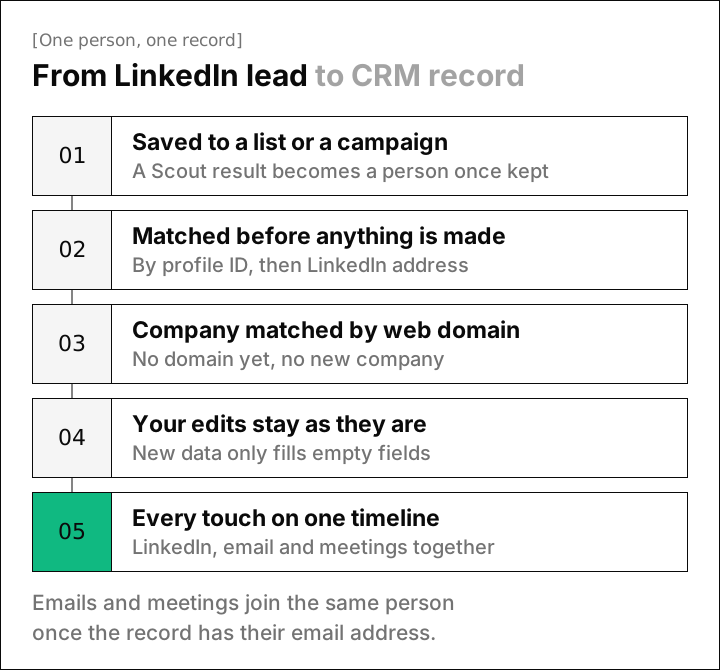
These are the rules we settled on, and the same questions are worth asking any vendor:
- Search results stay search results until you keep one, so a Scout list of 500 leads adds only the people you choose to keep.
- A person is matched first by the ID our data source gives their profile and then by LinkedIn address, because two people can share a name.
- A company is created only when its web domain is known, so firms with similar names stay apart.
- New data fills empty fields and leaves anything a teammate typed exactly as it was.
When to keep your CRM and add a LinkedIn outreach tool
If your team already runs HubSpot, Salesforce or Pipedrive well, you may not need a new CRM at all. An outreach tool that syncs into it keeps each deal where your reps already work.
- HeyReach lists HubSpot among its integrations on its pricing page, alongside Zapier and Make.
- La Growth Machine syncs natively with HubSpot and Pipedrive on its Ultimate plan, and its pricing FAQ says every action and message syncs to the contact's timeline.
- Waalaxy lists CRM sync on every plan, and its LinkedIn Inbox is an optional extra at €20 a month.
- Closely links integration pages for Salesforce, Pipedrive, HubSpot and GoHighLevel from its pricing page.
HubSpot itself can put LinkedIn steps in a sequence through its Sales Navigator integration. Its knowledge base describes them as task reminders to send a connection request or InMail manually, and sequences need a Sales or Service seat on a Professional or Enterprise plan.
Admittedly, a sync is the faster route when your team already lives in its CRM. Before you launch, check that a reply in the outreach tool stops the sequence and lands on the right existing contact. Our guide to the best LinkedIn automation tools compares ten of them on pacing, price and the CRMs they connect to.
How to choose a LinkedIn outreach tool with a CRM
Pick the kind first, then use the free trial to test the places where sending meets the record.
- 01Add a lead you already have
Put someone from your CRM in a test campaign and check that the tool finds their existing record.
- 02Reply from a second account
Answer the first message and confirm the sequence stops for that person in every campaign.
- 03Look for email and meetings
Send the same person an email and book a call, then see whether both appear next to the LinkedIn thread.
- 04Set your pacing
Use a daily range, working hours in your time zone and a weekly cap, and confirm nothing goes out overnight.
- 05Decide who approves messages
Choose whether someone checks each message or approves the whole campaign at launch.
- 06Turn a reply into a deal
Create an opportunity from a reply and check that its stage and amount land in your pipeline.
Happily, you can run all six checks in the first week of a trial with a list of ten people. If the CRM side matters most to you, our guide to the best AI CRM compares CRMs that fill themselves in.
Questions about LinkedIn outreach tools with a CRM
What is the best LinkedIn outreach tool with a CRM?
Omniscient fits teams that want approved LinkedIn outreach and a full CRM that fills itself in from email and calendar. NetHunt CRM suits Gmail teams that want email and LinkedIn steps together, and Kanbox or Meet Alfred suit smaller teams that want a simple pipeline.
Do LinkedIn automation tools include a CRM?
Some do, at different depths. Kanbox has Kanban pipelines, Meet Alfred has tags, notes and pipeline stages, and Linked Helper has tags and notes. Omniscient and NetHunt CRM go further and keep deals and email history on the same record.
Can I use a LinkedIn outreach tool with HubSpot or Salesforce instead?
Yes. HeyReach, La Growth Machine, Linked Helper and Closely list CRM integrations, and Meet Alfred adds native Salesforce and HubSpot on its Teams plan. Test that replies land on the right existing contact before you launch.
Is LinkedIn automation allowed?
Section 8.2 of LinkedIn's User Agreement bans bots and other unauthorized automated methods, and LinkedIn says members who use them risk having their accounts restricted. Careful pacing lowers that risk, and no tool can remove it.
How much does a LinkedIn outreach tool with a CRM cost?
On the vendors' own pages today, entry prices in this guide run from $8.25 a month for Linked Helper's local version on longer terms to $99 a month for Breakcold. Omniscient starts at $19 per seat a month, billed yearly.