Best AI CRMs in 2026
On this page
The hardest call we made building Omniscient's CRM was deciding when the AI may write to a record without asking you. We'd put that same question to any AI CRM you're weighing, because every CRM on this list now advertises AI on its homepage.
We built ours for the job you're probably hiring for: a CRM that keeps itself current, so your team can skip typing notes after every call. Below are the nine we'd shortlist as the best AI CRM options in 2026, with today's prices and what each one fills in for you.
The short version, sorted by how your team sells:
- Pick Omniscient if you want a CRM that fills itself in and LinkedIn outreach in the same place.
- Pick HubSpot if you want your marketing and sales tools on one platform.
- Pick Salesforce if you have an admin and need enterprise controls and custom builds.
- Pick Attio if you want to design the data model yourself.
- Pick Close if your team sells mostly by phone.
| Tool | What it is | Starting price | Best for |
|---|---|---|---|
 Omniscient | A CRM that fills itself in, with LinkedIn outreach you approve | $19 per seat a month, billed yearly | Small B2B teams that want CRM and outreach together |
 HubSpot | A CRM platform with marketing, sales and service tools | Free for up to 2 users | Teams that run marketing and sales together |
 Salesforce | A CRM with editions up to large enterprise and Agentforce | $25 per user a month | Larger teams with an admin |
 Attio | A flexible CRM with AI agents, enrichment and call intelligence | $35 per seat a month, billed yearly | Teams that want to design their own data model |
| An AI CRM built on a shared memory of your team's email and meetings | $24 per agent a month, billed yearly | Teams that want agents with free seats for viewers | |
| An AI CRM priced by AI work, with unlimited seats | Free, then $50 a month | Small teams that want everyone on board | |
| A CRM for calling, email and SMS, with an AI assistant on every plan | $9 a month for one user, billed yearly | Teams that sell by phone | |
 Pipedrive | A sales pipeline CRM with an AI sales assistant | See site | Small teams that work by pipeline stage |
| An AI CRM for sales, agency and partnership teams, with a LinkedIn extension | $24 per member a month, billed yearly | Founders and agencies selling through their network |
What makes a CRM an AI CRM
An AI CRM is a CRM that writes to its own records. It reads your email, meetings and call notes, fills in contacts and deal fields, answers questions about your pipeline and drafts your next message. A chat box on top of fields people still type by hand helps too, though it saves you far less time.
How we chose these AI CRMs
We started from the CRMs that keep showing up for this search and read each one's homepage and pricing page. Then we judged them on the questions we had to answer for our own product:
- Where the AI gets its facts: your inbox, your calendar, call transcripts or the web.
- Whether each value it writes shows the quote or email it came from.
- Whether it asks before changing something a person typed.
- How the AI is priced: inside the seat, through credits, per agent or only on higher plans.
- How much setup it needs before a small team gets real use from it.
Honestly, the second and third questions matter most to us. A CRM that fills in a wrong amount with confidence costs you more than one that leaves the field empty, because someone will forecast from that number.
What we learned building a CRM that fills itself in
Omniscient's CRM reads the emails and meetings it's allowed to see, and Otto, our AI agent, proposes values for the fields you've chosen. The tricky part was deciding when a proposal should become a real value on the record.
Every field you add can carry its own rule, and the rules work like this:
- You set each field to off, suggest or auto.
- A value with no quote behind it, or that Otto is less than 60% sure of, is dropped.
- A value a person typed is never changed.
- An auto field fills on its own only when it's empty and Otto is at least 85% sure.
- Everything else waits in Suggestions, where you accept or skip it.
Amount, close date and stage are always read. Amount and close date fill themselves only when they're empty and Otto is at least 85% sure, while a stage change always waits for you to accept it.
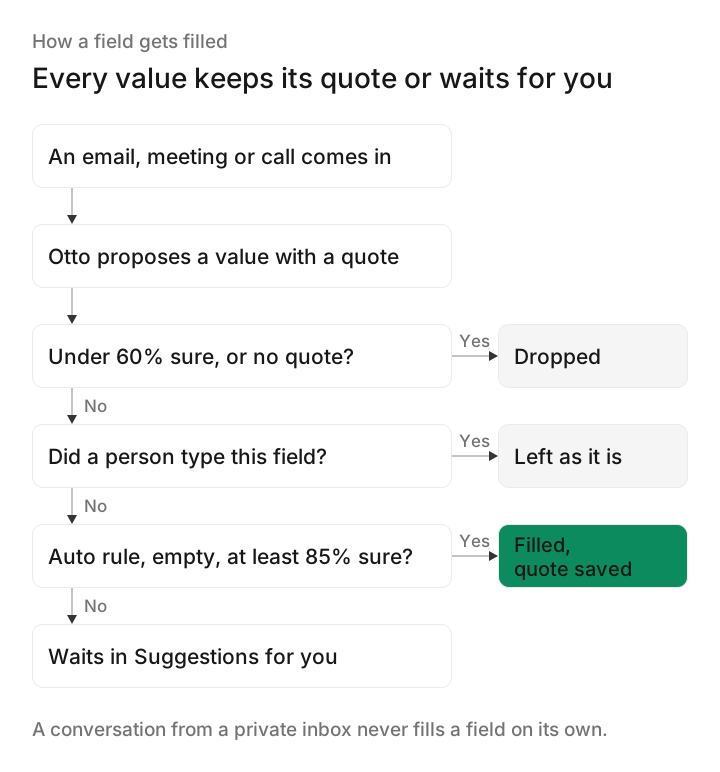
Two smaller rules came from the same worry. A conversation from a private inbox never fills a field on its own. And when a fact and its quote share no meaningful word or number, the record shows "Quote may not match" so you look twice.
Thankfully, the same idea gives you a quick test for any AI CRM in a trial. Click a value the AI wrote and see whether you can find the sentence it came from.
The 9 best AI CRMs in 2026
1. Omniscient
Omniscient is an AI CRM that fills itself in from your email, calendar and call transcripts, and runs LinkedIn outreach you approve. Otto drafts your follow ups and writes a short brief before each meeting.
- Every value Omniscient writes shows its quote and its source.
- Meeting notes come from the transcripts Google Meet, Zoom and Teams already create, so a bot joins only if you add call recording for $25 per seat.
- Ask Omniscient answers questions about your pipeline and links each answer to the emails, calls and notes it came from.
- You choose per inbox what teammates see: everything, only that a conversation happened, or nothing.
- We move your companies, contacts, deals and notes over from HubSpot, Salesforce, Pipedrive or Attio for you.
We set aside roughly thirty thousand for this.
We need it live by January 15.
Marcus signs anything over twenty thousand.
On the LinkedIn side, Scout finds leads from a plain sentence, and Otto drafts each message for someone on your team to approve. Replies from every campaign land in one inbox with an answer drafted, and the LinkedIn Outbound page shows the full flow.
Teammates who only view or log data are free, and paid seats start at $19 per seat a month, billed yearly, with AI included. Pro, at $49, adds fields filled with proof, meeting prep briefs, Slack alerts and the pipeline forecast. The free trial lasts 14 days with no credit card.
Admittedly, Omniscient has no phone dialer and no email sequences or marketing email, so Close or HubSpot fits you better if those are your main channels. Large teams that need custom builds will find more room in Salesforce.
2. HubSpot
HubSpot is a customer platform that connects its marketing, sales and service tools around one CRM. Its free CRM includes Breeze Assistant, which researches companies, preps you for sales calls and summarizes CRM records.
- The free CRM covers up to 2 users and 1,000 contacts, with no credit card.
- Sales Hub Starter lists at $20 per seat a month, and the page also shows a lower "starts at $7" price for new customers.
- Professional starts at $90 per seat a month, plus a one time $1,500 onboarding fee.
- Paid plans include monthly HubSpot Credits for AI, 500 on Starter and 3,000 on Professional, and extra credits cost $0.01 each.
Its Prospecting Agent researches accounts, finds your contacts and drafts personalized outreach. If you only need a sales CRM, weigh Professional's onboarding fee and the credit limits against a lighter tool first.
3. Salesforce
Salesforce is a CRM platform that brings customer data and AI agents together, with editions from a free suite up to large enterprise. Its sales page describes agents that research prospects, prep deals and monitor accounts around the clock.
- Starter Suite costs $25 per user a month, billed monthly or yearly, and its AI syncs emails, events and contacts on its own.
- Pro Suite costs $100 per user a month, billed yearly.
- The pricing page says AI can be added to Core, at $195 per user a month, and above.
- Max, at $550 per user a month, includes Agentforce for Sales, and a Free Suite is listed at $0.
Frankly, Salesforce makes the most sense when you have an admin or a partner to set it up and keep it tidy. A small startup can begin on Starter Suite, though adding AI means moving up to Core or above.
4. Attio
Attio is a flexible CRM that you shape around your own objects and fields, with AI agents that research the web and enrich records for you.
- Ask Attio answers questions about your revenue data, and the Pro plan lists Call Intelligence, which records and analyzes meetings.
- When you connect your inbox and calendar, Attio captures emails and calls automatically.
- Plus costs $35 per seat a month billed yearly, or $44 monthly, and Pro costs $79 billed yearly, or $99 monthly.
- The Free plan covers up to 3 seats, and the Pro trial lasts 14 days.
- Each plan includes seat credits for Ask Attio plus shared workspace credits for AI features and workflows.
Attio suits a team with someone who enjoys designing objects and workflows, since that flexibility is the main reason to pick it. We compare it with HubSpot in Attio vs HubSpot and with us in Omniscient vs Attio.
5. Day AI
Day AI is an AI CRM that builds a shared memory from your team's email, calendar, meetings and Slack, then runs AI agents on top of it. Day calls that memory Customer Memory, and its homepage example of an agent at work notes that "nothing went out without your approval."
- Turbo costs $24 per agent a month, Professional $60 and Executive $200, on yearly billing paid upfront, and Super is listed at $800 a month.
- The Free plan lets teammates search, view and share, with Gmail and Calendar ingestion and meeting recording clips.
- Day says it has no per seat fees and no usage based pricing, and we didn't see a free trial on its pricing page.
Interestingly, Day's plans look a lot like ours, with free seats for teammates who mostly look things up and paid seats for the people who put the AI to work. Each paid agent gets automated skill slots, from 2 on Turbo to 10 on Executive.
6. Clarify
Clarify is an AI CRM that calls itself "the autonomous CRM," and it prices its plans by the AI work it does, with unlimited seats. It syncs with your email and calendar, records and summarizes calls, and its sales agent, Rep, drafts follow ups and can set up a campaign and enroll leads in it.
- The Free plan costs $0 with unlimited seats, 1,000 credits a month, 20,000 records and one active campaign.
- Starter costs $50 a month for the whole team, with 5,000 credits a month and five active campaigns, and its plan table shows credit options from 5,000 to 40,000.
- A meeting summary uses 30 credits and a campaign email uses 1, while Clarify says meeting recording never depends on credits.
Luckily for small teams, adding a seat never changes the bill, so everyone can join from day one. Watch the credits instead, since every summarized meeting draws from the same pool and Starter credits don't roll over.
7. Close
Close is a sales CRM for teams that call, email and text their leads, with an AI assistant named Chloe on every plan. You can ask Chloe about your leads, your pipeline or what happened on the last call.
- Solo costs $9 a month billed yearly, or $19 monthly, for one user.
- Essentials costs $35 per user a month billed yearly, Growth $99 and Scale $139.
- Lead summaries, suggested actions, AI email rewrite and auto updates start on Growth.
- Call Assistant costs $50 a month per organization plus $0.02 a minute, on any plan.
- The free trial lasts 14 days, needs no card and includes $5 of calling and enrichment credits.
For a team on the phone all day, Close's Power Dialer moves to the next number on your list as each call ends. The Predictive Dialer calls several leads at once and connects you only when someone answers.
8. Pipedrive
Pipedrive is a sales pipeline CRM that helps small businesses manage leads and close deals. Its AI Sales Assistant predicts which deals you're most likely to win or lose and suggests which leads to pursue.
- Nova, its meeting intelligence, captures what matters before, during and after each call, and the homepage says it's included in all plans at no extra cost.
- The free trial lasts 14 days with no credit card.
- We couldn't open Pipedrive's pricing page when we wrote this, so check today's plans on its pricing page.
Pipedrive suits a small team that plans its week around pipeline stages and wants AI suggestions on top.
9. folk
folk is an AI CRM that tracks relationships and deals for sales, agency and partnership teams. Its Chrome extension, folkX, imports people and whole lists from LinkedIn and Sales Navigator.
- Standard costs $24 per member a month billed yearly, or $30 monthly, and Premium costs $48, or $60 monthly.
- Standard sets monthly AI limits, such as 2,000 magic fields and 1,500 for the workflow assistant.
- Every plan includes folk's follow up and recap assistants, and its homepage shows a workflow that suggests a follow up email when a new interaction comes in.
- The trial lasts 2 weeks with no credit card.
It suits founders and agencies whose deals start from LinkedIn conversations and their own network.
How AI CRMs charge for AI
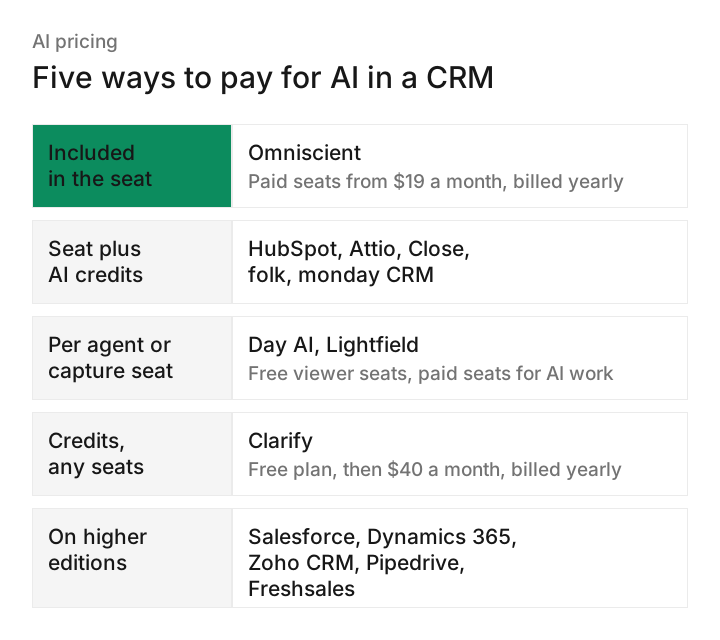
Seat prices tell you only part of the cost, because the AI often comes with its own allowance. Among the eight CRMs whose pricing pages we could read, we found five ways to charge for it.
What each model means for your bill:
- Omniscient includes the CRM's AI in each paid seat, plus monthly credits for Deal Room proposals.
- HubSpot, Attio, Close and folk give each plan a monthly AI allowance, and unused HubSpot and Close credits don't roll over.
- Day AI bills only the agents you deploy.
- Clarify's seats cost nothing, so the credit pool is the whole bill.
- Salesforce adds AI from its Core edition, at $195 per user a month.
Personally, we'd ask every vendor one thing in the trial: what does a busy month cost when the AI reads every email and meeting? Ask for the answer in numbers, like the 30 credits Clarify lists for one meeting summary.
AI CRMs compared
Here's what you can try for free, and how each CRM prices its AI.
| CRM | Free plan | Free trial | How AI is priced |
|---|---|---|---|
| Omniscient | Free seats for teammates | 14 days, no card | Included in the seat |
| HubSpot | Up to 2 users | Free plan | Monthly credits on paid plans |
| Salesforce | Free Suite | Length not stated | Added on Core and above |
| Attio | Up to 3 seats | 14 days of Pro | Seat and workspace credits |
| Day AI | Free seats for teammates | Not listed | Per agent, no usage meter |
| Clarify | Unlimited seats | Free plan | Monthly credit pool |
| Close | Not listed | 14 days, no card | Monthly credits per user |
| Pipedrive | check | 14 days, no card | check |
| folk | Not listed | 2 weeks, no card | Monthly limits per plan |
If you're still torn, start from how your team sells and try the two that fit it best.

How to choose an AI CRM
You'll learn more from one week with your own inbox connected than from any demo. These are the checks we'd run in a free trial:
- 01Connect one real inbox
Connect your email and calendar on day one and see what the CRM writes by Friday.
- 02Open an AI value
Pick any field the AI filled and look for the email, quote or call it came from.
- 03Type over a field
Change a value by hand, wait a day and confirm the AI left it alone.
- 04Ask about a live deal
Ask what's holding up a real deal and check every record the answer points to.
- 05Mark an inbox private
Set one inbox to private and check what your teammates can still see.
- 06Price a busy month
Use the credit page to estimate a month where the AI reads every email and meeting.
- 07Plan the move
Ask how your contacts, deals and notes come over from the CRM you use today.
Fortunately, every CRM on this list has a free plan or a free trial, so you can run these checks before you pay. If automatic data entry is your main reason to switch, our guide to the CRM with automatic data entry goes deeper, and best CRM for startups covers smaller teams.
Questions about AI CRMs
What is the best AI CRM in 2026?
For small B2B teams that want a CRM that fills itself in plus LinkedIn outreach, we'd start with Omniscient. HubSpot fits teams running marketing and sales together, Salesforce fits large teams with an admin, and Close suits teams that sell by phone.
What is an AI CRM?
An AI CRM fills in its own records from your email, meetings and calls, and the most useful ones show the source behind every value they write.
Is there a free AI CRM?
Several CRMs here have one: HubSpot's free CRM covers up to 2 users and includes Breeze Assistant, and Attio is free for up to 3 seats. Clarify's free plan has unlimited seats, while Omniscient and Day AI give free seats to teammates who mostly search and view records.
How much does an AI CRM cost?
Entry paid plans in this guide start at $9 a month for Close's one user Solo plan, and most entry seats cost $19 to $35 a month on yearly billing.
Can an AI CRM fill itself in automatically?
Yes. Omniscient, Attio, Day AI and Clarify all capture email and meetings from a connected inbox and calendar, and Salesforce's Starter Suite syncs emails, events and contacts on its own. Look for one that shows the quote behind each value and never overwrites what a person typed.