Omniscient vs Attio: CRM, LinkedIn Outreach and Pricing Compared
On this page
- What Attio does well
- What Omniscient does well
- Omniscient vs Attio feature by feature
- How each CRM keeps records up to date
- LinkedIn outreach in Attio and Omniscient
- Email sending: where Attio is ahead
- AI in Attio and Omniscient
- Omniscient vs Attio pricing
- Moving from Attio to Omniscient
- Which one should you choose
- Questions about Omniscient vs Attio
If you're weighing Omniscient vs Attio, you probably want a CRM that stays current without extra typing, and you want to know which one can run your LinkedIn outreach. Both read your email and calendar, and they part ways on what happens after that.
We build Omniscient, so read this knowing which side we sit on. We read Attio's pricing page and help center on November 2, 2026, plus the LinkedIn apps in its directory. We haven't run Attio with a live sales team, so everything we say about it comes from what Attio publishes.
Our short answer depends mostly on where your first conversation with a buyer happens:
- Pick Attio if your team works mostly in email and wants to shape the CRM around custom objects of its own.
- Pick Omniscient if LinkedIn is where you open most conversations and you want each reply on a record that fills itself in from your email and calls.
- Run both for a few weeks if you're unsure, since Omniscient works beside your current CRM.
| Tool | What it is | Starting price | Best for |
|---|---|---|---|
 Omniscient | A CRM that fills itself in, with LinkedIn outreach you approve | Paid from $19 per seat a month, billed yearly | Small B2B teams that sell through LinkedIn |
 Attio | A flexible CRM with email sequences, call recording and AI on credits | Paid from $35 per user a month, billed yearly | Teams that live in email and want their own data model |
What Attio does well
Attio is a flexible CRM that builds records from your email and calendar and lets you shape the data model around how your business works.
These stood out to us on Attio's pricing page:
- Email and calendar sync comes with every plan, Free included.
- Objects grow with the plan, from 3 on Free to 5 on Plus and 12 on Pro, and custom objects and formula attributes start on Pro.
- Call Intelligence records and transcribes Zoom, Google Meet and Microsoft Teams calls, and it starts on Pro.
- The API, webhooks, an MCP server and an App SDK come with every plan, and Attio has iOS and Android apps.
Honestly, Attio is where we'd point a team whose process doesn't fit a standard CRM, like deal flow for an investor. Its startup program also takes up to 80% off for eligible startups, so check if you qualify before you compare prices.
What Omniscient does well
Omniscient is a CRM and LinkedIn outreach tool that finds leads and sends only the LinkedIn messages your team has approved. The CRM side fills itself in from your email, calendar and call transcripts, and on Pro it shows the quote behind every value it writes.
One app covers the path from a first LinkedIn note to a signed deal:
- Connect Gmail or Outlook and your calendar, and each email and meeting lands on the right person, company and deal.
- Leads from forms, LinkedIn campaigns, events and imports are matched by email, LinkedIn address and company domain, so each person has one record.
- Call notes come from the transcripts Google Meet, Zoom and Teams already create, so a bot joins only if you add call recording.
- Scout finds leads from a plain sentence like "founders at fintech startups in New York" and scores each one out of 100 for fit and timing, using signals like hiring, a new role or a post on your topic.
- Otto, our agent, drafts each LinkedIn note from the person's profile and recent activity, and your team approves the text before anything goes out.
Admittedly, Omniscient is narrower than Attio in a few places. We don't send email or offer a mobile app, and LinkedIn is the only outreach channel we run.
Omniscient vs Attio feature by feature
Attio's details below come from its pricing page and help center.
| Attio | Omniscient | |
|---|---|---|
| Email and calendar sync | Every plan, 1 account per user on Free and Plus, 2 on Pro | Every seat, free ones included |
| Sends email | Yes, with email sequences on Pro and Enterprise | No, Otto drafts emails you send yourself |
| Sends on LinkedIn | No, you add a LinkedIn app such as lemlist or HeyReach | Yes, once your team approves the text |
| Finds new leads on LinkedIn | Through apps in its directory | Scout, with a fit score and the signals behind it |
| Call notes | Call Intelligence records calls, from Pro | From Meet, Zoom and Teams transcripts, with recording at $25 a seat |
| AI on emails and calls | Email summaries and labels from Plus, call summaries on Pro | Meeting notes from Starter, fields filled with the source quote from Pro |
| Custom objects | From Pro, with up to 12 objects in all | Yes, in the data model |
| Reports | Up to 3, 15 or 100 reports on Free, Plus and Pro | Forecast on Pro, dashboards from a sentence on Business |
| AI answers | Ask Attio, on monthly credits | Ask Omniscient, in the seat price |
| Mobile apps | iOS and Android | None |
How each CRM keeps records up to date
Attio fills in what it calls communication intelligence, such as first and last interaction and connection strength. From Plus up, it writes summaries and labels for emails, and on Pro, Call Intelligence turns calls into summaries linked to the right records.
Omniscient saves each email, meeting and transcript to the record, and on Pro it suggests field changes with the quote they came from. You accept or skip each one, and a value someone on your team typed is never changed.
We made suggestions wait for you on purpose. One wrong amount that a manager trusts in a forecast costs more than an empty field, so a value only writes itself when that field's rule allows it.
LinkedIn outreach in Attio and Omniscient
LinkedIn is the widest gap, because Attio doesn't send LinkedIn invitations or messages. Its sequences send email only, through your synced Gmail or Microsoft account, on Pro and Enterprise.
Attio's own help center suggests sequences for warm leads and existing customers, and it names "cold or high volume sales outreach" as a case where you shouldn't use them.
So Attio teams that prospect on LinkedIn add another tool, and Attio's app directory lists a few:
- lemlist, a sales engagement tool that runs multichannel campaigns and lets you add Attio people to them.
- A HeyReach app built by Neon Deer, which pushes Attio people into HeyReach campaigns and logs campaign events on their timeline.
- SuperLinkIn, which saves your direct conversations to the person's record as a note.
Whichever one you pick, two things follow:
- You pay for the LinkedIn tool on top of Attio, and pacing and account safety live in that tool's own settings.
- Replies reach Attio only as far as that tool's integration carries them.
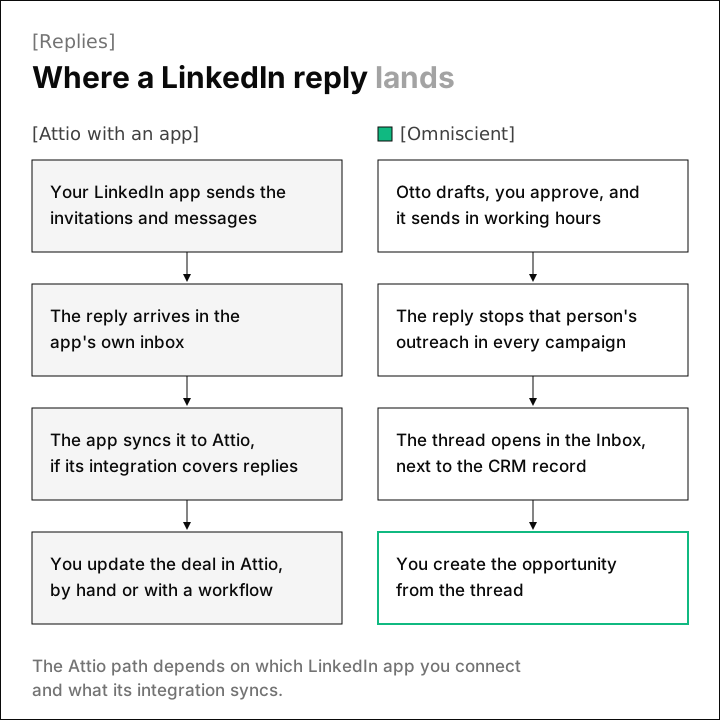
In Omniscient, Scout, Campaigns and the Inbox live in one app, next to the CRM. We built the sending engine ourselves this year, and pacing took most of our care, because LinkedIn doesn't publish its invitation limits.
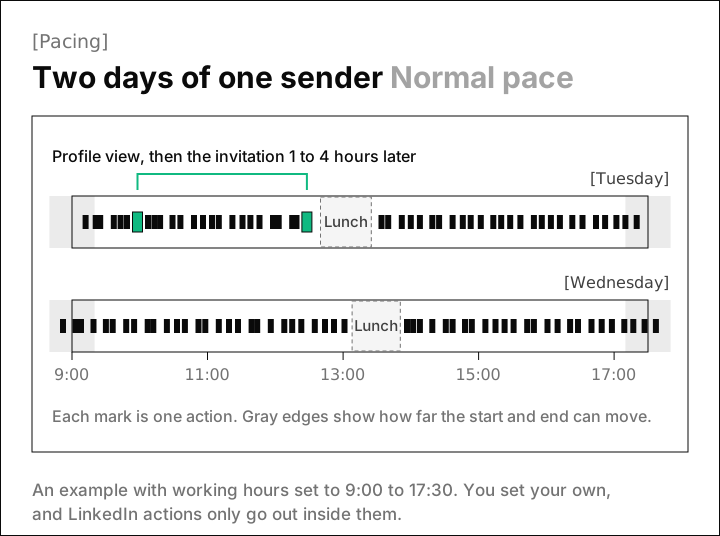
LinkedIn's invitation limit page only says that reaching the limit may restrict your invitations, and that the restriction typically lasts a week. So at the Normal pace, our engine follows these rules for each sender:
| Rule | What the engine does |
|---|---|
| Warmup | Starts a new or reconnected sender at 5 invitations a day and adds 2 a day until it reaches your limit |
| Working hours | Sends only inside the sender's hours, and the start and end shift by up to 20 minutes each day |
| Lunch | Pauses for 30 to 60 minutes near the middle of the day |
| Gaps | Waits a random 3 to 12 minutes between actions |
| Daily total | Stops somewhere between 80% and 100% of your daily limit |
| Profile view | Visits the profile 1 to 4 hours before the invitation |
| Slowdown | Drops to half pace for 3 days, then eases back over 3 more, when LinkedIn rate limits the sender or fewer than 1 in 5 of a week's invitations are accepted (once 20 or more went out) |
Two more rules came out of building the engine:
- You approve each person's messages, or let going live approve everyone who's ready. The approval is tied to the exact text, so an edit clears it and the queue refuses text nobody approved.
- When LinkedIn doesn't confirm a send in time, the engine counts it against the day and waits for the conversation to show whether it went out. We chose that because a message sent twice reads worse to a buyer than a short delay.
Pacing lowers the risk, and it can't remove it. LinkedIn's prohibited software page says tools that "automate activity on LinkedIn's website" break its User Agreement and can get an account restricted or shut down.
Our guides to automating LinkedIn outreach without getting restricted and LinkedIn connection request limits go deeper on the risk and the numbers.
When someone replies, Otto drafts an answer you can edit, and the LinkedIn Outbound page shows that flow screen by screen.
Email sending: where Attio is ahead
Attio sends email from inside the CRM, one at a time or in bulk, with these limits on its pricing page:
| Attio plan | Emails a month per user | Bulk send at once | Email sequences |
|---|---|---|---|
| Free | 200 | 10 | No |
| Plus | 1,000 | 50 | No |
| Pro | Unlimited | 50 | Yes |
| Enterprise | Unlimited | 50 | Yes |
Omniscient reads your mailbox and never sends, deletes or changes anything in it. Otto drafts the next email from the thread, and you send it from your own inbox.
We think a CRM that reads every email you write is easier to trust when it can't send from your inbox. Frankly, that choice costs you something if your outbound runs on email sequences to warm leads, since Attio's Pro plan covers them in one place and Omniscient doesn't.
AI in Attio and Omniscient
Attio prices its AI with credits, and its pricing FAQ says workspace credits pay for both the AI features and workflows. The allowances look like this:
- Seat credits for Ask Attio come to 100, 500, 1,000 or 2,500 per user a month, from Free to Enterprise.
- Workspace credits come to 250, 1,500 or 10,000 a month on Free, Plus and Pro, and Enterprise is custom.
- Extra workspace credits start on Plus at 5,000 a month for $70 billed yearly, or $85 billed monthly.
Omniscient puts the CRM's AI in the seat price. Ask Omniscient answers questions about any account in plain English and links each answer to the records it used.
The one place we use credits is the Deal Room, where each paid seat adds monthly proposal credits and a full proposal uses 40.
Interestingly, the two models suit different teams. Credits show you exactly what AI costs as usage grows, while AI in the seat makes the seat price the number you plan around.
Omniscient vs Attio pricing
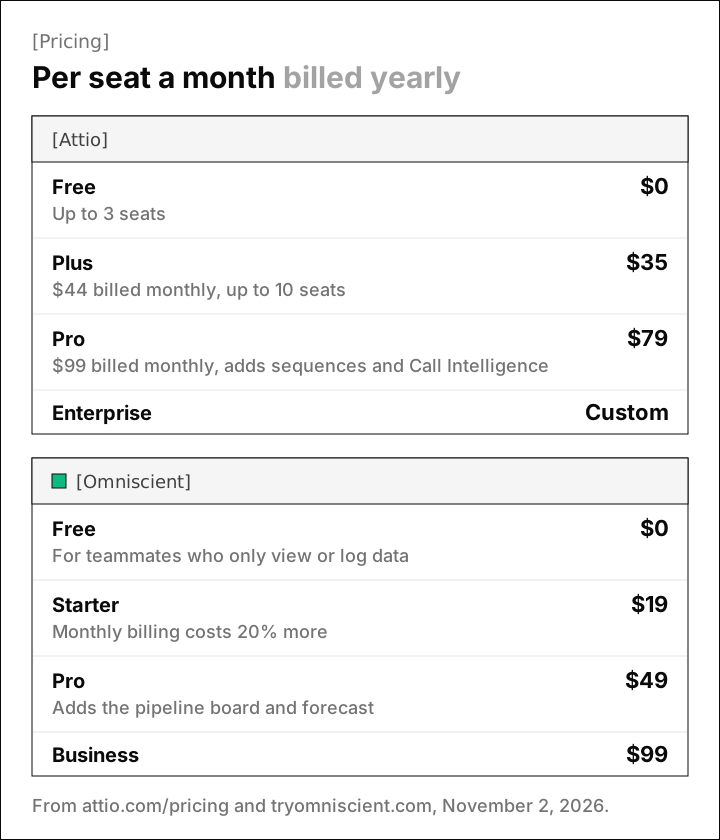
Both charge per seat and give a lower price for yearly billing:
| Attio | Omniscient | |
|---|---|---|
| Free | $0, up to 3 seats | $0 for teammates who only view or log data |
| First paid plan | Plus, $35 per user a month yearly or $44 monthly, up to 10 seats | Starter, $19 per seat a month yearly |
| Popular plan | Pro, $79 per user a month yearly or $99 monthly | Pro, $49 per seat a month yearly |
| Top plan | Enterprise, custom and billed yearly | Business, $99 per seat a month yearly |
| Monthly billing | Yearly billing saves 20% on Plus and Pro | Monthly billing costs 20% more |
| Extras | More workspace credits from $70 a month, billed yearly | Call recording at $25 a seat, and 10% off from 21 seats |
| Trial | 14 days of Pro | 14 days, no credit card |
A few things move the bill more than the headline price:
- On Attio, sequences, Call Intelligence and custom objects start on Pro, so price Attio at Pro if you need any of them.
- On Attio, heavy use of AI and workflows can mean buying extra workspace credits.
- On Omniscient, the forecast and fields filled with proof start on Pro, and a recording bot costs $25 per seat on top.
Moving from Attio to Omniscient
Thankfully, you don't have to switch in one go. Omniscient runs beside your current CRM, so you can compare both on real deals first.
- 01Connect your inbox
Add Gmail or Outlook and your calendar while Attio keeps running.
- 02Bring your records over
Our importer reads companies, people, deals with their stages, and notes from Attio, or our team migrates you from an export.
- 03Rebuild what's custom
The importer leaves Attio's custom objects behind, so recreate them in Omniscient's data model or send them to us as a spreadsheet.
- 04Connect a LinkedIn sender
It starts at 5 invitations a day and adds 2 a day, so connect it a couple of weeks before a launch.
The CRM page walks through how we run a migration, and our roundup of the best AI CRMs covers other CRMs worth a look if neither tool fits.
Which one should you choose
Luckily, the choice mostly comes down to two questions: where your conversations start, and how far you need to bend the CRM.
Choose Attio if:
- Your team sells mostly by email and wants sequences for warm leads inside the CRM.
- You need custom objects, or a process like deal flow that a standard CRM doesn't fit.
- Your reps want mobile apps for days away from the desk.
Choose Omniscient if:
- You open most conversations on LinkedIn and want your outreach and its replies inside the CRM.
- You want leads scored for fit and timing before anyone writes a message.
- You want records that fill themselves in, with the quote behind each value.
- You'd rather have the CRM's AI in the seat price than a credit balance to watch.
If you plan to keep Attio for email, our roundup of the best LinkedIn automation tools compares how each one gets replies into a CRM.
Questions about Omniscient vs Attio
Does Attio have LinkedIn automation?
Attio doesn't send on LinkedIn. Its sequences send email only, so teams that prospect on LinkedIn add an app from Attio's directory, such as lemlist or HeyReach.
Is Omniscient cheaper than Attio?
Paid seats start at $19 a month on Omniscient and $35 on Attio, billed yearly. Compare the plan you'd really use: Attio's sequences and call recording start on Pro at $79, and Omniscient's forecast starts on Pro at $49.
Can I move my data from Attio to Omniscient?
Yes. Our importer reads companies, people, deals with their stages, and notes from Attio, or our team migrates you from an export. You recreate custom objects in Omniscient, or send them to us as a spreadsheet.
Is LinkedIn automation safe for my account?
LinkedIn doesn't publish exact limits, and its help center says automation tools can get an account restricted. Omniscient lowers the risk with warmup, working hours, random gaps and automatic slowdowns, and it only sends text your team has approved.