Attio vs HubSpot: Features, Pricing and Who Each Is For
On this page
- Attio vs HubSpot at a glance
- What Attio does well
- What HubSpot does well
- Attio vs HubSpot features by plan
- Data model: custom objects in Attio and HubSpot
- Email, sequences and calls in Attio and HubSpot
- LinkedIn outreach in Attio and HubSpot
- AI and credits in Attio and HubSpot
- Attio vs HubSpot pricing
- Moving between Attio and HubSpot
- Where Omniscient fits
- Attio vs HubSpot: which one to choose
- Questions about Attio vs HubSpot
If you're weighing Attio vs HubSpot, you're choosing between a CRM you shape yourself and a platform that already has a hub for each team. Both start free, and both put email sequences on their second paid plan.
We build Omniscient, a CRM with LinkedIn outreach, and we wrote the importers that bring data over from both tools. We read both pricing pages on November 3, 2026. We haven't run either tool with a live sales team, so the features here come from what each vendor publishes.
Here's our short answer:
- Pick HubSpot if marketing brings in most of your leads and you want forms, ads, email campaigns and the sales pipeline on one shared record.
- Pick Attio if your process doesn't fit a standard pipeline and you want to design your own objects, or if you sell mostly by email to people you know.
- Look at Omniscient if most of your deals start in LinkedIn conversations, since neither Attio nor HubSpot sends LinkedIn messages for you.
| Tool | What it is | Starting price | Best for |
|---|---|---|---|
 Attio | A flexible CRM with email sync, sequences on Pro and AI on credits | Free for up to 3 seats, Plus from $35 per user a month billed yearly | Teams that want to design their own data model |
 HubSpot | A customer platform with marketing, sales and service hubs on one CRM | Free for up to 2 users, Sales Hub Starter from $7 per seat a month billed yearly for new customers | Teams whose leads come from marketing |
 Omniscient | A CRM that fills itself in, with LinkedIn outreach you approve | Paid from $19 per seat a month, billed yearly | Small B2B teams that sell through LinkedIn |
Attio vs HubSpot at a glance
Every line below comes from Attio's pricing page, HubSpot's Sales Hub pricing page and HubSpot's CRM page, read on November 3, 2026.
| Attio | HubSpot Sales Hub | |
|---|---|---|
| Free plan | Up to 3 seats | Up to 2 users and 1,000 contacts, with no time limit |
| First paid plan | Plus, $35 per user a month billed yearly | Starter, $7 per seat a month billed yearly for new customers, listed at $20 |
| Plan with sequences | Pro, $79 billed yearly | Professional, $90 billed yearly or $100 monthly, with a yearly commitment |
| Fees you pay once | None listed | $1,500 onboarding on Professional, $3,500 on Enterprise |
| Meeting recording | Call Intelligence from Pro | Notetaker from Starter |
| Custom objects | From Pro, with up to 12 objects | Listed on Enterprise |
| Reports | Up to 3 on Free, 15 on Plus and 100 on Pro | 10 dashboards on Free, custom reports from Professional |
| Through apps such as HeyReach and lemlist | Task reminders in sequences, from Professional, with Sales Navigator |
What Attio does well
Attio is a flexible CRM that builds records from your email and calendar and lets you shape objects and fields around how your business works.
These parts stood out to us on its pricing page:
- Email and calendar sync come on every plan, and even Free fills in first interaction, last interaction and connection strength for each contact.
- Objects grow with the plan, from 3 on Free to 5 on Plus and 12 on Pro, and custom objects and formula attributes start on Pro.
- Workflows, AI agents, the API, webhooks, an App SDK and an MCP server come on every plan, Free included.
Honestly, Attio is where we'd point a team whose process doesn't look like a standard sales pipeline, such as an investor tracking deal flow. That freedom works best when someone on your team enjoys designing objects, so plan for their time.
What HubSpot does well
HubSpot is a customer platform that runs marketing, sales and service tools on one shared CRM. Its pricing page lists over 2,000 apps you can connect.
On the Sales Hub pricing page, these are the parts we'd look at first:
- Starter adds 500 calling minutes, HubSpot's Notetaker for meetings and up to 50 workflows with limited triggers and actions.
- Professional adds sequences, forecasting, conversation intelligence, lead scoring and up to 300 workflows.
- The mobile app comes on every plan, and teammates who only need to look can have view only seats at no extra cost.
In our view, HubSpot's biggest strength is that marketing and sales share one record. Each contact carries an Original Traffic Source, the first known web source that brought them in, and our HubSpot importer keeps it as the lead's source.
Admittedly, the bill climbs at Professional, where a required $1,500 onboarding fee comes on top of the seats.
Attio vs HubSpot features by plan
The clearest difference shows up when you ask which plan each feature starts on:
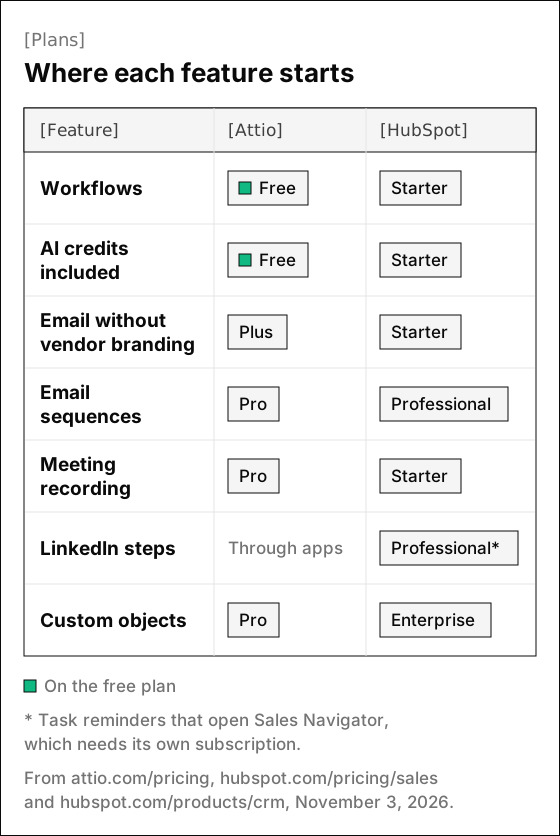
In practice, three rows in the chart decide which plan you'd really buy:
- Sequences start on Pro in Attio and on Professional in HubSpot, so if you need them, compare those two plans and skip the cheaper ones.
- Meeting recording starts lower in HubSpot, where Notetaker comes with Starter, while Attio's Call Intelligence starts on Pro.
- Custom objects arrive a plan earlier in Attio, while HubSpot's CRM page lists them on Enterprise.
Data model: custom objects in Attio and HubSpot
Attio treats objects as something you design, starting from people, companies and deals. You then add objects and attributes of your own, such as investors or partners, and link them the way your business works.
HubSpot starts from fixed objects that most sales teams share, like contacts, companies and deals. That shape fits a standard sales process from the first day.
We saw this difference up close when we wrote importers for both tools:
- HubSpot's deal stages come with a win probability for each stage, which a forecast can use right away.
- Attio's deal stages arrive as a list of statuses without probabilities, so our importer reads the won stage from Attio's celebration setting and the lost one from its name.
- HubSpot keeps leads and customers in one contact list sorted by lifecycle stage, so our importer brings contacts at a lead stage over as leads.
Interestingly, building both importers left us thinking that each shape pays off in a different place. HubSpot's fixed objects make reports and forecasts work early, and Attio's open ones fit an unusual process without workarounds.
Email, sequences and calls in Attio and HubSpot
Both tools log email on the right records and keep sequences for their higher plans:
| Attio | HubSpot Sales Hub | |
|---|---|---|
| Email in the CRM | Sync on every plan, 1 account per user on Free and Plus, 2 on Pro | One to one email on every plan, with HubSpot branding on Free |
| Emails a month | 200 on Free, 1,000 on Plus, unlimited from Pro | Not stated on the pricing page |
| Sequences | Pro and Enterprise | Professional and Enterprise, up to 500 emails per user a day on Professional |
| Meeting recording | Call Intelligence on Pro, for Zoom, Google Meet and Microsoft Teams | Notetaker on Starter, for Google Meet, Microsoft Teams and Zoom |
| Calling | Not on the pricing page | 500 minutes on Starter and 3,000 on Professional, with call transcription on Professional |
Attio's sequences send email only, through your synced Gmail or Microsoft account. Its help center lists "cold or high volume sales outreach" among the cases where you shouldn't use them, so they suit warm leads and customers.
Frankly, if your reps live on the phone, HubSpot has the edge here, since calling minutes start on Starter and Attio's pricing page doesn't list a dialer.
LinkedIn outreach in Attio and HubSpot
Neither Attio nor HubSpot sends LinkedIn invitations or messages for you, which matters if LinkedIn is where your first conversations happen.
HubSpot puts its LinkedIn steps inside sequences on Professional and Enterprise, and they need a Sales Navigator subscription of their own. Its knowledge base calls them task reminders, and completing one opens Sales Navigator on the contact's record so you can send the InMail or connection request yourself.
Attio teams that prospect on LinkedIn add other tools instead:
- Attio's Chrome extension turns LinkedIn profiles into records in one click, says a 2023 changelog entry, though its current help page doesn't mention LinkedIn.
- Its app directory lists outreach tools such as lemlist, which runs multichannel campaigns, and a HeyReach app that pushes Attio people into HeyReach's LinkedIn campaigns.
Either way, the LinkedIn tool is a second bill, and its pacing settings shape how safe your account stays. We built our own sending engine this year and spent most of our care on pacing, because LinkedIn's invitation limit page doesn't publish an exact number.
At the normal pace, our engine follows these rules for each sender:
- A new sender starts at 5 invitations a day and adds 2 a day until it reaches your limit.
- Each day's total lands somewhere between 80% and 100% of that limit, so the count changes from day to day.
- It sends only in the sender's working hours, with a lunch break and a random gap of 3 to 12 minutes between actions.
- It views a person's profile 1 to 4 hours before it sends the invitation.
- It drops to half pace for 3 days when LinkedIn rate limits the sender or the past week's acceptance falls under 20%, then eases back over 3 more days.
Pacing lowers the risk without removing it, since LinkedIn's prohibited software page says automation tools can get an account restricted. Our guide to automating LinkedIn outreach without getting restricted goes deeper.
AI and credits in Attio and HubSpot
Both tools meter AI with credits, counted in different ways:
| Attio | HubSpot Sales Hub | |
|---|---|---|
| Per seat | 100, 500, 1,000 or 2,500 seat credits per user a month for Ask Attio, from Free to Enterprise | None listed |
| Shared pool | 250, 1,500 or 10,000 workspace credits a month on Free, Plus and Pro | 500 a month on Starter, 3,000 on Professional and 5,000 on Enterprise |
| More credits | 5,000 more a month for $70 billed yearly, or $85 monthly | $0.010 per credit, in packs of 1,000 for $10 or pay as you go |
| Unused credits | Renew each month on your billing date, with rollover not stated | Reset each month and don't roll over |
HubSpot's credits help page adds that free users can't use credits. Without extra capacity, features that use credits pause until your next reset date.
Thankfully, both give you some control over what AI costs you each month. HubSpot lets you set how much each feature can spend, and Attio's credits guide lets admins cap how much of the shared pool Ask Attio uses.
Attio vs HubSpot pricing
Both charge per seat and give a lower price for yearly billing. These are the plans Attio's pricing page and HubSpot's Sales Hub pricing page listed on November 3, 2026:
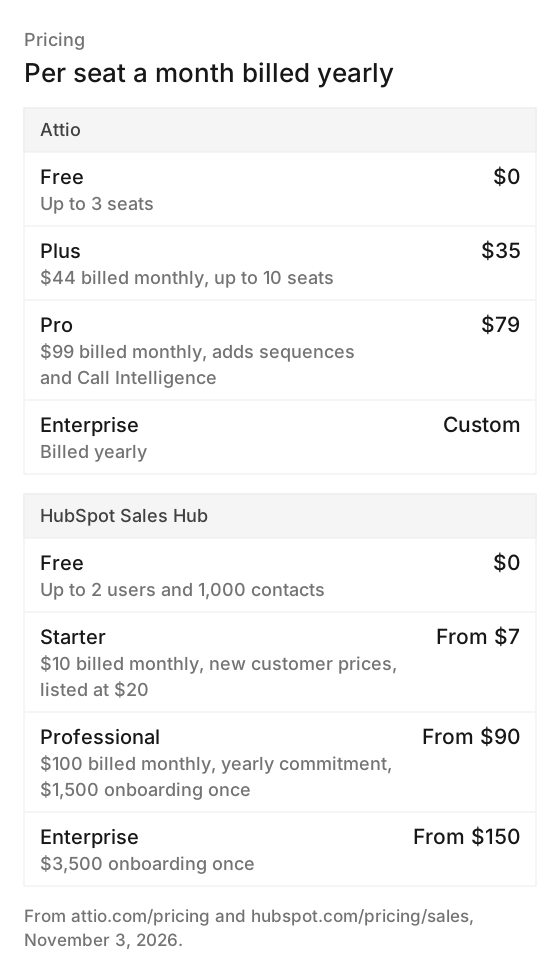
What moves the bill more than the headline price:
- HubSpot shows Starter's $7 yearly and $10 monthly prices as discounts for new customers next to a listed $20, so ask what a seat costs when you renew.
- HubSpot Professional asks for a yearly commitment even when you pay monthly, plus the $1,500 onboarding fee.
- Attio's Plus plan stops at 10 seats, so a team of 11 or more starts on Pro.
Moving between Attio and HubSpot
Happily, Attio's migration guide moves HubSpot data into any paid Attio plan through Import2, which it says is free for Attio users. It covers companies, people, deals, custom objects, notes, tasks and files.
Going the other way, HubSpot's CRM page lists CRM import among the features of its free plan. These details from building our own importers are worth checking in either direction:
- Our importer matches deal owners by email address, so invite your team with the same emails before you import.
- If your Attio workspace relies on custom objects, HubSpot lists them only on Enterprise, so check which plan can hold them before you move.
Where Omniscient fits
Omniscient is a CRM that fills itself in from your email, calendar and call transcripts, and it runs LinkedIn outreach that your team approves. Otto, our AI agent, drafts each LinkedIn note and message from the person's profile and recent activity, and nothing sends until a teammate approves it.
 Sam's LinkedIn
 Rina SatoPallet CloudNeeds approval
 Jordan BlakeTallyfinApproved
 Diego MarínShiftwiseChanged since approval
 Amara KofiLedgerlyNeeds approvalRina SatoCEO, Pallet Cloud
Our plans compare like this:
- Starter costs $19 per seat a month billed yearly, and Pro costs $49 with the pipeline board, the forecast and fields filled with the quote that backs them.
- Teammates who only view or log data are free, and the CRM's AI is part of the seat price.
- Each approval is tied to the exact text, so an edited message shows as changed since approval until someone approves it again.
- Our importer brings companies, contacts, deals with their stages, and notes over from HubSpot or Attio.
Luckily, you don't have to switch to try it, because Omniscient runs beside the CRM you use today. The CRM page and the LinkedIn outbound page show both sides.
Omniscient won't suit every team, since we don't send marketing email or email sequences and don't have a mobile app or a dialer yet. If campaigns drive your pipeline, HubSpot fits better, and if you sell by email to warm leads, Attio's Pro plan does.
Attio vs HubSpot: which one to choose
Start with where your first conversation with a buyer usually happens:
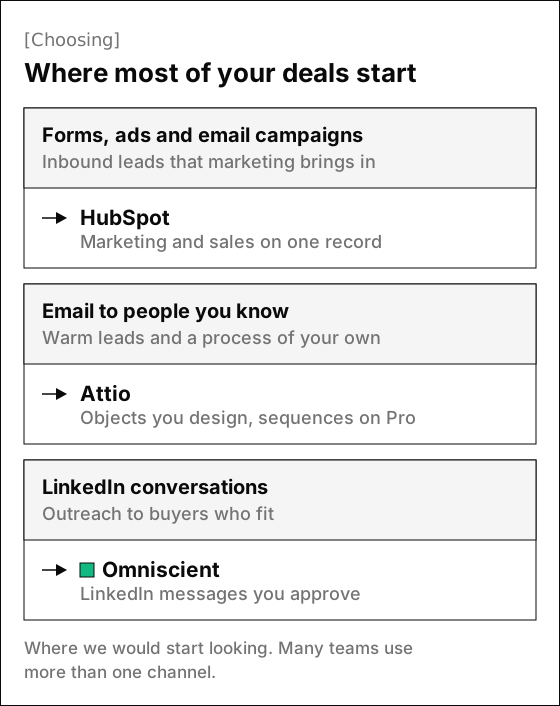
Choose HubSpot if:
- Your leads come from forms, ads and email campaigns, and you want marketing and sales working from the same record.
- Your reps make calls and want calling minutes, meeting notes and call transcripts in the CRM.
Choose Attio if:
- Your process needs objects of your own, like investors or partners, linked the way you work.
- You sell mostly by email to people you know and want sequences inside the CRM on Pro.
Choose Omniscient if:
- Most of your deals start in LinkedIn conversations, and you want each reply on a record that fills itself in.
- You want a teammate to approve LinkedIn messages before they go out.
If none of the three fits, our roundups of HubSpot CRM alternatives and Attio alternatives compare more options.
Questions about Attio vs HubSpot
Is Attio cheaper than HubSpot?
At the first paid plan, HubSpot costs less for new customers: Sales Hub Starter starts at $7 a seat billed yearly and lists at $20, while Attio Plus costs $35 billed yearly. At the plans with sequences, Attio Pro costs $79 billed yearly and HubSpot Professional costs $90, plus a $1,500 onboarding fee paid once.
Does Attio have a free trial?
Yes. Attio's pricing page offers a 14-day trial of its Pro plan, and its Free plan covers up to 3 seats.
Which is better for a startup, Attio or HubSpot?
Attio fits a startup that wants to shape its own data model, and its startup program offers up to 80% off for eligible teams. HubSpot fits a startup whose leads come from marketing, and it runs its own HubSpot for Startups program.