Best HubSpot CRM Alternatives for Small Teams
On this page
HubSpot's free CRM covers 2 users and 1,000 contacts with no end date, so plenty of small teams start there. The search for HubSpot CRM alternatives usually begins a step later, when the team needs email sequences or a forecast and sees what Sales Hub Professional costs.
We build Omniscient, a CRM with LinkedIn outreach for small B2B teams, and we wrote our own HubSpot importer. Building it meant reading companies, contacts, pipelines, deals and notes through HubSpot's API, so we've seen which parts of an account move over cleanly. Below are the eight alternatives we'd shortlist for a small team.
If you only have a minute, match your reason for leaving HubSpot to the tool we'd look at first:
| Your reason for leaving HubSpot | Where we'd look first |
|---|---|
| You prospect on LinkedIn and want each reply on a CRM record | Omniscient |
| You want a clear pipeline more than marketing tools | Pipedrive |
| You've run out of free users | Zoho CRM or EngageBay |
| You want to design your own objects and fields | Attio |
| Your deals start in your own network | folk |
| You want sales sequences at a lower seat price | Freshsales |
| Your team sells by phone | Close |
| You still want marketing and sales in one app | EngageBay |
| Tool | What it is | Starting price | Best for |
|---|---|---|---|
 Omniscient | A CRM that fills itself in, with LinkedIn outreach you approve | $19 per seat a month, billed yearly | Small B2B teams that sell through LinkedIn and meetings |
 Pipedrive | A sales pipeline CRM with meeting intelligence on every plan | See site | Teams that plan their week by pipeline stage |
| A sales CRM with a free edition and AI agents from Zia | Free for 3 users | Teams that want a free plan and help moving off HubSpot | |
 Attio | A flexible CRM that connects to your inbox and calendar | Free for up to 3 seats | Teams that want to design their own data model |
| An AI CRM with a LinkedIn extension and email campaigns | $24 per member a month, billed yearly | Founders and agencies selling through their network | |
| A sales CRM from Freshworks with Freddy AI | $9 per user a month, billed yearly | Teams that want sales sequences at a lower seat price | |
| A CRM for calling, texting and email, with an AI sales agent | $9 a month for one user, billed yearly | Teams that sell by phone | |
| A CRM with email marketing, sales and a helpdesk in one app | Free for up to 15 users | Teams that want marketing and sales together for less |
Why small teams look for a HubSpot CRM alternative
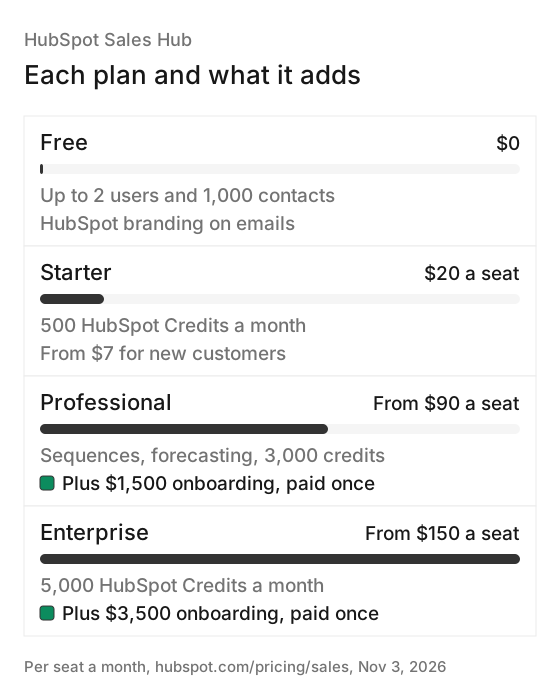
HubSpot's free CRM is generous, and a team of two may never outgrow it. The bill changes once you add sellers or need the tools on higher plans. Here's what HubSpot's Sales Hub pricing page says today:
- The free CRM covers up to 2 users and 1,000 contacts with "no expiration date," and it adds HubSpot branding to your emails and meeting links.
- Starter lists $20 per seat a month, next to a "starts at" price of $7 that HubSpot marks as a discount for new customers.
- Professional starts at $90 per seat a month on a yearly commitment, as HubSpot's pricing guide explains, plus a required onboarding fee of $1,500 that you pay once.
- Sequences and forecasting start on Professional, and LinkedIn actions in sequences need a separate Sales Navigator subscription.
- AI runs on HubSpot Credits, 500 a month on Starter and 3,000 on Professional, and unused credits don't roll over to the next month.
Honestly, if two founders only need a contact list and a deal pipeline, the free CRM is hard to beat, and you may not need to switch yet. The alternatives below make the most sense once you're adding sellers, or you need sequences and a forecast without moving up to Professional.
The 8 best HubSpot CRM alternatives for small teams
1. Omniscient
Omniscient is a CRM software that builds its records from your email, calendar and call transcripts, and runs LinkedIn outreach from the same app. Otto, our AI agent, writes your meeting notes and proposes field values with the quote that backs each one.
For a team leaving HubSpot, our plans line up like this:
- Starter costs $19 per seat a month billed yearly, with record pages, meeting notes from transcripts, follow up email drafts, Ask Omniscient and a daily digest.
- Pro costs $49 and adds the pipeline board and forecast, custom fields, fields filled with proof, meeting prep briefs and Slack alerts.
- Business costs $99 and adds a manager view with call coaching, MEDDICC and BANT from calls, and dashboards from a sentence.
- Teammates who only view or log data are free, once your workspace has a Pro or Business seat.
- Monthly billing costs 20% more, and the 14 day trial of Pro needs no credit card.
Fields set to auto follow a rule we chose on purpose. Otto fills an empty value only when he's at least 85% sure and has a quote to show, and he never changes a value someone on your team typed. Values he's less sure of wait in Suggestions for a teammate to accept, because one wrong amount in a forecast costs more than an empty field.
On the LinkedIn side, you describe the people you want in Scout's chat and approve its search plan. You judge a few sample leads before it finds the full list. Otto drafts each message, and nothing sends until a teammate approves it, either person by person or for everyone at launch.
LinkedIn's invitation limit page gives no exact number, so we built each sender to pace itself:
- A new sender starts at 5 invitations a day and adds 2 a day until it reaches the limit you set.
- Each day's total lands somewhere between 80% and 100% of that limit, so no two days look the same.
- It works inside the sender's hours, with a lunch break and random gaps of 3 to 12 minutes.
- It views the profile 1 to 4 hours before it sends the invitation.
- It slows down for 3 days when LinkedIn rate limits the account or acceptance falls under 20%.
Admittedly, Omniscient does less than HubSpot in a few places. We don't send marketing emails or email sequences, so Otto's drafts go out only when you send them yourself. There's no dialer either, so a team that sells by phone will be better served by Close.
The CRM page shows the rest, and moving your HubSpot data is covered further down.
2. Pipedrive
Pipedrive is a sales pipeline CRM software that helps small businesses manage leads and deals. Its AI Sales Assistant predicts which deals you're likely to win or lose and suggests which leads to pursue.
- Nova, its meeting intelligence, writes a brief before each call, records and transcribes it, and drafts CRM updates for you to review.
- The homepage says Nova comes with all plans at no extra cost.
- Pipedrive's help center lists four plans, Lite, Growth, Premium and Ultimate, and charges for every seat whether or not it's assigned.
- Its pricing page didn't load for us on November 3, so check today's plan prices there.
- The free trial lasts 14 days with no credit card.
Pipedrive suits a team that wants a clear pipeline more than marketing tools. Since you pay for empty seats too, remove unused ones before your plan renews.
3. Zoho CRM
Zoho CRM is a sales CRM software that helps teams answer leads faster and run their pipeline, with AI agents from its assistant, Zia.
- The Free edition is free forever for 3 users, with contact management, workflow automation and up to 10 email templates.
- Standard costs $14 per user a month billed yearly, or $20 monthly, and adds email integration, calling, several pipelines and sales forecasting.
- Professional costs $23 billed yearly, or $35 monthly, and adds AI agents, predictive intelligence and quoting tools (CPQ).
- For teams leaving HubSpot, the homepage promises "free migration assistance, and if you're locked mid-contract, Zoho CRM is on us for 6 months."
Interestingly, Zoho puts sales forecasting on Standard, while HubSpot keeps it for Professional. If you're partway through a HubSpot contract, read the terms of Zoho's six month offer before you sign anything.
4. Attio
Attio is a CRM software that connects to your inbox and calendar and lets you shape objects and fields around how your business works. Its homepage describes agents that prospect and reach out when buyers are looking.
- The Free plan covers up to 3 seats, 3 objects and 200 emails a month.
- Plus costs $35 per seat a month billed yearly, or $44 monthly, for up to 10 seats and 5 objects.
- Pro costs $79 billed yearly, or $99 monthly, and adds sequences and Call Intelligence.
- AI runs on credits, from 100 seat credits per user a month on Free to 1,000 on Pro, plus a pool for the workspace.
- The trial gives you 14 days of Pro with no credit card, and Attio's help center has a guide to moving from another CRM that lists HubSpot.
Personally, we'd pick Attio when someone on the team enjoys designing objects, since that flexibility is the main reason to choose it. Our Attio vs HubSpot comparison puts the two side by side.
5. folk
folk is an AI CRM software that helps small sales teams and agencies keep track of contacts and deals, with a Chrome extension for LinkedIn and Sales Navigator. Its AI assistants find and enrich leads and score them against your ideal customer.
- Standard costs $24 per member a month billed yearly, or $30 monthly, with pipelines, email campaigns, AI magic fields and the LinkedIn extension.
- Standard syncs one email account per member, along with calendar and WhatsApp.
- Premium costs $48 billed yearly, or $60 monthly, and adds email sequences, custom objects, dashboards and API access.
- The 2 week trial includes everything in Premium and needs no credit card.
Luckily for founders, the LinkedIn extension and email campaigns come on Standard, so you can start on the cheaper plan. folk fits a founder or an agency whose deals start in their own network, and Premium is the plan to price if sequences are why you're leaving HubSpot.
6. Freshsales
Freshsales is a sales CRM software from Freshworks that helps teams capture, qualify and track their leads. Its AI, Freddy, gives each lead an intent score, and the Pro plan adds deal insights.
- Growth costs $9 per user a month, billed annually, with email, phone, chat, custom fields and basic workflows.
- Pro costs $39 and adds sales sequences, contact scoring, deal insights and territory management.
- Enterprise costs $59 and adds forecasting insights, custom modules and audit logs.
- The free trial lasts 21 days with no credit card.
For a team that mainly needs sequences, Freshsales lists them on Pro, at $39 a seat billed yearly. Those are yearly prices, and the pricing page also has a monthly option if you'd rather not commit for a year.
7. Close
Close is a sales CRM software that helps teams call and text their leads from the same place as their email. Its AI sales agent, Chloe, can call down a list of leads in batches and take actions in Close from a chat.
- Solo costs $9 a month billed yearly, or $19 monthly, for one user and up to 10,000 leads.
- Essentials costs $35 per user billed yearly, or $49 monthly, with unlimited contacts and calling, email and SMS built in.
- Growth costs $99 billed yearly, or $109 monthly, and adds workflows, the Power Dialer and bulk email.
- Calls are charged by usage, and the 14 day trial needs no credit card.
Frankly, if your reps spend most of the day on calls, Close is where we'd send you. HubSpot's pricing page lists 500 calling minutes on Starter and 3,000 on Professional, and Omniscient has no dialer at all.
8. EngageBay
EngageBay is a CRM software that puts email marketing, landing pages, sales pipelines and a helpdesk in one app for startups and small businesses. Its homepage pitches it as "HubSpot Power at a Fraction of the Cost."
- The Free plan covers up to 15 users and 250 contacts, with email marketing, 2 email sequences, a landing page, CRM and live chat.
- Basic shows $13.79 per user a month on the yearly tab and $14.99 on the monthly tab, with 500 contacts.
- Growth shows $59.79 or $64.99 and raises the limit to 5,000 contacts, and Pro shows $110.39 or $119.99 for 10,000.
EngageBay is the closest match here if you'll miss HubSpot's marketing tools. Happily, the free plan has room for 15 users, so the limit to watch is contacts, which stops at 250 where HubSpot's free CRM allows 1,000.
How the alternatives compare on price and plans
The chart puts each alternative's first paid seat for a team next to HubSpot Professional, the plan where HubSpot's sequences and forecasting start. Entry plans don't all include the same tools, so read it with the sections above: Omniscient's pipeline board, for example, starts on Pro at $49.
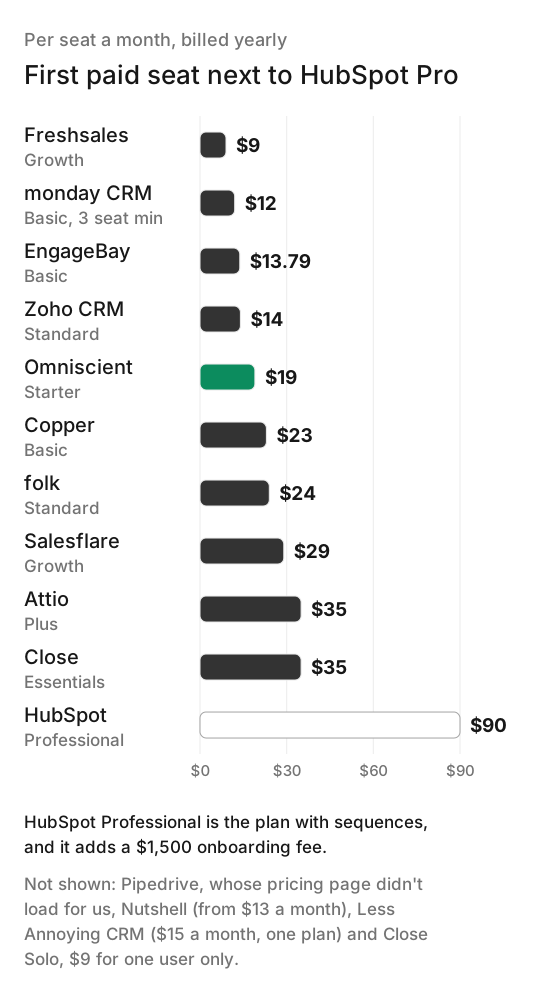
Beyond the seat price, check these before you book a demo:
| CRM | Free plan | Free trial | Email sequences start on |
|---|---|---|---|
| HubSpot | 2 users, 1,000 contacts | Not on the pricing page | Professional |
| Omniscient | Free seats for teammates who view or log data | 14 days of Pro, no card | None, LinkedIn sequences instead |
| Pipedrive | check | 14 days, no card | check |
| Zoho CRM | 3 users | Length not stated | check |
| Attio | Up to 3 seats | 14 days of Pro, no card | Pro |
| folk | Mentioned, no limits listed | 2 weeks, no card | Premium |
| Freshsales | Mentioned, no limits listed | 21 days, no card | Pro |
| Close | None listed | 14 days, no card | Growth, as workflows |
| EngageBay | 15 users, 250 contacts | Free plan instead | Free, with 2 sequences |
How to move from HubSpot to another CRM
We built Omniscient's HubSpot importer ourselves, and most of what we learned applies whichever CRM you pick. Thankfully, our connection only reads from HubSpot, so you can run both side by side until you're sure.
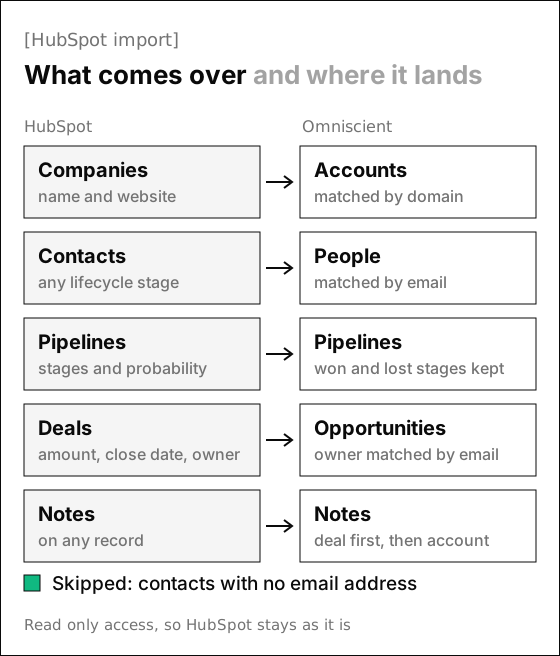
These details shaped how our importer works, and they're worth checking in any CRM's importer:
- Deal owners are matched to teammates by email address, so a deal whose owner hasn't joined yet arrives with no owner.
- Contacts without an email address are skipped, so export them to a spreadsheet before you switch.
- Companies with no website still come over, with a placeholder that we swap for a real domain once their contacts' work emails arrive.
- HubSpot keeps subscribers and marketing leads in the same contact list as buyers, and they come over as people too, linked to an account from their website or work email domain.
- Notes come over as plain text, and each one lands on its deal, or else its company, or else its contact.
- Running the import again updates each deal's stage, amount and close date, fills in owners who have joined since, and skips notes it already brought over.
We'd run the new CRM next to HubSpot for a couple of weeks and switch in this order:
- 01Connect your inbox and calendar
Add Gmail or Outlook first, so the new CRM's timeline fills in while HubSpot keeps running.
- 02Invite your team
Use the same email addresses they use in HubSpot, so deal owners match when you import.
- 03Save what won't move
Export contacts without an email address, and write down your workflows and sequences.
- 04Run the import
Bring everything over, then check five deals by hand for stage, amount and owner.
- 05Rebuild automations last
Recreate workflows once the data settles, so nothing fires on a half imported record.
- 06Plan around your renewal
If you committed to a year of HubSpot, time the switch to your renewal date.
Accounts, contacts, opportunities with their stages, and notes. Records already here are matched and filled in.

 Connect HubSpot
HubSpot portal 48291Opportunities, 1,180 accounts, 3,402 contacts, 615 leadsRunning
If you'd rather not run it yourself, we migrate your companies, contacts, deals and notes from HubSpot for you. Our Omniscient vs HubSpot comparison goes deeper on the two, and our guide to the best CRM for startups covers a few more options.
Questions about HubSpot CRM alternatives
What is the best HubSpot CRM alternative for a small team?
Omniscient is our pick for small B2B teams that prospect on LinkedIn and want the CRM to fill itself in. Pipedrive fits teams that want a clear pipeline, EngageBay fits teams that still want marketing and sales in one app, and Close fits teams that sell by phone.
Is there a free alternative to HubSpot CRM?
Yes. Zoho CRM's Free edition covers 3 users, and EngageBay's free plan covers up to 15 users with 250 contacts. Attio's Free plan also covers up to 3 seats.
Which HubSpot alternatives have email sequences for less than Sales Hub Professional?
Freshsales Pro has sales sequences at $39 per user a month billed yearly, and folk Premium has email sequences at $48 per member a month billed yearly. Attio adds sequences on Pro, at $79 per seat a month billed yearly, and EngageBay's free plan includes 2 email sequences.
Can I move my data from HubSpot to another CRM?
Yes. Omniscient's importer brings over companies, contacts, deal pipelines, deals and notes, or we migrate them for you. Zoho offers free migration help, and Attio's help center has a guide to moving from another CRM, HubSpot included.
Does HubSpot CRM work with LinkedIn?
HubSpot lists a LinkedIn Sales Navigator integration, and its pricing page says LinkedIn actions in sequences need a Sales Navigator subscription. Omniscient sends LinkedIn invitations and messages from your own account, and only after a teammate approves them.