Best CRM for Startups in 2026
On this page
- What a startup needs from its first CRM
- What we learned building a CRM for small teams
- The best CRM for startups: 9 picks for 2026
- Startup discounts on CRMs
- Free plans and trials for startups
- Which CRM fits each stage of a startup
- How to switch CRMs later without losing data
- How to choose a CRM for your startup
- Questions about CRMs for startups
Building Omniscient's CRM, we had to decide who becomes a contact when a founder connects a busy inbox, and our first answer was everyone who emailed them. That choice decides how much of the CRM your team can trust, so it's worth testing in any CRM you try.
We build Omniscient for small B2B teams where the founder still sells. Below are our picks for the best CRM for startups in 2026: nine CRMs with today's prices, free plans and published startup discounts.
The short version, by how your startup sells:
- Pick Omniscient if you sell B2B through your inbox, meetings and LinkedIn, and want the CRM to fill itself in.
- Pick HubSpot if marketing and sales will share one system.
- Pick Attio if you want to design your own data model.
- Pick Pipedrive if your first sales hire wants a simple pipeline.
- Pick Close if your team sells by phone.
- Pick Twenty if you have engineers and want an open source CRM you can host.
| Tool | What it is | Starting price | Best for |
|---|---|---|---|
 Omniscient | A CRM that fills itself in, with LinkedIn outreach you approve | $19 per seat a month, billed yearly | B2B startups selling through email, meetings and LinkedIn |
 HubSpot | A CRM platform with marketing, sales and service tools | Free for up to 2 users | Startups that run marketing and sales together |
 Attio | A flexible CRM you shape around your own objects | Free for up to 3 seats | Teams that want to design their data model |
 Pipedrive | A pipeline CRM with meeting intelligence on every plan | $14 per seat a month, billed yearly | A first sales hire who works by stage |
| An AI CRM for small teams, with a LinkedIn extension | $24 per member a month, billed yearly | Founders who sell through their network | |
| A CRM for calling, email and SMS | $9 a month for one user, billed yearly | Teams that sell by phone | |
| A CRM with a forever free plan and built-in AI agents | Free for 3 users | Startups that want a free plan with room to grow | |
 Salesforce | A CRM platform from a free suite to enterprise editions | Free for up to 2 users | Startups that expect a complex sales process |
| An open source CRM you can host yourself | $9 per user a month, billed yearly | Technical teams that want to own their CRM |
What a startup needs from its first CRM
Your team is small and your sales process will keep changing, so these are the needs we'd check first in a startup CRM:
- Records that fill in from your email and calendar, so the founder's selling still reaches the CRM.
- A free plan, or free seats for teammates who mostly look things up.
- A pipeline your first sales hire can learn in a day.
- A price that still works at five or ten seats.
- An easy way out, so a switch in two years doesn't mean weeks of cleanup.
Honestly, we'd weigh the first need above the rest, since a founder with a full calendar rarely types notes after every call. A CRM that depends on typing falls behind in exactly the weeks you're busiest with buyers.
What we learned building a CRM for small teams
Omniscient's CRM builds its records from the email and calendar you connect. The sync skips bulk mail and automated senders, but at first it added anyone else who emailed you. A cold pitch became a contact as easily as a buyer did.
So the welcome flow now suggests settings that keep the CRM to people you sell to:
- Add people only when you reach out, from emails you send and meetings you hold.
- Leave out personal addresses like gmail.com and outlook.com.
- Track external meetings only.
- Read one month of past mail the first time, with options from one week to one year.
- Keep a do not track list of emails or domains, like your lawyer or your family.
The cost we accepted is timing: someone new who writes to you first only becomes a contact once you reply or meet them.
You can change every choice later in Settings, where each connected inbox keeps its own sharing rule. Teammates then see everything from that inbox, only who and when, or nothing at all.
Thankfully, you can run the same check on any CRM during its trial. Connect one real inbox and count how many of the new contacts are people you'd actually sell to.
The best CRM for startups: 9 picks for 2026
1. Omniscient
Omniscient is an AI CRM that builds its records from your email, calendar and call transcripts, with LinkedIn outreach you approve in the same app. Otto, our AI agent, writes your meeting notes and drafts your follow ups.
- Paid seats start at $19 per seat a month, billed yearly, with AI included, and monthly billing costs 20% more.
- Starter adds record pages, follow up email drafts, Ask Omniscient, a daily digest and meeting notes from your call transcripts.
- Otto writes those notes from the transcripts Google Meet, Zoom or Teams already make, and a recording bot is a $25 per seat add on.
- Pro, at $49, adds the pipeline board and forecast, custom fields, fields filled with proof, meeting prep briefs and Slack alerts. Its 14 day free trial needs no card.
- On Pro and Business, teammates who only view or log data can have free seats.
- The importer brings your companies, contacts, deals and notes across from HubSpot, Salesforce, Pipedrive or Attio.
For LinkedIn outbound, you describe your buyer in a sentence and Scout finds people who match. Otto then drafts each LinkedIn message, and nothing sends until a teammate approves it. Sending keeps to your working hours with random gaps between actions, and new accounts warm up slowly.
Admittedly, Omniscient has no dialer and no email sequences, so Close or HubSpot suits teams that sell by phone or email campaigns. The pipeline board also starts on Pro, so a team that only wants a board at the lowest price may prefer Pipedrive's Lite plan.
2. HubSpot
HubSpot is a customer platform that runs marketing, sales and service from one shared CRM. Breeze Assistant, its AI helper, comes with the free CRM and can research companies and prep you for calls.
- The free CRM covers up to 2 users and 1,000 contacts, with email tracking, meeting scheduling and deal pipelines.
- Sales Hub Starter lists $20 per seat a month and a lower $7 starting price, with a note that discounts are for new customers only.
- Professional starts at $90 per seat a month with a yearly commitment, plus a required one time onboarding fee of $1,500.
- HubSpot for Startups takes up to 90% off new Professional or Enterprise products in year one.
If two founders only need a pipeline, the free CRM covers it, and the startup discount starts to matter once you move up to Professional.
3. Attio
Attio is a flexible CRM that you shape around your own objects and fields, with AI agents for prospecting, outreach and deal briefings. Connect your inbox and calendar, and Attio logs your emails and calls on its own.
- The Free plan covers up to 3 seats and 50,000 records, with one synced email account per user.
- Plus costs $35 per seat a month billed yearly, or $44 monthly, and Pro costs $79, or $99 monthly.
- Attio for Startups takes 80% off the yearly Pro plan and credits in year one and 30% in year two.
- The startup offer covers workspaces of up to 10 seats, and you apply within 90 days of creating your workspace.
Attio fits best when someone on your team enjoys building objects and workflows, since that's where its flexibility shows. If you're weighing Attio against us, Omniscient vs Attio puts the two side by side.
4. Pipedrive
Pipedrive is a sales CRM that helps small businesses track their pipeline and close deals, with meeting intelligence included on every plan.
- Lite costs $14 per seat a month billed yearly, or $24 monthly, Growth costs $39 or $49, and Premium $59 or $79.
- Lite includes Pipedrive Nova, which writes a brief before each meeting, a transcript of each call and CRM updates you approve.
- Full email sync with open and click tracking starts on Growth.
- The 14 day free trial needs no credit card, and you can invite as many teammates as you want.
Lite, interestingly, covers meeting briefs and call transcripts while full email sync waits for Growth. Check which of the two your team leans on before you pick a plan.
5. folk
folk is an AI CRM that keeps a small team's contacts and deals in one place. Its assistants enrich contacts and suggest follow ups when a new interaction comes in.
- Standard costs $24 per member a month billed yearly, or $30 monthly, and Premium costs $48, or $60 monthly.
- Standard includes pipelines, the folkX Chrome extension for LinkedIn, and email, calendar and WhatsApp sync.
- Custom objects, email sequences and dashboards start on Premium.
folk suits founders whose deals start on LinkedIn or through their own network, where a current contact list matters more than a long pipeline.
6. Close
Close is a sales CRM that brings calling, email and SMS into one place, with an AI sales agent named Chloe on every plan.
- Solo costs $9 a month billed yearly, or $19 monthly, for one user and up to 10,000 leads.
- Essentials costs $35 per user a month billed yearly, or $49 monthly, with unlimited contacts and calling, email and SMS built in.
- Workflows and the Power Dialer start on Growth, at $99 per user a month billed yearly.
- The free trial lasts 14 days with no credit card, and Close offers a 30 day money back guarantee.
Solo covers a founder who sells by phone, and once you hire, Essentials is the Close plan to compare.
7. Zoho CRM
Zoho CRM is a sales CRM that helps teams answer leads faster and run their pipeline, with AI agents from its assistant, Zia.
- The Free plan is free forever for 3 users, with contact management and workflow automation.
- Standard costs $14 per user a month billed yearly, or $20 monthly, and adds email and calendar integration, several pipelines and sales forecasting.
- Professional, at $23 billed yearly or $35 monthly, adds AI agents and predictive intelligence.
- Bigin Express, Zoho's simpler CRM for teams moving from spreadsheets, costs $7 per user a month billed yearly, or $9 monthly.
Frankly, Zoho rewards a team that likes to set things up, since its range of apps and settings is wide. Its pricing page also lists free onboarding and help to switch from another CRM.
8. Salesforce
Salesforce is a CRM platform that scales from a free two user suite up to large enterprise editions with AI agents.
- Free Suite covers up to 2 users at no cost, as long as you log in at least once every 60 days.
- Starter Suite costs $25 per user a month on monthly or yearly billing, and its AI syncs emails, events and contacts for you.
- Pro Suite costs $100 per user a month, billed yearly, and adds quoting and forecasting.
- AI add ons start at the Core edition, which costs $195 per user a month, billed yearly.
Personally, we'd put a seed stage team on Salesforce only when a big customer expects it or a teammate has run it before. Without that, the setup and upkeep take time a small team rarely has.
9. Twenty
Twenty is an open source CRM that technical teams can shape into their own, hosted by Twenty or on your own servers.
- The cloud Pro plan costs $9 per user a month billed yearly, or $12 monthly, and Organization costs $39, or $52 monthly.
- Pro includes Google and Microsoft email and calendar sync, a custom data model and AI workflows with a limited personal AI allowance.
- Self hosted Pro is $0 and covers up to 5 workspaces with community support, while self hosted Organization costs $19 per user a month.
Self hosting pays off when you have an engineer to add the objects and integrations you need. Without one, Twenty's cloud plan saves you the upkeep.
Startup discounts on CRMs
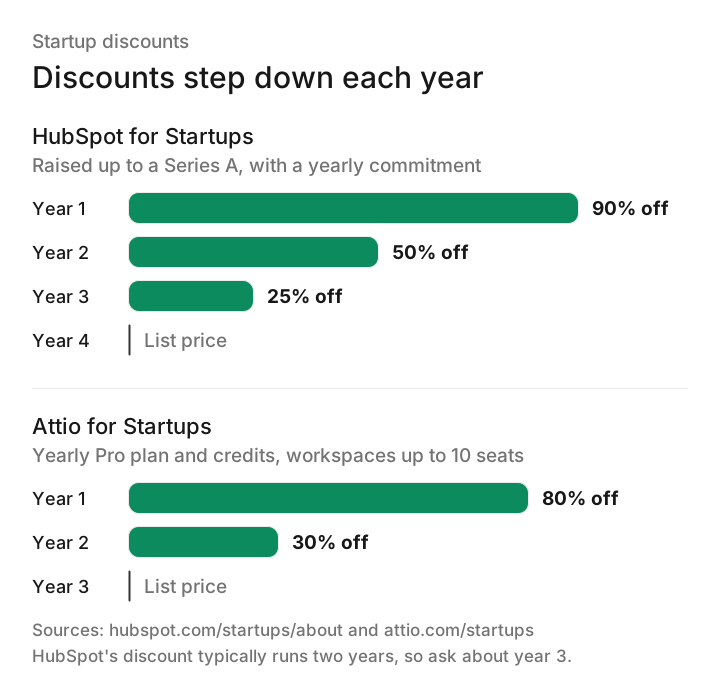
HubSpot and Attio both publish startup programs, and both discounts step down each year. Plan your budget on the full price you'll pay once the discount years end.
The fine print we'd read before you apply:
- HubSpot's top tier is for startups up to a Series A, linked to an approved partner or with verified venture funding, and it needs a yearly commitment.
- HubSpot's FAQ says the discount typically lasts two years, but the top tier lists a third year at 25% off, so ask which applies.
- A second HubSpot tier takes 30% off in year one and 15% in year two, for members of approved startup groups.
- Attio asks for venture backing or a tie to one of its startup partners. Its FAQ also asks for a company incorporated less than 10 years ago.
Fortunately, both list their terms in public, and for any other CRM here, you can ask the sales team about a startup price before you sign.
Free plans and trials for startups
Luckily, every CRM here lets you try it before you pay, through a free plan, a trial or both.
| CRM | Free plan | Free trial | Entry paid price |
|---|---|---|---|
| Omniscient | Free seats for teammates who view or log data, on Pro and Business | 14 days of Pro, no card | $19 per seat, billed yearly |
| HubSpot | Up to 2 users and 1,000 contacts | Use the free CRM | $20 per seat, with a lower new customer price |
| Attio | Up to 3 seats | 14 days of Pro | $35 per seat, billed yearly |
| Pipedrive | Not listed | 14 days, no card | $14 per seat, billed yearly |
| folk | Not listed | 2 weeks, no card | $24 per member, billed yearly |
| Close | Not listed | 14 days, no card | $9 for one user, billed yearly |
| Zoho CRM | Up to 3 users | Length not stated | $14 per user, billed yearly |
| Salesforce | Free Suite, up to 2 users | Length not stated | $25 per user |
| Twenty | Free to host yourself | Free trial, no card | $9 per user, billed yearly |
Which CRM fits each stage of a startup
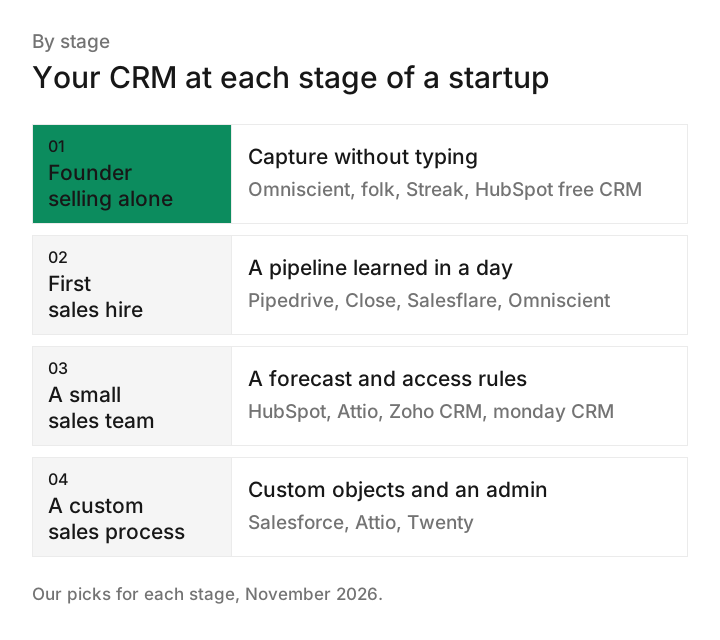
The right CRM changes as you hire, so here's our match for four common startup stages.
If your deals start on LinkedIn, our guide to LinkedIn outreach tools with a CRM covers the outbound side.
How to switch CRMs later without losing data
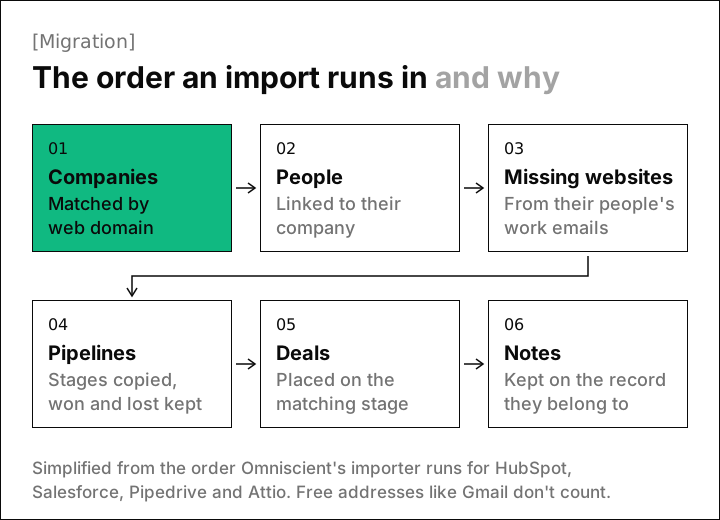
Your first CRM may not be your last, so check how data comes out before you put it in. We wrote Omniscient's importer for HubSpot, Salesforce, Pipedrive and Attio, and the order it runs in shows what a clean move needs.
What each step protects:
- Companies come first, matched by web domain, so every person has a company to land on.
- A company without a website gets one from its people's work emails, and free addresses like Gmail don't count.
- Pipelines come before deals, so each deal lands on a matching stage, with won and lost kept.
Our importer also skips people with no email address, so export those contacts separately if you need them.
Ask any CRM how it matches companies on import, since records without a website are the hardest to place. A wrong match also takes longer to fix than a missing one, because people and deals follow the company they land on.
How to choose a CRM for your startup
Most trials here last 14 days, which is enough if you use them on real work. This is the order we'd test in:
- 01Write down how you sell
List the channels your deals start from, like email, LinkedIn, calls or inbound forms.
- 02Invite your next teammate
Add a colleague and see what a free or viewer seat lets them see and do.
- 03Price your next hires
Look up the plan you'd need at three and at five seats, on yearly and monthly billing.
- 04Ask about startup pricing
Ask whether you qualify for a discount and what you'll pay once it ends.
- 05Test the way out
Export a list, or ask how contacts, deals and notes would move to another CRM.
For a closer look at AI that fills in records, our list of the best AI CRMs compares how each one shows its work.
Questions about CRMs for startups
What is the best CRM for startups in 2026?
For B2B startups that sell through email, meetings and LinkedIn, we'd start with Omniscient. HubSpot fits startups that run marketing and sales together, and Pipedrive suits a first sales hire.
Is there a free CRM for startups?
Yes: HubSpot, Attio, Zoho CRM and Salesforce all have free plans for 2 or 3 users, and Twenty is free to host yourself. On its Pro and Business plans, Omniscient gives free seats to teammates who only view or log data.
Do CRMs offer startup discounts?
Two of the CRMs on this list publish startup programs. HubSpot for Startups takes up to 90% off new Professional or Enterprise products in year one, and Attio for Startups takes 80% off its yearly Pro plan in year one.
When should a startup start using a CRM?
Start as soon as you have more open conversations than you can keep in your head.