Omniscient vs HubSpot: Features, Pricing and Setup Compared
On this page
- Omniscient vs HubSpot features compared
- What HubSpot does well
- What Omniscient does well
- How each CRM fills in your records
- LinkedIn outreach in HubSpot and Omniscient
- Email and calling: where HubSpot is ahead
- AI and credits in HubSpot and Omniscient
- Omniscient vs HubSpot pricing
- Omniscient vs HubSpot setup
- Moving from HubSpot to Omniscient
- Which one should you choose
- Questions about Omniscient vs HubSpot
If you're comparing Omniscient vs HubSpot, you probably sell to other businesses and start a good share of your deals on LinkedIn. You might be on HubSpot's free CRM today or close to paying for Sales Hub. The two tools differ most on LinkedIn outreach, email sending, how AI is billed and setup.
Omniscient is our product, so weigh what follows with that in mind. We read HubSpot's pricing page, product pages and knowledge base on November 3, 2026. We also wrote Omniscient's HubSpot importer, though we haven't run Sales Hub with a live sales team.
Where your buyers first hear from you settles most of the choice:
- Pick HubSpot if you want marketing email, landing pages and sales on one database, or your reps book meetings through email sequences and calls.
- Pick Omniscient if you open most conversations on LinkedIn and want each reply on a record that fills itself in from your inbox and meetings.
- Run both for the 14 days of our free trial if you're unsure, since Omniscient reads your HubSpot data without changing anything in it.
| Tool | What it is | Starting price | Best for |
|---|---|---|---|
 Omniscient | A CRM that fills itself in, with LinkedIn outreach you approve | Paid from $19 per seat a month, billed yearly | Small B2B teams that sell through LinkedIn and meetings |
 HubSpot | A CRM platform with sales, marketing and service hubs | Free CRM for up to 2 users | Teams that want marketing and sales tools on one database |
Omniscient vs HubSpot features compared
HubSpot's column comes from its Sales Hub pricing page, product pages and knowledge base, and ours from our pricing and the app itself.
| HubSpot Sales Hub | Omniscient | |
|---|---|---|
| Free plan | Up to 2 users and 1,000 contacts, with no end date | Free seats for teammates who only view or log data |
| Email and calendar | Email tracking and a meeting scheduler on the free CRM | Each email and meeting lands on the right record |
| Email sequences | From Professional | None, though you can send single emails |
| Sales Navigator card, InMail and manual LinkedIn tasks, from Professional | Lead search, campaigns you approve and paced sending | |
| Call notes | Transcripts of recorded calls, from Professional | Notes from Meet, Zoom and Teams transcripts, from Starter |
| Forecast | From Professional | From Pro |
| Calling | 500 minutes on Starter, 3,000 on Professional | No dialer |
| Marketing email | Yes, in Marketing Hub | No |
| How AI is paid for | HubSpot Credits, with a monthly amount on each paid plan | In the seat price |
| Mobile apps | iOS and Android, free | None |
What HubSpot does well
HubSpot is a CRM platform that puts sales, marketing, service and website tools on one shared customer database, and Sales Hub is the part built for sales teams.
From HubSpot's own pages, a few things stand out for a small team:
- The free CRM covers up to two users and 1,000 contacts, and HubSpot calls it "100% free with no expiration date."
- Breeze Assistant, HubSpot's AI helper, comes with the free CRM and can research companies and sum up records.
- The mobile app is free on iOS and Android.
Honestly, if your team runs newsletters and landing pages next to sales, HubSpot is hard to replace.
What Omniscient does well
Omniscient is a CRM that fills in each record from your email, calendar and meeting transcripts, with LinkedIn outreach built into the same app. Otto, our AI agent, drafts your meeting notes and LinkedIn messages, and proposes field values with the quote behind each one.
A few details from the app:
- Every seat, free ones included, captures email and meetings from Gmail or Outlook onto the right person, company and deal.
- Meeting notes come from the transcripts Google Meet, Zoom and Teams already make, so a bot joins your calls only if you add call recording.
- Scout finds people from a plain sentence and scores each one out of 100 for fit and timing, using signals like hiring or a new role.
- Ask Omniscient answers questions about your accounts in plain English and links each answer to the records it used.
Admittedly, HubSpot covers ground we don't, since we send no marketing email or email sequences and have no dialer or mobile app. LinkedIn is also the only channel our campaigns run on.
How each CRM fills in your records
HubSpot's data agent answers custom questions about a company or contact from your "transcripts, emails, meetings, and the web." HubSpot says "every answer writes to the record," and it lists smart properties at $0.10 per answer, from Starter up.
In Omniscient, each field on Pro can be off, suggest values or fill itself, and Otto follows these rules:
- A field set to fill itself is filled only when it's empty and Otto is at least 85% sure, with a quote to show.
- Less certain values, from 60% up, wait in Suggestions with their quote, and you accept or skip each one.
- Otto never overwrites a value on his own, including one your team typed.
We picked these rules because a wrong amount in a forecast does more harm than a blank one. Our guide to CRMs with automatic data entry compares how other tools handle it.
LinkedIn outreach in HubSpot and Omniscient
HubSpot reaches LinkedIn through its Sales Navigator integration, which has its own requirements:
- Each rep who uses it needs a Sales Hub Professional or Enterprise seat and a LinkedIn Sales Navigator Advanced Plus account.
- A card on each record shows the person's LinkedIn details and lets you send InMails, though the conversation isn't saved to the timeline unless you log it by hand.
- Sequences can hold connection request and InMail steps, which HubSpot's sequences guide describes as reminders to send each one manually. The note you write in the step doesn't fill in the Sales Navigator box either.
Interestingly, HubSpot's prospecting agent also drafts outreach across "phone calls, LinkedIn messages, emails, and more," at $1 for each lead it recommends outreach for.

In Omniscient, the engine sends once a message is approved, either person by person or for everyone who's ready when you go live. Each approval is tied to the exact text, so an edit clears it.
We built careful pacing into the engine because LinkedIn's invitation limit page gives no exact number. It says only that reaching the limit may restrict your invitations, typically for a week. Each sender follows these rules, and the gaps shown are for the Normal pace:
| Rule | What the engine does |
|---|---|
| Warmup | Starts a new sender at 5 invitations a day and adds 2 a day until it reaches your limit |
| Working hours | Sends inside the sender's hours, which shift by up to 20 minutes each day, with a 30 to 60 minute lunch break |
| Gaps | Waits a random 3 to 12 minutes between actions |
| Daily total | Stops somewhere between 80% and 100% of your daily limit |
| Profile view | Visits the profile 1 to 4 hours before the invitation |
| Slowdown | Half pace for 3 days, then back to full over 3 more, after a LinkedIn rate limit or when under 1 in 5 of a week's invitations are accepted (20 or more sent) |
Good pacing lowers the risk of a restriction, though it never takes it to zero. LinkedIn's prohibited software page says members who use automation tools risk having their accounts restricted or shut down. Our guide to automating LinkedIn outreach without getting restricted covers it in detail.
When someone replies, their outreach stops in every campaign and the thread opens in the Inbox next to their record. Otto can draft an answer into the composer for you to edit, and he never sends it himself. The LinkedIn Outbound page shows the rest of the flow.
 Rina SatoCo-founder, Pallet Cloud
Email and calling: where HubSpot is ahead
HubSpot's pricing page lists calling minutes and sequence limits, and its Sales Hub pricing guide ties them to each paid plan:
| HubSpot plan | Calling minutes a month | Email sequences |
|---|---|---|
| Starter | 500 | No |
| Professional | 3,000 | Up to 500 email sends per user a day |
| Enterprise | 12,000 | Up to 1,000 email sends per user a day |
Omniscient reads your mailbox to fill in records, and Otto drafts your next email from each thread. Once you allow sending, you can send a single email or reply from your own Gmail or Outlook, but there are no email sequences or bulk sends.
Personally, we'd weigh this gap first if your team books meetings through cold email or calls, since HubSpot Professional covers more of that work in one place.
AI and credits in HubSpot and Omniscient
HubSpot runs its AI agents on HubSpot Credits, and its credits page sets out how they work:
- Credits cost $0.010 each, and capacity packs come as 1,000 credits for $10.
- The pricing page lists 500 credits a month on Starter, 3,000 on Professional and 5,000 on Enterprise.
- The prospecting agent uses 100 credits a lead, and unused credits "expire at the end of the month and don't carry over."
Omniscient includes AI in the seat price, as our pricing section puts it: "Pay per seat. AI is included." The one credit balance is in the Deal Room, where each paid seat adds proposal credits every month. Ask Omniscient also has a daily limit on questions for each person.
Omniscient vs HubSpot pricing
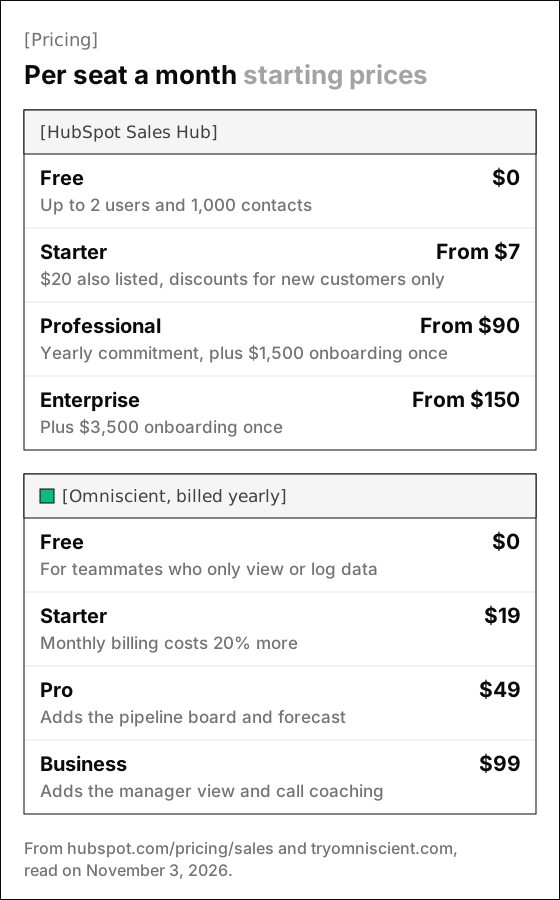
Both tools price by the seat, and HubSpot adds a required onboarding fee, paid once, to Professional and Enterprise.
| HubSpot Sales Hub | Omniscient | |
|---|---|---|
| Free | $0 for up to 2 users and 1,000 contacts | $0 for teammates who only view or log data |
| First paid plan | Starter, from $7 per seat a month (check) | Starter, $19 per seat a month billed yearly |
| Plan with a forecast | Professional, from $90 per seat a month on a yearly commitment | Pro, $49 per seat a month billed yearly |
| Top plan | Enterprise, from $150 per seat a month | Business, $99 per seat a month billed yearly |
| Onboarding | $1,500 once on Professional, $3,500 once on Enterprise | No fee listed |
| Monthly billing | Professional is $100 per seat a month in HubSpot's pricing guide | Costs 20% more |
| Trial | None shown on the pricing page | 14 days, no credit card |
HubSpot's Starter card shows both $7 and $20 a seat, with a note that discounts are for new customers only, so ask HubSpot which price applies to your team.
Before you compare totals, check where the features you need start:
- On HubSpot, sequences, forecasting and the Sales Navigator integration start on Professional, and Sales Navigator Advanced Plus is a separate LinkedIn subscription.
- On Omniscient, the pipeline board, forecast and fields filled with proof start on Pro, and a call recording bot costs $25 per seat on top.
Omniscient vs HubSpot setup
HubSpot's free CRM needs no credit card, but its LinkedIn path needs a paid seat and a few more pieces:
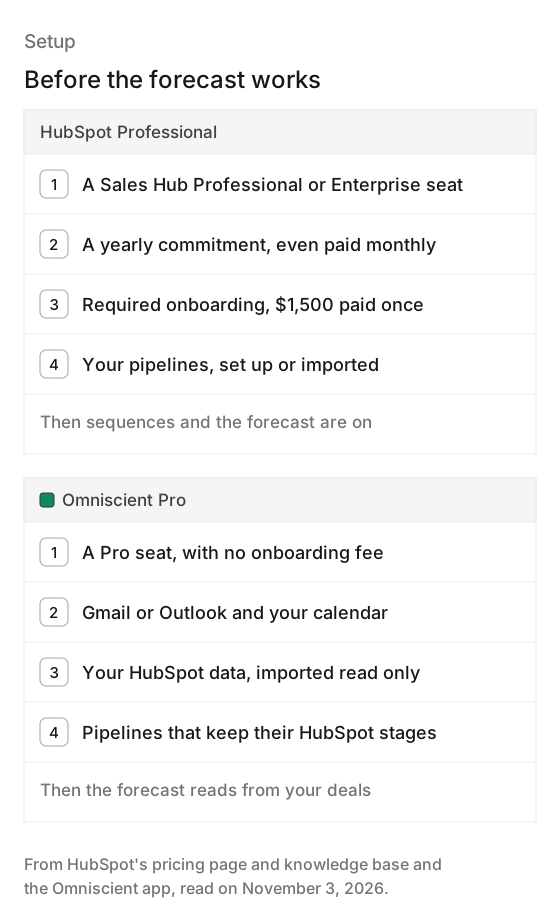
Luckily, you can keep HubSpot running while you set up Omniscient, since most steps are connections:
- 01Connect your inbox
Add Gmail or Outlook and your calendar, and emails and meetings start landing on their records.
- 02Import from HubSpot
Sign in to HubSpot from the Import dialog, or ask us to migrate your data for you.
- 03Connect a LinkedIn sender
It starts at 5 invitations a day and adds 2 a day, so plan your first campaign around that ramp.
- 04Describe your buyer
Tell Scout who you sell to, rate a sample of 8 leads, then build the full list.
- 05Approve the first campaign
Otto drafts the messages, and nothing sends until your team approves them.
Moving from HubSpot to Omniscient
Thankfully, our HubSpot importer only reads, so your HubSpot account stays exactly as it was. It brings over these records:
- Companies become accounts, matched by domain, and contacts become people, matched by email.
- Contacts still at the subscriber, lead or marketing qualified lead stage arrive as leads.
- Pipelines keep their stages, and deals become opportunities with their amount, close date and owner.
- Notes arrive as plain text on the deal, company or contact they belong to.
Plan around a few details before you run it:
- Contacts without an email address are skipped unless they're still at a lead stage, so export any you want to keep first.
- Owners are matched to teammates by email, so invite your team with the addresses they use in HubSpot.
- Custom properties, workflows and sequences stay in HubSpot, and running the import again updates what's there without making doubles.
Our roundup of HubSpot CRM alternatives walks through a full switch, and the CRM page shows how records fill in afterwards.
Which one should you choose
If you're still torn, ask where buyers first hear from you and how much of your outbound runs on email.
Choose HubSpot if:
- You want marketing email, landing pages and your CRM on one database.
- Your reps book meetings through email sequences or calls and need a dialer.
- Your team works from phones a lot and wants mobile apps.
- You're two people on the free CRM, and it still covers what you need.
Choose Omniscient if:
- You open most conversations on LinkedIn and want outreach and replies inside the CRM.
- You want leads scored for fit and timing before anyone writes a message.
- You want records that fill themselves in, with the quote behind each value.
- You'd rather have AI in the seat price than a credit balance to watch.
Questions about Omniscient vs HubSpot
Is Omniscient cheaper than HubSpot?
Omniscient's paid seats start at $19 a month billed yearly, and HubSpot's Starter card shows $7 and $20 a seat. For a forecast, Omniscient Pro is $49 a seat billed yearly, and HubSpot Professional starts at $90 a seat plus a $1,500 onboarding fee paid once.
Does HubSpot automate LinkedIn outreach?
HubSpot's sequences add LinkedIn connection requests and InMails as tasks your reps send by hand, through a Sales Navigator integration that needs a Professional or Enterprise seat and Sales Navigator Advanced Plus. Omniscient sends invitations and messages itself, at a set pace, once your team approves them.
Can I use Omniscient and HubSpot together?
Yes, while you compare them, since Omniscient reads your HubSpot data and never writes back to it. Plan to pick one as your main CRM when the trial ends.
Can I move my data from HubSpot to Omniscient?
Yes, our importer brings over companies, contacts, pipelines, deals and notes, or we migrate them for you. Contacts without an email address are skipped unless they're still at a lead stage, and custom properties and workflows stay in HubSpot.
Does Omniscient send email like HubSpot?
You can send single emails and replies from your own Gmail or Outlook once you allow sending. Omniscient has no email sequences or marketing email, which HubSpot covers on Professional and in Marketing Hub.