Best CRM With Automatic Data Entry in 2026: 8 Picks Compared
On this page
When we taught Omniscient to fill in a company's industry and size from its own website, we had to decide what happens when the site doesn't say. We chose to leave the field empty, because a guessed headcount looks exactly like a real one once it sits in your CRM.
That choice makes a useful test for any CRM with automatic data entry you're weighing. Below we compare eight of them on what each one fills in for you and what it does when it isn't sure.
| Tool | What it is | Starting price | Best for |
|---|---|---|---|
 Omniscient | A CRM that fills itself in from email, calendar and call transcripts, with LinkedIn outreach | $19 per seat a month, billed yearly | Small B2B teams that want to see where each value came from |
 HubSpot | A CRM platform that logs email from connected inboxes | Free for up to 2 users | Teams that run marketing and sales together |
 Salesforce | A CRM whose Starter Suite syncs emails, events and contacts | $25 per user a month | Teams with an admin and a custom sales process |
 Attio | A flexible CRM with email sync and enrichment on every plan | Free for up to 3 seats | Teams that want to design their own data model |
 Pipedrive | A pipeline CRM whose Nova notetaker drafts updates you approve | See site | Small teams that plan around pipeline stages |
| A CRM built to work inside Gmail and Google Calendar | $23 per seat a month, billed yearly | Service businesses on Google Workspace | |
| An AI agent that fills in its own CRM or the one you have | $50 per person a month | Teams that want to keep Salesforce or HubSpot | |
| An AI CRM that updates itself from every customer interaction | $89 per user a month | Teams that want Slack captured with email and meetings |
What a CRM with automatic data entry fills in
Automatic data entry means the CRM writes its own records from the tools your team already uses. Your team stops copying email addresses into contacts and typing up notes after each call.
It comes in six kinds, and a CRM can handle some of them well and skip the rest:
| Kind | What gets filled | Where it comes from |
|---|---|---|
| Contact capture | People and their companies | Email headers and meeting invites |
| Activity logging | Each email and meeting, on the right record | Gmail, Outlook and your calendar |
| Call notes | Notes, next steps and objections | Call transcripts or a recording bot |
| Deal fields | Amount, close date, stage and next step | Emails and calls, read by AI |
| Enrichment | Industry, size, location and job titles | The company's website or a data provider |
| Lead capture | New leads and where each one came from | Web forms and webhooks |
Honestly, contact capture and activity logging are common now, and every CRM in this guide offers some form of them. The differences sit in the last four rows and in the rules each CRM follows when an email or call is unclear.
These are the questions we'd put to any vendor that promises a CRM that fills itself in:
- Who becomes a contact when you connect a busy inbox?
- Which values does it write on its own, and which wait for you?
- Can you click a value and see the sentence it came from?
- What happens to a field someone on your team typed?
What we learned building automatic data entry
Omniscient's CRM fills itself in from the Gmail or Outlook inbox and calendar you connect and from the transcripts your calls already create. It also takes in your website forms and LinkedIn replies, and much of our work went into rules for what to leave out.
Not every email should become a contact
Newsletters, receipts, alerts and no reply senders all carry names and company domains. A sync that turns every one of them into a contact buries your buyers under vendors, so our sync runs each email through filters first.
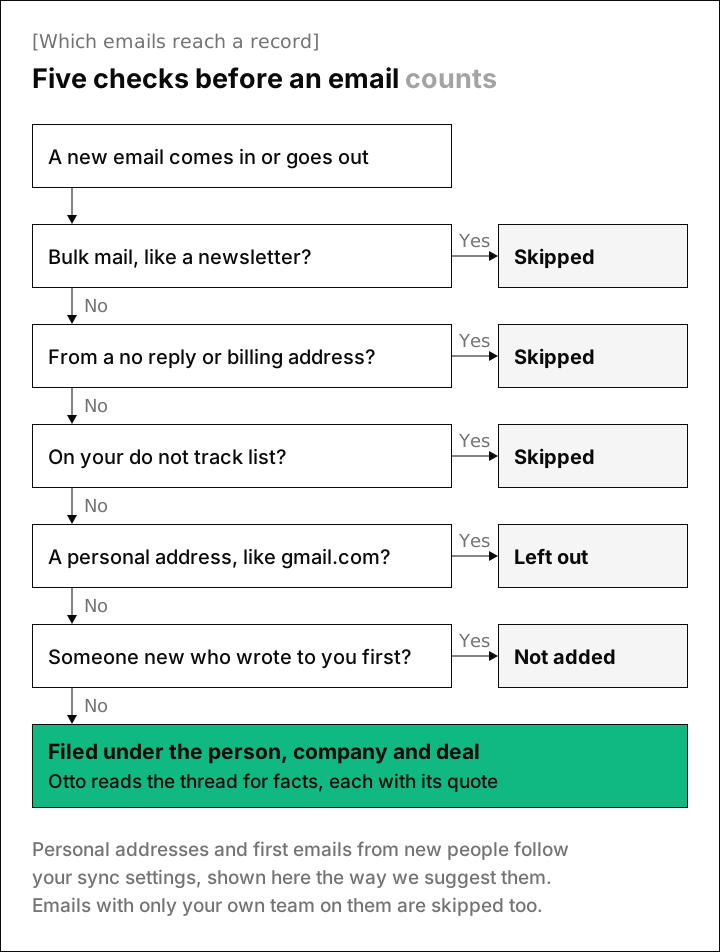
A few details behind those checks:
- In Gmail, we skip the Promotions, Social, Updates and Forums tabs, plus mail with list headers such as List-Unsubscribe or List-Id.
- In Outlook, we skip the mail that Focused Inbox sorts into its Other tab.
- Each person keeps their own do not track list of addresses or whole domains, such as your lawyer's address or family.com.
- With the suggested setting, people are added only from emails you send and meetings you hold.
Our sync first added anyone who emailed you, and the welcome flow now suggests the stricter setting instead. Each person can change it later in Settings.
Each person's company comes from their email domain, so mail.acme.com and acme.com land on the same company record. Once a company has a meeting with you, or emails have gone both ways, Omniscient opens an opportunity for it if it has none.
Company details come from the company's own site
When a new company has a web domain, Otto, our AI agent, reads its home page and about page once. It fills Industry, Employees, Headquarters and Description, and only when those fields are empty.
Thankfully, the rule from the opening covers every one of those fields. If the site doesn't mention a headcount, Employees stays blank, and a value someone on your team typed is never replaced.
Personal domains like gmail.com are never looked up. A site that won't load gets three attempts before we give up on it.
Some values fill in, and the rest wait for you
Otto reads each new email thread and call transcript for the facts that move a deal, like next steps, objections, competitors, budget, timeline and who decides. Each fact carries a quote copied word for word, and a fact without a quote is left out.
Amount, close date and stage are always read, though each follows its own rule:
- Amount and close date fill on their own only when the field is empty and Otto is at least 85% sure.
- A change of stage always waits as a suggestion on the record, where you accept it or skip it.
- A field a person typed is never changed, however sure Otto is.
- A conversation from a private inbox never fills a field on its own.
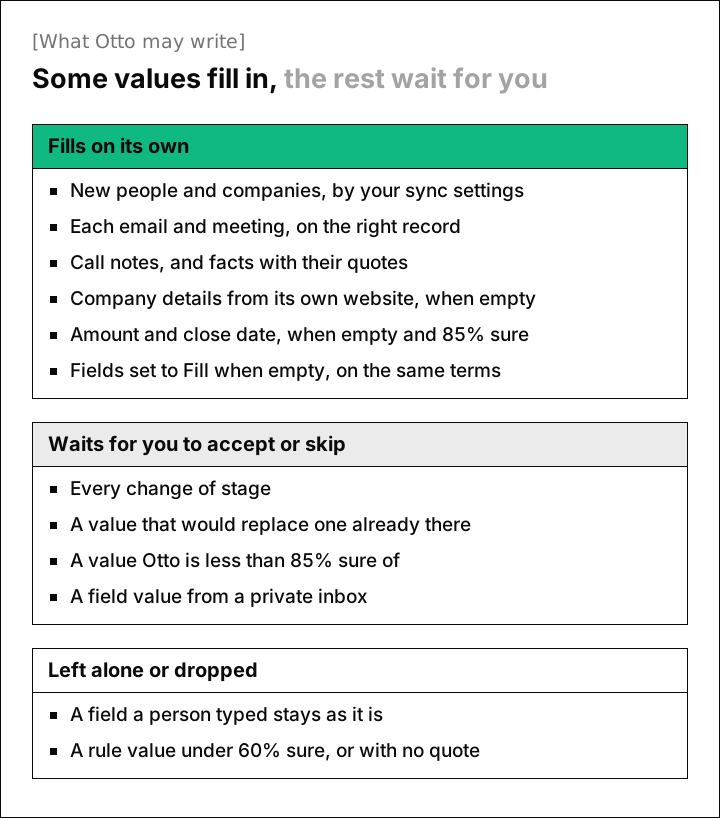
Any other field can follow the same kind of rule. On the field's page, you set Otto to Off, Suggest or Fill when empty, then describe in plain words what to look for.
We're also looking at HubSpot before we decide.Email from Dana Okafor
Could you send your security review by Friday?Email from Dana Okafor
A value Otto is less than 60% sure of, or can't quote, is dropped before you ever see it. Field rules like this one come with the Pro plan, while email capture comes with every plan and call notes start on Starter.
Call notes without a bot in the meeting
Omniscient reads the transcripts that Google Meet, Zoom and Teams already create, so no bot has to join your call. Meet and Teams transcripts can take a while to appear, so we check each meeting every 30 minutes, up to 8 times over 3 days.
Without a bot, notes depend on whoever hosts the call turning transcription on. Once a meeting turns out to have no transcript, we stop checking it.
Otto writes the notes and facts from the transcript, and the transcript itself is never stored. If you'd rather have Omniscient record the call, call recording sends a bot for an extra $25 per seat.
The 8 best CRMs with automatic data entry in 2026
1. Omniscient
Omniscient is an AI CRM that fills itself in from your email and meetings, and runs LinkedIn outreach your team approves. Each fact it pulls from a conversation keeps its quote, and every value it writes is marked as Otto's.
- Email and calendar capture works on every seat, and on a Pro workspace, teammates who only view or log data get free seats.
- Meeting notes, follow up drafts and Ask Omniscient start on Starter, at $19 per seat a month billed yearly, and Pro at $49 adds fields filled with proof.
- Website forms and webhooks from tools like Typeform add leads, along with where each visitor came from, such as Organic search.
- Replies to your LinkedIn campaigns land on the same person record.
- We move your data over from HubSpot, Salesforce, Pipedrive or Attio for you.
The free trial gives you Pro for 14 days, with no credit card. Admittedly, Omniscient has no phone dialer and no newsletter tool. Teams that send marketing email from their CRM should look at HubSpot, and large teams that need custom builds will find more room in Salesforce.
2. HubSpot
HubSpot is a customer platform that connects marketing, sales and service tools around one CRM. Its free CRM covers up to 2 users and 1,000 contacts, and it includes Breeze Assistant, HubSpot's AI assistant.
- When you connect a work inbox, HubSpot's logging rules log emails to and from your existing contacts by default, on every plan.
- Creating new contacts from logged emails is a beta setting that a Super Admin turns on, and a never log list keeps chosen addresses and domains out.
- Sales Hub Starter starts at $7 per seat a month, and the page also shows $20 with a note that discounts are for new customers only.
- Professional starts at $90 per seat a month, plus a required one time onboarding fee of $1,500.
Since default logging starts from contacts you already have, HubSpot works best when your forms and marketing already bring people in.
3. Salesforce
Salesforce is a CRM platform that runs from a free suite up to large enterprise editions, with AI agents through Agentforce. Its sales page talks about "capturing every interaction automatically, so the record shows what actually happened."
- Starter Suite costs $25 per user a month, billed monthly or yearly, and its plan card lists AI that automatically syncs emails, events and contacts.
- The pricing page says AI can be added to Core and above, and Core costs $195 per user a month, billed yearly.
- Agentforce for Sales costs extra, from $125 per user a month.
Frankly, Salesforce makes the most sense once you have an admin or a partner to set it up. A small team can start on Starter Suite for the sync, then move up to Core when it wants to add AI.
4. Attio
Attio is a flexible CRM that you shape around your own objects and fields, with email and calendar sync on every plan. Its homepage says the CRM "logs itself," with emails and calls "captured automatically."
- Its site describes enrichment as "Auto-enrich every record," and the Free plan lists automatic data enrichment, with more on Plus and Pro.
- The Free plan covers up to 3 seats, and Plus costs $35 per seat a month billed yearly, or $44 monthly.
- Pro costs $79 billed yearly, or $99 monthly, and its plan card includes Call Intelligence, which records and analyzes meetings.
- AI features draw on monthly credits, and the Pro trial lasts 14 days.
Attio suits a team with someone who enjoys designing objects and workflows. We compare it with our own CRM in Omniscient vs Attio.
5. Pipedrive
Pipedrive is a sales pipeline CRM that helps small teams manage leads and close deals by stage. Its two way email sync connects up to five email accounts.
- Nova, its meeting intelligence, records and transcribes your calls, then drafts CRM updates you review and approve in one click.
- The homepage says Nova is included in all plans at no extra cost, and the free trial lasts 14 days with no credit card.
- We couldn't load Pipedrive's pricing page when we checked, so see its pricing page for today's plans.
Luckily for teams wary of AI writing to deals, Nova's approve step means you see each update before it lands.
6. Copper
Copper is a CRM that works inside Gmail and Google Calendar, built for service businesses that sell through relationships. Its site says it "captures contact details and logs emails and meetings as you work."
- Contact enrichment is listed on Basic, so every plan includes it.
- Basic costs $23 per seat a month billed yearly, or $29 monthly, with up to 2,500 contacts.
- Every plan has a free trial of 14 days, with no credit card needed.
Copper fits a team that already spends its day in Gmail. Its homepage and pricing page don't mention AI meeting notes, so plan on a separate notetaker if you want call summaries on the record.
7. Coffee
Coffee is an AI agent that fills in a CRM for sales teams, either in its own CRM or on top of Salesforce or HubSpot. Its homepage promises "Less CRMing, more revenue."
- It creates "contacts and companies from external meetings and emails" and merges duplicates "the moment they appear."
- After a meeting, it writes notes and follow up drafts, with action items and suggested deal updates.
- On top of Salesforce or HubSpot, it writes clean data back, and its homepage says "Your CRM stays the system of record."
- Grande costs $50 per person a month, with a meeting recorder and a free trial of 14 days, and Venti costs $1,000 per workspace a month.
Interestingly, Coffee is the one pick here built to write its updates into a CRM you already run. That makes it worth a look if your team is settled on Salesforce or HubSpot.
8. Lightfield
Lightfield is an AI CRM that updates itself from every customer interaction, then runs agents on top of that record. It connects email, calendar, Slack, LinkedIn and your other systems, and its homepage promises "A record that updates itself."
- Starter costs $89 per user a month, billed monthly, for up to 3 seats, with automatic record updates, meeting recording and transcription, and email, calendar and Slack sync.
- Starter comes with a free trial of 14 days.
- Pro costs $999 per workspace a month, billed yearly, with 5 capture seats, and emails and meetings sync for users with a capture seat.
Lightfield suits a team that wants Slack captured too, so count how many people need a capture seat before you pick a plan.
CRMs with automatic data entry compared
Email capture is common ground across these eight, so the call notes column is where they differ most.
| CRM | Email and calendar | Call notes | Free plan or trial |
|---|---|---|---|
| Omniscient | Synced for every seat, with rules for who's added | From Meet, Zoom and Teams transcripts | Free seats on Pro, trial of 14 days |
| HubSpot | Logged by default for existing contacts | check | Free for up to 2 users |
| Salesforce | Starter Suite syncs emails, events and contacts | check | Free Suite |
| Attio | Synced on every plan | Call Intelligence on Pro | Free for up to 3 seats, Pro trial of 14 days |
| Pipedrive | Two way sync, up to 5 accounts | Nova, on all plans | Trial of 14 days |
| Copper | Logged as you work in Gmail | Not listed | Trial of 14 days |
| Coffee | Logged from emails and meetings | Meeting recorder on Grande | Trial of 14 days |
| Lightfield | Synced for capture seats | Recording and transcription | Trial of 14 days on Starter |
Personally, we'd weigh that column above the rest if your deals move forward in meetings, because that's where the details you'd otherwise type come from.
How to test automatic data entry in a free trial
Your own inbox will teach you more in a week than any demo, so these are the checks we'd run with it connected:
- 01Connect your busiest inbox
Pick the one where newsletters sit next to buyers, then count the new contacts the next morning.
- 02Search for a newsletter
Look up a vendor that emails you every week and confirm it didn't become a contact.
- 03Hold one sales call
Run a call on Meet, Zoom or Teams and note what lands on the deal, and when.
- 04Trace one value
Open a field the AI filled and find the sentence it came from.
- 05Type over a field
Change a value by hand, then send an email that says otherwise and check that your value stays.
- 06Add a company by domain
See which details fill in, and whether any of them look guessed.
Fortunately, every CRM here has a free plan or a free trial, so you can run these checks before you pay. For more picks, see our guides to the best AI CRM and the best CRM for founders.
Questions about CRMs with automatic data entry
What is a CRM with automatic data entry?
It's a CRM that writes its own records from your email, calendar, calls and web forms, so contacts, meetings and deal details appear without anyone typing them.
Which CRM has the best automatic data entry?
For small B2B teams that want to see where each value came from, we'd start with Omniscient. Pipedrive suits teams that want to approve call updates in one click, and Coffee suits teams staying on Salesforce or HubSpot.
Can a CRM log emails automatically?
Yes, every CRM in this guide syncs or logs email once you connect your inbox, though the rules differ. HubSpot, for example, logs email with your existing contacts by default.
Do I need a meeting bot for automatic call notes?
It depends on the CRM, since Omniscient reads the transcripts Google Meet, Zoom and Teams already create, while Pipedrive's Nova and Lightfield record and transcribe calls themselves.
Is there a free CRM with automatic data entry?
HubSpot's free CRM covers up to 2 users and logs email from a connected inbox, and Attio is free for up to 3 seats with email and calendar sync. Omniscient has a free trial of 14 days, and free seats with email and calendar capture on a Pro workspace.