Best CRM for Founders in 2026: 9 Picks With Prices
On this page
- What a founder needs from a CRM
- What we learned about sharing a founder's inbox
- The best CRM for founders: 9 picks for 2026
- CRM prices for a founder and a first hire
- Which CRM fits the way you sell
- How to hand your deals to a first sales hire
- How to choose a CRM as a founder
- Questions about CRMs for founders
The best CRM for founders fills itself in from the inbox you sell with, and lets you choose what your team can see. While you're still the main seller, that inbox holds customer threads next to investor updates and offer letters.
We build Omniscient for this stage, so we've had to solve both of those problems ourselves. Below are our nine picks for 2026 with today's prices. We judged them on how founders sell, in short bursts between other work and mostly through their own network.
Our quick picks, by the way you sell:
- Pick Omniscient if you sell B2B through email, meetings and LinkedIn, and want the CRM to fill itself in.
- Pick folk if your deals come from your network and your LinkedIn contacts.
- Pick Attio if you want investors and partners next to your customers, in a workspace you design.
- Pick HubSpot if you and a cofounder want a free CRM to start with.
- Pick Pipedrive if you're about to hire your first rep and want a board of stages you can both learn quickly.
- Pick Streak if you run your sales from Gmail.
- Pick Close if you sell by phone.
| Tool | What it is | Starting price | Best for |
|---|---|---|---|
 Omniscient | A CRM that fills itself in, with LinkedIn outreach you approve | $19 per seat a month, billed yearly | Founders selling B2B through email, meetings and LinkedIn |
| An AI CRM for small teams, with a LinkedIn extension | $24 per member a month, billed yearly | Founders who sell through their network | |
 Attio | A flexible CRM you shape around your own objects | Free for up to 3 seats | Founders who track investors and partners too |
 HubSpot | A CRM platform with a free plan that doesn't expire | Free for up to 2 users | Cofounders who want a free start |
 Pipedrive | A pipeline CRM with meeting intelligence on every plan | See site | A first sales hire who works by stage |
| A CRM that works inside Gmail | $49 per user a month, billed yearly | Founders who run sales from Gmail | |
| A CRM for calling, email and SMS | $9 a month for one user, billed yearly | Founders who sell by phone | |
| An AI CRM that updates itself from every customer interaction | $89 per user a month | Founders who want capture and call recording in one tool | |
| An AI CRM with agents on a shared memory of your team's mail and meetings | $60 per agent a month, billed yearly | Founders who want agents and free seats for teammates |
What a founder needs from a CRM
You sell between investor meetings and product work, and you're often the only person who knows the whole story of a deal. These are the needs we'd check first:
- Records that fill in from your email and calendar, since typing notes after every call rarely fits a founder's week.
- A choice over what teammates see, because your inbox also holds investor and hiring mail.
- A reminder when a deal goes quiet, so a busy fundraising month doesn't cost you a customer.
- A place for deals that start on LinkedIn or through an introduction.
- A low price for one seat, plus an easy way to add a first sales hire and a cofounder who mostly looks things up.
Honestly, we'd weigh the first two needs above the rest. They decide whether the CRM holds the whole story of each deal, and whether you'll ever let anyone else read it.
What we learned about sharing a founder's inbox
Omniscient's CRM builds its records from the email and calendar each person connects. For a founder, that one inbox mixes buyers with board members, candidates and lawyers.
So every connected inbox in Omniscient has its own rule for what teammates see, and only the person who connected it can change it. The database enforces the rule, so answers from Ask Omniscient follow it too.
The three rules work like this:
- Full access shows teammates the subject, a preview and the facts Otto found, each with its quote.
- Who and when only shows who you emailed or met and when, plus Otto's facts without their quotes.
- Only me keeps everything from that inbox with you, including the facts and suggestions Otto made from it.
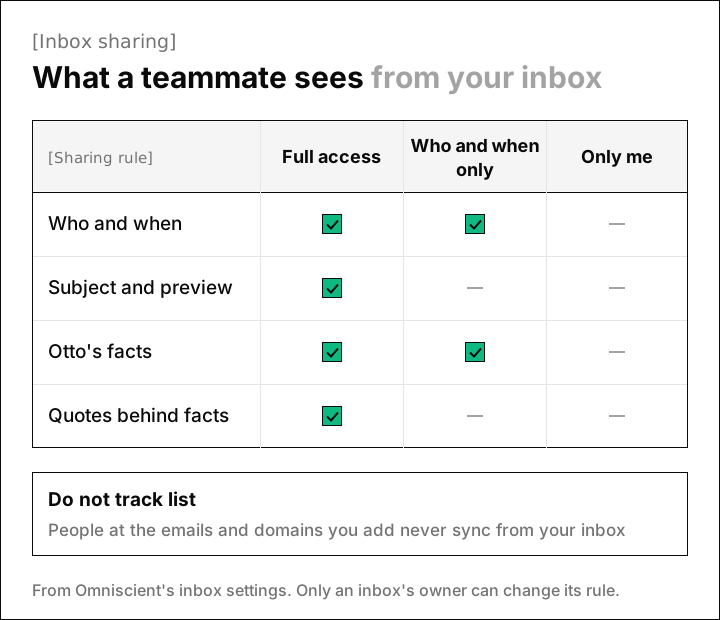
The limit we chose is that each rule applies to a whole inbox at once. If investors and customers write to the same address, put investor domains on the do not track list, and Omniscient won't sync those people.
Because the list works person by person, an email to both an investor and a customer still syncs for the customer. Under full access, your team can read its subject and preview.
Thankfully, you can test all of this on a free plan or a trial before you commit. Step 2 of the checklist near the end of this guide shows how.
The best CRM for founders: 9 picks for 2026
1. Omniscient
Omniscient is an AI CRM that builds its records from your email, calendar and call transcripts, and runs LinkedIn outreach you approve in the same app. Otto, our AI agent, writes your meeting notes and drafts your follow ups.
- Paid seats start at $19 per seat a month, billed yearly, with AI included, and monthly billing costs 20% more.
- Starter covers meeting notes from the transcripts Google Meet, Zoom or Teams already make, follow up drafts, Ask Omniscient and the daily digest.
- Pro, at $49 billed yearly, adds the pipeline board and forecast, fields filled with proof, meeting prep briefs and free seats for teammates who only view or log data.
- The 14 day Pro trial needs no card, and we move your records over from HubSpot, Salesforce, Pipedrive or Attio for you.
Each weekday morning, the digest lists your meetings and the emails to answer. It also flags an open deal when its close date has passed or there's been no contact for 14 days. It checks deals at companies you've emailed or met from your own inboxes in the last 120 days.
For LinkedIn outbound, you type who you want to reach and Scout finds people who match, ranking people your team already talks to higher. Otto drafts each message, and nothing sends until someone on your team approves it.
Sending runs only during your working hours, and the normal pace leaves a random gap of 3 to 12 minutes between actions. We chose random gaps so a day of sending looks like a person working through a list.
Admittedly, Omniscient has no phone dialer and no email sequences, so Close suits a founder who sells by phone. The pipeline board also starts on Pro, so a founder who only wants a free board may prefer HubSpot's free CRM.
2. folk
folk is an AI CRM that keeps a small team's contacts and pipelines in one place, with a LinkedIn extension for Chrome.
- Standard costs $24 per member a month billed yearly, or $30 monthly, and Premium costs $48, or $60 monthly.
- Standard includes pipelines, email campaigns, the LinkedIn extension and email, calendar and WhatsApp sync.
- Email sequences, deals, custom objects and dashboards start on Premium.
- The 2 week trial includes the Premium features and needs no credit card.
Its homepage shows a deal reminder that counts the days since you last connected with someone, with a follow up button beside it. That suits a founder whose deals come through introductions and LinkedIn conversations.
3. Attio
Attio is a flexible CRM that you shape around your own objects, with agents that prospect and draft follow ups for you to approve. Connect your inbox and calendar, and Attio captures your emails and calls on its own.
- The Free plan covers up to 3 seats, 3 objects and 50,000 records, with one synced email account per user.
- Plus costs $35 per seat a month billed yearly, or $44 monthly, for up to 10 seats and 5 objects.
- Pro costs $79 a seat billed yearly, or $99 monthly, and adds Call Intelligence, sequences and permission controls.
- The Pro trial lasts 14 days, and you can start without a credit card.
Interestingly, Attio lets you build an investor pipeline next to the customer one, because you design the objects and lists yourself. Free allows 3 objects and Plus allows 5, so count yours before you add one. If you're weighing it against us, Omniscient vs Attio puts the two side by side.
4. HubSpot
HubSpot is a customer platform that runs marketing, sales and service on one shared CRM, and its free CRM has no expiry date.
- The free CRM covers up to 2 users and 1,000 contacts, with email tracking, meeting links, deal pipelines and Breeze Assistant.
- Sales Hub Starter lists $20 per seat a month, with a lower $7 starting price for new customers.
- Professional starts at $90 per seat a month, plus a required one time onboarding fee of $1,500.
Two cofounders can run their first pipeline on the free CRM. Read the Professional terms early, since the onboarding fee comes on top of the seat price.
5. Pipedrive
Pipedrive is a sales CRM that lays out your deals as a pipeline of stages, with a meeting assistant on every plan.
- Nova, its meeting assistant, pulls in deal history before a call, records and transcribes it, then suggests CRM updates for you to approve.
- The homepage says Nova is "included in all plans, at no additional cost."
- The free trial lasts 14 days with no credit card.
- We couldn't open Pipedrive's pricing page when we wrote this, so check today's plans on its pricing page.
Pipedrive fits the month you hire your first rep, because a board of stages is quick to learn and easy to review together.
6. Streak
Streak is a CRM that works inside Gmail, so your pipelines and deals sit next to the emails they came from.
- Pro costs $49 per user a month billed yearly, or $59 monthly, with unlimited pipelines, contacts and records.
- Pro+ costs $69, or $89 monthly, and adds automations, Zapier and more AI credits.
- The free plan keeps email tracking and 50 mail merge sends a day, without CRM pipelines.
- The free trial runs for 14 days on Pro+.
Streak suits a founder on Google Workspace who wants the CRM inside the inbox they already keep open all day.
7. Close
Close is a sales CRM that brings calling, email and SMS into one app, with an AI sales agent named Chloe on every plan.
- Solo costs $9 a month billed yearly, or $19 monthly, for one user and up to 10,000 leads.
- Essentials costs $35 per user a month billed yearly, or $49 monthly, with unlimited leads.
- The Power Dialer and automated workflows start on Growth, at $99 per user a month billed yearly.
- Close says most outbound calls cost around $0.02 a minute on top of the seat, and the 14 day trial needs no card.
Frankly, Solo is a sensible start for a founder who sells by phone and works alone for now. Once you hire, Essentials is the Close plan to compare.
8. Lightfield
Lightfield is an AI CRM that updates itself from every customer interaction, so its agents can run outbound and flag deals at risk.
- Starter costs $89 per user a month, billed monthly, for up to 3 seats and 50,000 records.
- Starter includes email, calendar and Slack sync, meeting recording and transcription, and records that update on their own.
- Pro costs $999 a month per workspace, billed yearly, with 5 capture seats and unlimited viewer seats.
- Starter comes with a 14 day free trial.
Lightfield fits a founder who wants capture and call recording in one product from the first day. Plan for the move to workspace pricing once you need a fourth seat.
9. Day AI
Day AI is an AI CRM that builds a shared memory from your team's email, calendar, meetings and Slack, and runs agents on top of it.
- The Free plan costs $0 and includes Gmail and Calendar ingestion, meeting recording clips and meeting notes.
- Every workspace needs at least one Professional or Executive agent, and Professional costs $60 per agent a month on yearly billing.
- Once you have one, teammates join on Free at no cost, and Turbo agents cost $24 each a month.
- Pipeline management and campaign sequences start on Professional.
Day's homepage says every agent reports to someone on your team, with an audit trail of what ran. We didn't see a free trial on its pricing page.
CRM prices for a founder and a first hire
Most founders start with one paid seat and add a seller later. This table shows the free option, the trial and the entry price for each CRM today.
| CRM | Free plan | Free trial | Entry paid price |
|---|---|---|---|
| Omniscient | Free seats for teammates who view or log data, once you have a Pro or Business seat | 14 days of Pro, no card | $19 per seat, billed yearly |
| folk | Not listed | 2 weeks, no card | $24 per member, billed yearly |
| Attio | Up to 3 seats | 14 days of Pro | $35 per seat, billed yearly |
| HubSpot | Up to 2 users and 1,000 contacts | Not listed | From $7 per seat for new customers |
| Pipedrive | check | 14 days, no card | check |
| Streak | Gmail tools without pipelines | 14 days of Pro+ | $49 per user, billed yearly |
| Close | Not listed | 14 days, no card | $9 for one user, billed yearly |
| Lightfield | Not listed | 14 days of Starter | $89 per user, billed monthly |
| Day AI | Free teammates, once you have a Professional agent | Not listed | $60 per agent, billed yearly |
Luckily, a cofounder who mostly looks things up can join at no cost on Attio's or HubSpot's free plan. Omniscient and Day AI also add free teammates once you pay for one Pro seat or one Professional agent.
For published startup discounts, our guide to the best CRM for startups lists each program and its fine print.
Which CRM fits the way you sell
Founders sell through different channels, so we matched each CRM to the channel it handles best, based on each vendor's own site. Where did your last five deals start? Build your shortlist from that row of the chart.
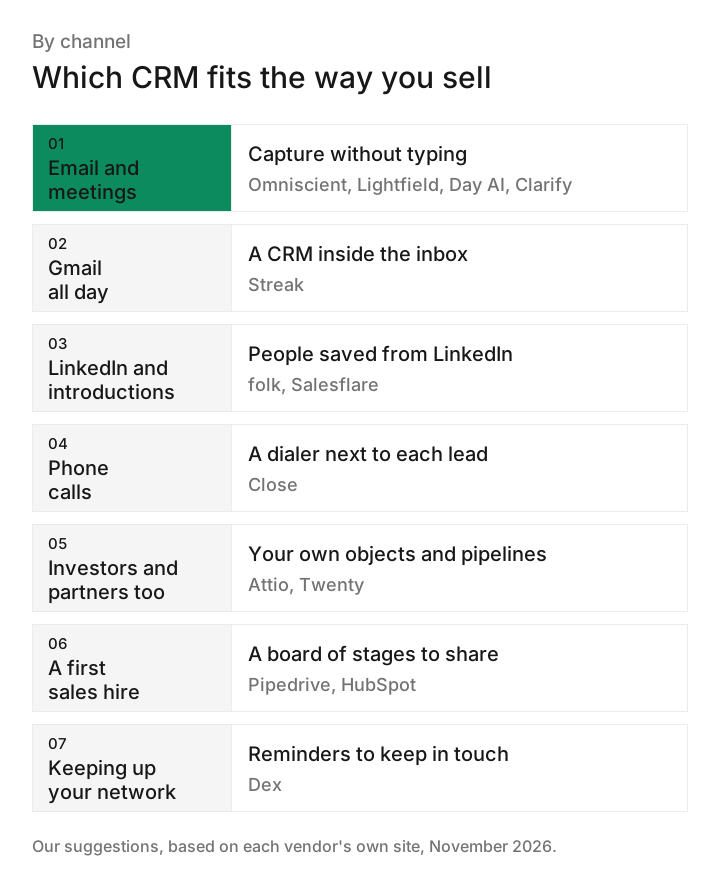
If most of your deals start on LinkedIn, our guide to LinkedIn outreach tools with a CRM covers the outbound side in more depth.
How to hand your deals to a first sales hire
Your first sales hire inherits every open deal you've been carrying in your head. The CRM is where that history lives, so get it ready before their first day.
This is the order we'd follow:
- Give every open deal an owner and a written next step.
- Set your inbox's sharing rule so the new rep can read customer threads.
- Put investor and personal domains on a do not track list, or your CRM's version of one.
- Stay on the deals where you hold the relationship, and bring the rep to the next call.
- Ask the rep to read five deal timelines and tell you what's missing.
In Omniscient, the next step lives on each opportunity, and the morning digest flags open deals with a passed close date or 14 days without contact. Personally, we'd finish this list before the rep starts, so their first week goes to buyers instead of old threads.
How to choose a CRM as a founder
Most trials here last 14 days, which is enough if you run real selling through them. These five checks cover what a founder needs to know:
- 01Connect your real inbox
Sync your own Gmail or Outlook and look at which contacts appear after the first sync.
- 02Check what a teammate sees
Invite a cofounder or advisor and ask what they can see of one investor thread.
- 03Run a week of real selling
Take your calls and follow ups through the CRM for five working days.
- 04Price your first hire
Look up the plan you'd need with one more seller and one teammate who only views.
- 05Test the way out
Export your contacts and deals, or ask how they'd move to another CRM.
Questions about CRMs for founders
What is the best CRM for founders in 2026?
For founders who sell B2B through email, meetings and LinkedIn, we'd start with Omniscient. folk suits founders who sell through their network, and Close suits founders who sell by phone.
Is there a free CRM for founders?
Yes, HubSpot's free CRM covers 2 users and 1,000 contacts, and Attio's Free plan covers up to 3 seats. Omniscient and Day AI give free seats to teammates, but only once your workspace pays for one Pro seat or one Professional agent.
When should a founder start using a CRM?
Start when you have more open conversations than you can keep in your head, or a few weeks before your first sales hire joins.
Should a founder track investors in the same CRM as customers?
It works when the CRM keeps them apart, with a separate object or pipeline and a rule for who can see each one. In Omniscient, the simplest route is to keep investor domains out of the sync with the do not track list.