Best CRM for B2B SaaS in 2026: 8 Picks With Prices
On this page
When we built website forms into Omniscient, we had to decide what to call a lead who arrives from ChatGPT or Perplexity. We gave those visits their own channel, AI referral, so you can count them apart from organic search.
Small calls like that one decide how much your CRM can tell you about where pipeline starts. Below are the eight we'd shortlist as the best CRM for B2B SaaS teams in 2026, with today's prices and the sales motion each one suits.
The short version, by how your team sells:
- Pick Omniscient if deals start in your inbox, meetings and LinkedIn, and you want a CRM that fills itself in.
- Pick HubSpot if marketing runs inbound and sales works from the same records.
- Pick Attio if you want product usage and custom objects in your CRM.
- Pick Salesforce if you sell to large companies and have an admin.
- Pick Pipedrive if a small team wants MRR and ARR on each deal.
- Pick Close if your reps book most demos by phone.
- Pick Day AI if you want AI agents working from your team's shared memory.
- Pick Freshsales if you want sequences and territories at a low seat price.
| Tool | What it is | Starting price | Best for |
|---|---|---|---|
 Omniscient | A CRM that fills itself in, with LinkedIn outreach you approve | $19 per seat a month, billed yearly | SaaS teams selling through email, meetings and LinkedIn |
 HubSpot | A CRM platform with marketing, sales and service tools | Free for up to 2 users | Teams where inbound marketing feeds sales |
 Attio | A flexible CRM with AI agents and custom objects | Free for up to 3 seats | Teams that want product data in a data model they design |
 Salesforce | A CRM platform from a free suite to enterprise editions | $25 per user a month | SaaS companies selling to enterprises, with an admin |
 Pipedrive | A pipeline CRM with meeting intelligence on every plan | See site | Small teams that want MRR and ARR on each deal |
| A CRM for calling, email and SMS, with an AI assistant | $9 a month for one user, billed yearly | Inside sales teams that book demos by phone | |
| An AI CRM that runs agents on a shared memory of your team's conversations | $24 per agent a month, billed yearly | Teams that want agents, with free seats for colleagues | |
| A sales CRM with sequences, territories and Freddy AI | $9 per user a month, billed yearly | Outbound teams on a tight budget |
What a B2B SaaS team needs from its CRM
A SaaS company sells a subscription to a group of people, then sells to the same account again at renewal. What that asks of your CRM depends on how each deal starts.
| How the deal starts | What the CRM has to do |
|---|---|
| Inbound demo request | Capture the form, name the channel and route it to a rep fast |
| Outbound to your ICP | Find accounts that fit and log every LinkedIn and email touch |
| Sales led deal | Keep everyone in the buying group on one deal, with notes from every call |
| Product led signup | Show product usage on the account |
| Renewal or expansion | Track contract value and renewal dates |
Honestly, few teams need every row on day one. Weigh each CRM against the motion behind most of last quarter's revenue, then check that it can grow into your next one.

What we learned building a CRM for SaaS sales
Omniscient's CRM builds its records from the email and calendar you connect, and Otto, our AI agent, fills in fields from what people say. Three parts matter most to SaaS teams, and each one came with a tradeoff.
Every demo request gets an owner
Omniscient's Capture settings let you add a form to your site with an embed code, or give Typeform, Webflow or Zapier a webhook address. Each submission then does four things:
- It finds or creates the person and opens an opportunity, or reuses the open one from an earlier submission.
- It names the channel from UTM tags and the referring site, such as AI referral, organic search or paid search.
- It picks an owner by taking turns or by fewest open opportunities, with the account owner first if you tick that box.
- It emails the owner a link the moment a new opportunity opens.
Our embed code passes the page address, the referrer and any UTM tags along by itself. A webhook only knows what the sending tool includes.
We chose to label a lead Direct when nothing says where it came from, so add UTM fields to any Typeform or Webflow form you connect.
Fields Otto fills from your calls and emails
On Pro, you can add your own fields to companies, people and opportunities. You set each one to Off, Suggest or Fill when empty, then write one line on what Otto should look for.
For a SaaS deal, we'd add these fields first:
- Champion, the person pushing for the purchase on their side.
- Seats wanted, the number of users they expect to start with.
- Competitor named, the other tools they're comparing you with.
- Renewal date and contract value on the company, once the account pays.
Otto drops any value it's under 60% sure of or can't back with a quote. On a Fill when empty field, it writes by itself only at 85% or more, and it never changes what a person typed.
The tradeoff is that Otto writes only what people said or wrote. A seat count from your billing system stays empty until you send it in.
Product data through the API
Omniscient doesn't read product usage by itself today, so your engineers can send it through our API, which creates or updates an account by its web domain.
We chose to have the API fill empty account fields and leave existing values alone, so a sync never overwrites what a rep typed. The cost is that a number that changes weekly, like active users, belongs on a custom object. There the API updates the record in place and logs each change.
Attio's own blog describes the full path, with usage metrics built in BigQuery and synced into Attio through Polytomic. The same path works for any CRM with an API.
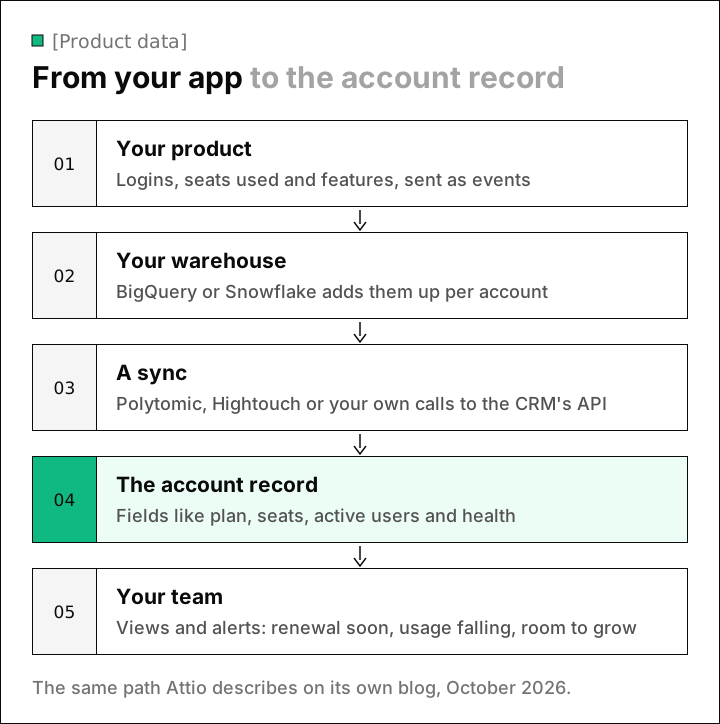
Luckily, you don't need a warehouse on day one. A nightly script that sends each account's plan and seat count covers a small team for a while, and in Omniscient you'd point it at a custom object so each night's numbers replace the last.
The best CRM for B2B SaaS: 8 picks for 2026
1. Omniscient
Omniscient is an AI CRM that builds its records from your email, calendar and call transcripts, and runs LinkedIn outreach you approve in the same app. Otto writes your meeting notes and drafts your follow up emails.
- Website forms and webhooks open an opportunity for each new lead and route it to an owner, as shown above.
- For LinkedIn outbound, Scout finds people from a one sentence description of your buyer, and Otto drafts each message for a teammate to approve.
- Meeting notes come from the transcripts Google Meet, Zoom or Teams already make. If you'd rather have a recording bot join, it costs $25 per seat.
- Seats start at $19 a month, billed yearly, with AI included, and monthly billing costs 20% more.
- Pro, at $49, adds the pipeline board and forecast, custom fields, fields filled with proof and meeting prep briefs.
- On Pro and Business, teammates who only view or log data are free, which suits customer success and finance.
- We move your companies, contacts, deals and notes over from HubSpot, Salesforce, Pipedrive or Attio.
The free trial lasts 14 days with no card, and LinkedIn sending keeps to working hours with a slow start for new accounts.
Admittedly, Omniscient has no phone dialer and no email sequences, so Close or Freshsales suits teams that book demos that way. Product led teams will also get more from Attio or HubSpot today, since we don't sync product usage on our own.
2. HubSpot
HubSpot is a customer platform that connects its marketing, sales and service tools around one CRM. The forms and emails that bring in demo requests share records with your reps.
- The free CRM covers up to 2 users and 1,000 contacts, with Breeze Assistant to research companies and prep for calls.
- Sales Hub Starter lists $20 per seat a month, with a "starts at $7" discount for new customers only.
- Professional starts at $90 per seat a month, plus a required one time onboarding fee of $1,500.
- View only seats are free, and paid plans include monthly HubSpot Credits for AI that don't roll over.
- HubSpot says the CRM connects to over 2,000 apps and syncs data both ways with dozens of them.
HubSpot fits best when one team owns the website and the nurture emails, and sales picks up from there. If you only need a sales CRM, weigh Professional's onboarding fee against a lighter tool.
3. Attio
Attio is a flexible CRM that you shape around your own objects, with AI agents that build pipeline and move deals forward. Its homepage lists product usage next to emails and calls as data it keeps live.
- The Free plan covers up to 3 seats, 50,000 records and 3 objects.
- Plus costs $35 per seat a month billed yearly, or $44 monthly, for up to 10 seats.
- Pro costs $79 billed yearly, or $99 monthly, and adds Call Intelligence, sequences and up to 12 objects.
- The Pro trial lasts 14 days.
- Its app store lists warehouse sync tools such as Polytomic and Hightouch.
Attio's own team uses those usage signals for churn alerts and upsell context. That setup suits a SaaS team with a data person, and our Omniscient vs Attio comparison covers how the two differ day to day.
4. Salesforce
Salesforce is a CRM platform that brings customer data and AI agents together, with editions from a free suite up to large enterprise.
- Starter Suite costs $25 per user a month, billed monthly or yearly, with AI that syncs emails, events and contacts, plus lead routing.
- Pro Suite costs $100 per user a month, billed yearly, and adds quoting and forecasting.
- Core costs $195 per user a month, billed yearly, and it's the first edition where Salesforce lets you add more AI.
- Revenue Cloud, which Salesforce describes as product to cash at scale, can be added from $200 per user a month.
Frankly, Salesforce pays off once your deals need custom quotes with approval steps, plus an admin to keep the reports tidy. Before then, Starter Suite covers routing and email sync at a price near the rest of this list.
5. Pipedrive
Pipedrive is a sales pipeline CRM that helps small businesses manage leads and close deals, with meeting intelligence on every plan.
- Nova writes a brief before each meeting and suggests CRM updates for you to review afterwards. Pipedrive includes it on every plan at no extra cost.
- Recurring products, on Growth and higher, work out MRR, ARR, ACV and TCV from each deal's billing settings.
- The free trial lasts 14 days with no credit card.
Interestingly, recurring products put MRR on each deal without any custom fields, which makes Pipedrive worth a look if you sell plans with fixed billing terms. Its pricing page blocked our reader, so check today's plan prices on Pipedrive's pricing page.
6. Close
Close is a sales CRM that puts calling, email and SMS in one place, with an AI assistant named Chloe on every plan.
- Solo costs $9 a month billed yearly, or $19 monthly, for one user.
- Essentials costs $35 per user a month billed yearly, or $49 monthly, with calling, email and SMS built in.
- Growth, at $99 billed yearly or $109 monthly, adds workflows and the Power Dialer.
- Scale, at $139 billed yearly or $149 monthly, adds the Predictive Dialer and live call coaching.
- The 14 day trial needs no card and includes $5 of calling and enrichment credits.
Close suits a SaaS team whose SDRs book demos by phone. Calls are billed by use on every plan, so budget for minutes on top of seats.
7. Day AI
Day AI is an AI CRM that builds a customer memory from your team's email, calendar, meetings and Slack, then runs AI agents on top of it. Its homepage promises an audit trail of what each agent ran, adding that "nothing went out without your approval."
- Day charges per agent, with no per seat fees and no usage based pricing.
- Turbo costs $24 per agent a month, Professional $60, Executive $200 and Super $800, billed yearly and paid upfront.
- Professional adds pipeline management and campaign sequences, and a workspace with one Professional agent can add colleagues at no cost.
- We didn't see a free trial on its pricing page.
Personally, we find Day's model close to ours, where the people who put AI to work pay and colleagues who look things up join free. Its homepage diagram also shows Snowflake and an API as sources, which helps if your usage data already sits in a warehouse.
8. Freshsales
Freshsales is a sales CRM from Freshworks that helps startups and growing businesses manage contacts and deals, with Freddy AI built in.
- Growth costs $9 per user a month, billed yearly, with lifecycle stages, email templates and basic workflows.
- Pro, at $39 billed yearly, adds contact scoring, territory management and sales sequences.
- Enterprise, at $59 billed yearly, adds forecasting insights, custom modules and audit logs.
- New signups get 21 days of full access.
Freshsales fits an outbound team that wants sequences and territories without enterprise prices, and Pro is the plan to compare with the others here.
B2B SaaS CRMs compared
Here's what you can try for free and what outreach comes with each CRM.
| CRM | Free option | Free trial | Outreach built in |
|---|---|---|---|
| Omniscient | Free seats for teammates on Pro and Business | 14 days, no card | LinkedIn messages you approve |
| HubSpot | Free CRM for up to 2 users | Use the free CRM | Email sequences (check tier) |
| Attio | Up to 3 seats | 14 days of Pro | Sequences on Pro |
| Salesforce | Free Suite | Length not stated | Email marketing on Starter Suite |
| Pipedrive | Not listed | 14 days, no card | check |
| Close | Not listed | 14 days, no card | Calling, email and SMS |
| Day AI | Free colleagues with a Professional agent | Not listed | Campaign sequences on Professional |
| Freshsales | Not listed | 21 days | Sequences on Pro |
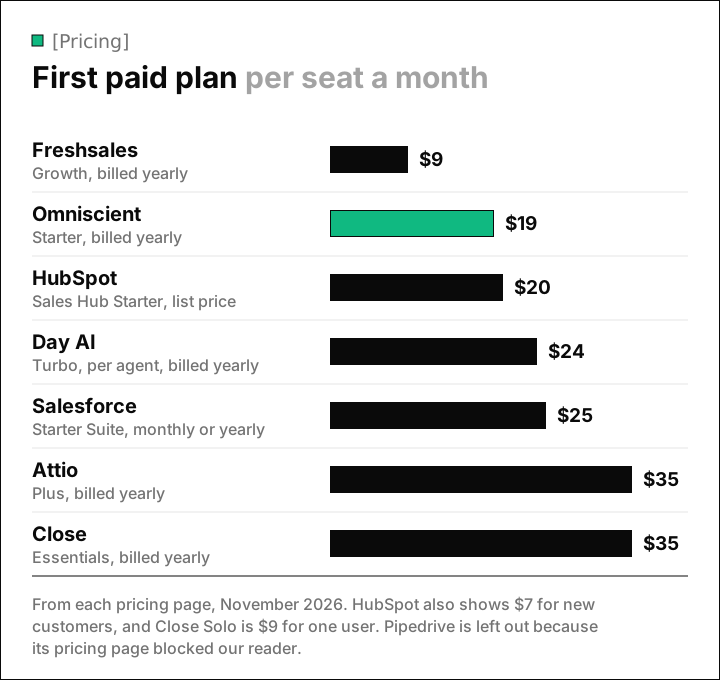
Seat prices are only part of the bill, so price in these extras before you sign:
- HubSpot Professional adds a $1,500 onboarding fee, and extra HubSpot Credits cost $0.01 each.
- Attio sells extra workspace credits for AI and workflows on top of each plan's allowance.
- Close bills calls by use, with most outbound calls at about $0.02 a minute.
- Omniscient's recording bot costs $25 per seat, for teams that would rather not use their meeting tool's transcripts.
How to choose a CRM for your SaaS team
A two week trial is enough if you spend it on one real deal. This is the order we'd test in:
- 01Name your main motion
Note whether last quarter's closed deals started inbound, outbound, in the product or as expansions.
- 02Fill in your own demo form
Submit it during the trial and check who owns the lead, which channel it shows and how fast the owner hears.
- 03Run one live deal through it
Connect your inbox and calendar, hold a real discovery call and read what the CRM wrote afterwards.
- 04Send in one product number
Ask how a plan name or seat count reaches the account, and who keeps that sync running.
- 05Price the plan you'll grow into
Look up the plan with forecasting at next year's seat count, on yearly and monthly billing.
Fortunately, you can try every CRM here before you pay, so run these checks first. For smaller teams, our guide to the best CRM for startups covers startup discounts. Our list of the best AI CRMs goes deeper on AI that fills in records.
Questions about CRMs for B2B SaaS
What is the best CRM for B2B SaaS in 2026?
For SaaS teams whose deals start in email, meetings and LinkedIn, we'd start with Omniscient. HubSpot fits teams where marketing runs inbound, Attio fits teams that want product data in the CRM, and Salesforce fits enterprise sales with an admin.
Does a B2B SaaS company need a special CRM?
Any solid CRM can work, as long as it handles several contacts per deal, renewal dates and contract value, product usage on the account and the channel behind each demo request.
Which CRM tracks MRR and ARR?
Pipedrive's recurring products work out MRR and ARR on each deal, on Growth and higher plans. On Omniscient's Pro plan you can add your own contract value and renewal date fields, and Salesforce sells Revenue Cloud for product to cash from $200 per user a month.
Can a CRM show product usage?
Several can, with a sync from your product or warehouse. Attio lists product usage among the data it keeps live, and its app store has sync tools like Polytomic and Hightouch, while Omniscient takes product data through its API.
How much does a CRM for a B2B SaaS team cost?
First paid plans here start at $9 per user a month for Freshsales Growth, billed yearly, and most cost $19 to $35 per seat. Plans with forecasting cost more, like Omniscient Pro at $49 or Salesforce Pro Suite at $100, both billed yearly.