LinkedIn Automation Pricing: What 10 Tools Cost in 2026
On this page
You want to know what LinkedIn automation will cost you each month, and every pricing page measures it differently. One tool bills per sender, the next per user or per identity, and several sell credits on the side.
We build Omniscient, which has its own LinkedIn sending engine, so we've had to price this kind of product ourselves. Below we compare LinkedIn automation pricing for ten tools, along with the extra costs that sit next to each plan.
LinkedIn automation pricing at a glance
This table shows each tool's entry plan for one LinkedIn account:
| Tool | Entry plan | Billed per | Monthly billing | Billed yearly, per month | Free trial |
|---|---|---|---|---|---|
| Omniscient | Starter | Seat | 20% more than yearly | $19 | 14 days, no card |
| Linked Helper | Standard, local | LinkedIn account | $15 | $8.25 on a 12 month term | 14 days of Pro, no card |
| Waalaxy | Pro | User | $19 | $16 | 14 days |
| Dux-Soup | STACKED local | Seat | $55 | $41.25 | None listed |
| HeyReach | Growth | Sender | $79 | $64 | 14 days, no card |
| Dripify | Pro | User | $79 | $59 | 7 days, no card |
| Expandi | Business | Seat | $99 | $79 | 7 days |
| Skylead | All-in-one | Seat | $100 | Annual plan through sales | 7 days |
| lemlist | Multichannel | User | $109 | $87 | 14 days |
| La Growth Machine | Basic | Identity | €60 | €50 | 14 days, no card |

Happily, every tool here publishes an entry price, so you can compare them before any sales call.
The lowest price only helps if the plan fits how you send:
- One person on one account pays least with Linked Helper Standard or Waalaxy Pro, though Linked Helper needs your computer or a rented server switched on.
- An agency with many accounts can buy HeyReach Agency or Skylead Agency, which charge one flat price for 25 senders or seats.
- A team that wants LinkedIn and cold email in one sequence can look at Dripify, Skylead, lemlist Multichannel and La Growth Machine.
- A team that wants LinkedIn outreach and a CRM in one seat fits Omniscient, as long as it doesn't need email steps.
How LinkedIn automation pricing works
On the pages we read, the bill grows in four ways:
- Per LinkedIn account: HeyReach charges per sender, La Growth Machine per identity and Linked Helper per account license.
- Per seat or user: Omniscient, Waalaxy, Dripify, lemlist, Expandi, Skylead and Dux-Soup price each seat or user.
- Flat team plans: HeyReach Agency and Skylead Agency each start at $999 a month for 25 senders or seats.
- Quotas and credits: Waalaxy caps invitations each month, Linked Helper caps data credits by plan, and HeyReach, lemlist, Dripify and La Growth Machine sell extra credits.
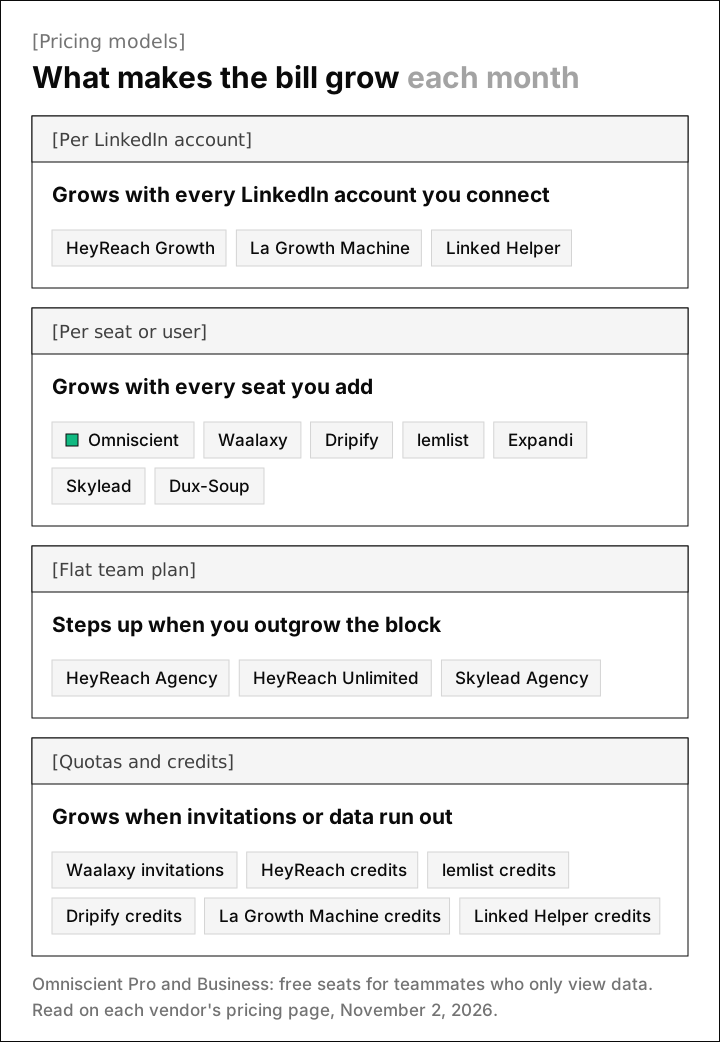
We understand per account pricing from our own bills. Every LinkedIn account connected to our engine costs us the same each month, whether it sends 5 invitations a day or 40.
The bigger difference is who else you pay for. HeyReach doesn't charge for teammates, assistants, clients or other users, and on Omniscient's Pro and Business plans, teammates who only view or log data take free seats.
LinkedIn automation pricing by tool
Omniscient
Omniscient is a CRM and LinkedIn outreach software that drafts a message for each lead and sends only what your team approves. Starter costs $19, Pro $49 and Business $99 per seat a month, billed yearly, and monthly billing costs 20% more.
- Each teammate who sends needs a paid seat, and on Pro and Business, teammates who only view or log data can take free seats.
- AI is included, and with personalizing on, Otto, our agent, writes each message from the person's posts, comments, new role or company news.
- The CRM comes in the same seat and fills itself in from your email and calendar.
- Seats get 10% off from 21 seats, and call recording is an extra $25 per seat.
- The free trial gives you 14 days of Pro with no credit card.
- Meeting notes and drafts
- Ask Omniscient
- 2 agents
- Pipeline board and forecast
- Fields filled by rules
- Prep briefs and field packs
- 5 agents
- Free teammate seats
- Manager mode and coaching
- MEDDIC from every call
- 15 agents
- Admin controls
Admittedly, Omniscient sends on LinkedIn only, with no cold email steps, and caps each account at 40 invitations a day and 200 a week. If you rotate dozens of client accounts or want email in the same sequence, HeyReach or lemlist will suit you better. The LinkedIn Outbound page shows how campaigns work.
Linked Helper
Linked Helper is a LinkedIn automation software that runs as a desktop app on your own computer or on a server you rent. Standard costs $15 per LinkedIn account a month on a monthly term, or $8.25 a month on a 12 month term.
- Pro costs $45 a month, or $24.75 on the 12 month term. It lifts Standard's cap of 20 a day on advanced actions, such as sending contacts to your CRM.
- Cloud storage, which keeps your data on Linked Helper's servers, costs $29.90 a month on Standard, or $16.50 on the 12 month term.
- You buy proxies and any server yourself, and volume discounts start at 10 licenses.
- The trial gives 14 days of Pro with no card.
Waalaxy
Waalaxy is a LinkedIn outreach software that sends invitations and follow ups within a monthly invitation quota. Pro costs $19 per user a month, or $16 billed yearly, for 300 invitations a month.
- Advanced costs $39 a month, or $32 billed yearly, for 800 invitations.
- Business costs $69, or $55 billed yearly, and adds cold email with 500 email finder credits a month instead of 25.
- The LinkedIn Inbox is an extra €20 a month, according to its FAQ.
- Every plan starts with a free trial of 14 days.
Frankly, a monthly quota is a sensible guardrail if you're automating for the first time.
Dux-Soup
Dux-Soup is a LinkedIn automation software that runs drip campaigns either as a desktop app or on its own servers. STACKED local costs $55 per seat a month, or $41.25 billed yearly, and runs on your Mac or Windows machine.
- STACKED cloud costs $99 a month, or $74.17 billed yearly, and keeps running with your computer off.
- The pricing page offers a demo and mentions no free trial.
HeyReach
HeyReach is a LinkedIn automation software that connects many LinkedIn accounts and rotates sending between them. Growth costs $79 per sender a month, $72 billed quarterly or $64 billed yearly.
- Growth gives each sender a dedicated residential proxy and 100 enrichment credits once, and you can buy more credits when they run out.
- Agency costs $999 a month for 25 senders or $1,399 for 50, and Unlimited costs $2,999 a month for up to 300. Both ask you to bring your own proxies.
- Email steps run through its Instantly or Smartlead integrations, and you pay for those tools separately.
- The trial lasts 14 days with no card and covers up to 3 LinkedIn accounts.
Dripify
Dripify is a LinkedIn automation software that runs drip campaigns of LinkedIn and email steps from its own servers. Pro costs $79 per user a month, or $59 billed yearly, and Advanced costs $99, or $79 billed yearly.
- Each plan includes 100 email finder credits a month, and extra packs start at 1,000 credits for $29.
- The trial lasts 7 days with no card.
Its pricing page lists up to 75 connection requests a day on both plans. Honestly, we'd set yours far lower, since our own engine defaults to 15 a day and 80 a week and never goes above 40 and 200.
Expandi
Expandi is a LinkedIn automation software that runs outreach sequences from the cloud, with a dedicated IP address in your country. Business costs $99 per seat a month, or $79 a month billed yearly.
- The Agency plan starts at 10 seats and is priced on request.
- Image and GIF personalization costs extra, and video runs through a paid Sendspark integration, with no prices on the page.
- The free trial lasts 7 days.
Skylead
Skylead is a LinkedIn automation and cold email software that builds smart sequences across both channels. All-in-one costs $100 per seat a month and includes unlimited email accounts, up to 100,000 emails a month and an email finder.
- Agency costs $999 a month for 25 seats, or $1,999 for unlimited seats, listed as a first year offer.
- An Annual plan pays for 10 months and gets 2 free, and you reach it through sales.
- The free trial lasts 7 days.
Interestingly, Skylead includes image and GIF personalization in the seat, which Expandi sells as an extra.
lemlist
lemlist is a sales engagement software that finds leads and runs campaigns across email, LinkedIn, calls and WhatsApp. LinkedIn steps need the Multichannel plan at $109 per user a month, or $87 billed yearly, because the Email plan doesn't include them.
- Extra lead data costs $20 a month, or $16 billed yearly, for 2,000 credits, which the page says covers 400 emails or 100 phone numbers.
- The FAQ describes a 14 day trial with Multichannel features and 200 credits.
La Growth Machine
La Growth Machine is a sales automation software that runs multichannel sequences on LinkedIn, email, calls and X. Basic costs €60 per identity a month, or €50 billed yearly, for LinkedIn and email.
- Pro costs €120 a month, or €100 billed yearly, and adds calls.
- Ultimate costs €180 a month, or €150 billed yearly, and adds X plus HubSpot and Pipedrive sync.
- Each identity is billed on its own, and the trial lasts 14 days with no card for one identity.
Extra costs to budget for besides the plan
We'd add these to the budget before picking a tool:
- Sales Navigator: Core costs US$119.99 a month or US$1,079.88 a year, which is more than any entry plan here, and Advanced costs US$159.99 a month.
- A cold email tool, when your LinkedIn tool passes email to Instantly or Smartlead as HeyReach does.
- Data credits, once the email finder credits in your plan run out.
- Proxies, for HeyReach Agency and Unlimited and for Linked Helper, plus a server if Linked Helper must run around the clock.
- A CRM, plus the time spent keeping it in step with your outreach tool.
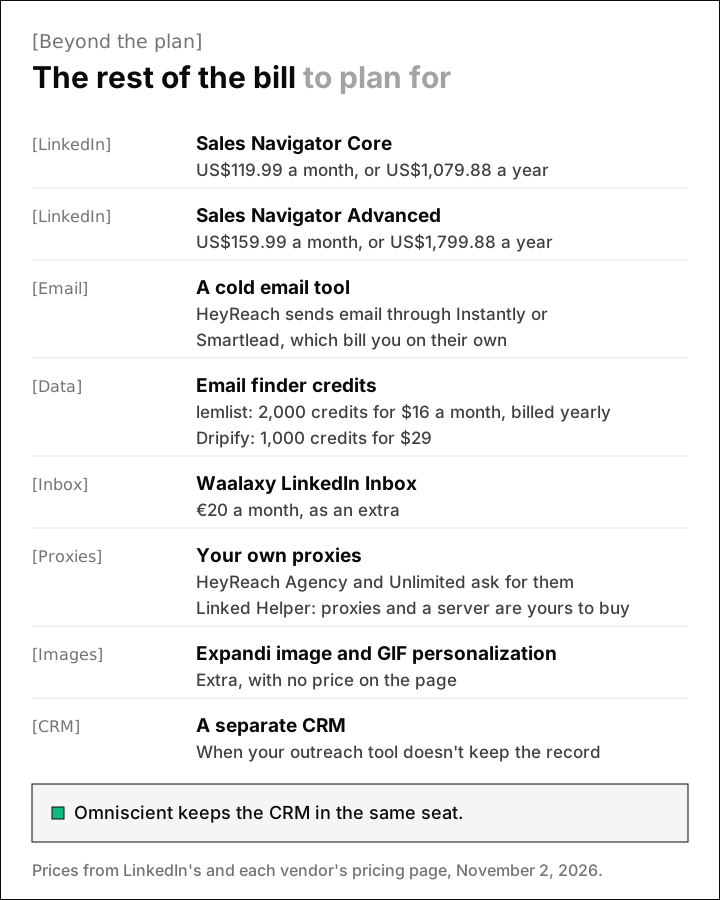
Luckily, HeyReach needs Sales Navigator only for certain steps. Its help center says InMail and the open profile check need a valid Sales Navigator license, so check your steps before you add one.
We built Omniscient to take the CRM line off that list. A reply stops that person's outreach in every campaign and lands in the Inbox next to their CRM record, with no sync to pay for. Our CRM page shows how the record fills itself in.
Monthly or yearly billing for LinkedIn automation
Yearly billing lowers the price at almost every tool here. HeyReach, Expandi and lemlist list 20% off, Dux-Soup lists 25%, and Dripify says up to 35%.
We'd still start on monthly billing, because a new LinkedIn account should send slowly at first. Our engine takes about two and a half weeks to warm an account up to 40 invitations a day, which is also enough time to judge the tool.
Thankfully, the trials tell you a lot before you pay, as long as you know how each one ends:
- Expandi charges for the period you picked after 7 days unless you cancel first.
- Dripify charges nothing when its trial ends, and the account goes inactive until you choose a plan.
- Linked Helper pauses campaigns at the end of its trial and renews nothing.
- HeyReach and Omniscient trials need no card, so nothing is charged when they end.
Once you pay, note that Expandi's help center says disconnecting a LinkedIn account "doesn't cancel the seat," so remove the seat from your subscription as well.
How to budget for LinkedIn automation
We'd build a LinkedIn automation budget in these five steps:
- 01Count the senders
List every LinkedIn account that will send, since most plans price each one on its own.
- 02Decide on email
If you want cold email in the same sequence, price a tool that includes it or add an email tool's own plan.
- 03Check for Sales Navigator
Look at the steps you plan to use, such as InMail, and see which ones need it.
- 04Price the data
Estimate how many emails or phone numbers you'll look up each month, then price the credit packs.
- 05Count everyone else
Check whether teammates who only read replies or update records need a paid seat.
A higher daily quota on a pricier plan rarely changes what you can safely send, because LinkedIn sets the real ceiling. It doesn't publish its invitation limit, and its help page says reaching it may restrict your invitations, typically for one week.
That's why our engine paces each account like a person at work:
- Each day's total lands between 80% and 100% of your limit, inside working hours with a lunch break.
- Actions keep random gaps of 3 to 12 minutes at the Normal pace, and a profile view comes 1 to 4 hours before each invitation.
- A new account starts at 5 invitations a day and adds 2 a day until it reaches your limit.
- The account drops to half pace for 3 days when acceptance falls under 20% or LinkedIn pushes back.
LinkedIn's prohibited software page says members who use automation tools "risk having their accounts restricted or shut down." That covers every tool on this list, ours included. Our guide to the LinkedIn connection request limit explains the usual weekly numbers.
To compare the same ten on pacing and replies, read our roundup of the best LinkedIn automation tools. Agencies with many senders can start with our guide to LinkedIn automation tools for agencies.
Questions about LinkedIn automation pricing
How much does LinkedIn automation cost per month?
In November 2026, entry plans for one LinkedIn account run from $15 a month at Linked Helper to $109 at lemlist on monthly billing, and yearly billing lowers most of them.
What is the cheapest LinkedIn automation tool?
Linked Helper's Standard plan costs $15 per LinkedIn account a month, or $8.25 a month on a 12 month term. It runs on your own computer or a server you rent, which has to stay on while campaigns send.
Do I need Sales Navigator for LinkedIn automation?
It depends on the steps you use. HeyReach, for example, needs it only for InMail and the open profile check. Sales Navigator Core adds US$119.99 a month, so check your steps first.
Is yearly billing worth it for LinkedIn automation?
Yearly billing lowers the price at most tools, with 20% off at HeyReach, Expandi and lemlist. We'd pay monthly until a new account has warmed up and the tool has proven itself.