Waalaxy vs lemlist: Which LinkedIn Tool Fits Your Team
On this page
Waalaxy is a LinkedIn outreach software that runs invitation and message campaigns from the cloud, with a monthly invitation quota on each plan. lemlist is a sales engagement software that runs outbound sequences across email, LinkedIn, calls, WhatsApp and SMS from one place.
So the Waalaxy vs lemlist choice mostly depends on which channel books your meetings today. If it's LinkedIn, Waalaxy costs less and is simpler to run, and if it's email, lemlist gives you far more to work with.
We built the LinkedIn sending engine inside Omniscient this year. That meant answering the same questions these tools answer for you, such as how many invitations a day are safe and where replies should land.
If you're short on time, here's where we'd start:
- Pick Waalaxy if LinkedIn is your main channel and you want a low price with ready sequences.
- Pick lemlist if email books most of your meetings and LinkedIn is a second touch in the same sequence.
- Look at Omniscient if you want to approve LinkedIn messages before they go, inside a CRM that fills itself in from your email and calendar.
Waalaxy vs lemlist at a glance
Here are the points that usually decide it:
| Waalaxy | lemlist | |
|---|---|---|
| What it is | LinkedIn outreach, with cold email on its top plan | Outbound across email, LinkedIn, calls, SMS and WhatsApp |
| LinkedIn from | Pro, €19 per user a month on the yearly tab | Multichannel, $87 per user a month billed yearly |
| LinkedIn and email together | Business, €69 per user a month on the yearly tab | Multichannel, the same $87 |
| How LinkedIn connects | Fully in the cloud, per a July 2026 help article | Through lemlist's Chrome extension and your browser session |
| Invitations a day | 11 on Pro, 80 to 100 on Advanced and Business | Up to 20 on working days, as lemlist recommends |
| Email warmup | None listed on the pricing page | lemwarm, included in every plan |
| CRM | HubSpot and Pipedrive, plus 2,000+ apps through Make, Zapier and n8n | HubSpot, Salesforce, Pipedrive and Attio |
| Free trial | 14 days on the pricing page, and its help center asks for a card | 14 days with Multichannel features, apart from calls, and 200 credits |
Waalaxy vs lemlist pricing
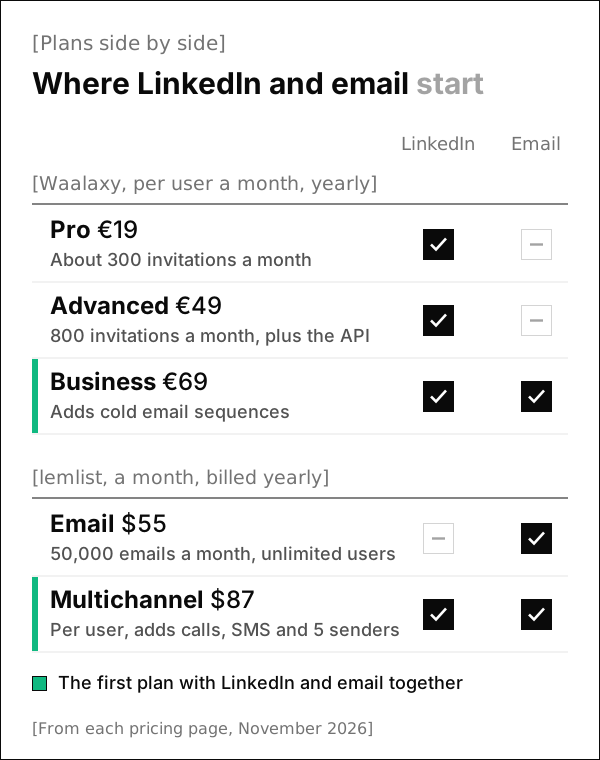
Both pricing pages open on yearly billing, and both charge per user for LinkedIn. Waalaxy's pricing page lists three plans and one paid extra:
- Pro, €19 per user a month: about 300 invitations a month, ready sequences, CRM sync and 25 Email Finder credits a month.
- Advanced, €49 per user a month: 800 invitations a month, plus the API and the Make, Zapier and n8n modules.
- Business, €69 per user a month: everything in Advanced, plus cold email sequences, LinkedIn and email campaigns and 500 Email Finder credits a month.
- The Inbox, with saved replies, reminders, tags and filters, is an optional extra at €20 a month.
Waalaxy's FAQ says yearly plans save up to 50%, and its help center gives €139 a month as the standard price of monthly Business, which may vary by country. The same article says no reminder goes out before a trial's first charge, so put the end date in your calendar.
lemlist's pricing page has two plans that matter here, plus two paid extras:
- Email, $69 a month or $55 billed yearly: 50,000 emails a month with unlimited users and senders, and no LinkedIn automation.
- Multichannel, $109 per user a month or $87 billed yearly: LinkedIn automation, SMS, a built in call dialer, unlimited emails and messages and 5 senders per user.
- Lead enrichment costs $20 a month, or $16 billed yearly, for 2,000 credits a month.
- Buying intent signals cost $29 a month, or $21 billed yearly, for 100 signals a month.
Honestly, the pricing tells you who each tool is for. Waalaxy's cheapest plan already includes LinkedIn, while lemlist puts LinkedIn on the plan that also carries calls and SMS. For LinkedIn and email together, the gap is smaller: €69 on Waalaxy Business against $87 on lemlist Multichannel.
LinkedIn features in Waalaxy and lemlist
Both tools send invitations and follow up messages on a schedule, so the bigger difference is how each one connects to your account.
In a help article dated July 1, 2026, Waalaxy says it "is now 100% cloud" and that its Chrome extension has left the Chrome Web Store. Campaigns run from the web app in the background, so you don't need LinkedIn open while they work, and an optional extension called Alien Copilot only speeds up imports.
Interestingly, reviews written before July 2026 may still describe Waalaxy as a Chrome extension, so check the date on anything you read.
Waalaxy's other LinkedIn features, from its own pages:
- 99+ outreach sequences you can use as they are, with automated follow ups and unlimited campaigns.
- Invitations, messages, profile visits and follows, each with its own daily quota on Advanced and Business.
- Up to 50,000 prospects per account on Advanced and Business, and CSV imports and exports on every plan.
lemlist links LinkedIn through its Chrome extension instead. Its extension guide says the extension "relies on your browser cookies to recognize your current LinkedIn session," so logging out or clearing cookies can break the link until you reconnect.
lemlist's LinkedIn side, from its pricing page and help center:
- LinkedIn steps cover profile visits, follows, invitations, messages, voice messages and InMail.
- Each lemlist account connects to one LinkedIn account, according to its help article on multiple profiles, so a second profile needs its own seat and its own Chrome profile.
- You can work in lemlist from inside LinkedIn and Gmail, and a unified inbox keeps replies from every channel together.
- Its help center points you to a LinkedIn Health Score, still in beta, under the Deliverability Hub settings.
LinkedIn limits and account safety
LinkedIn doesn't publish an exact invitation limit, and its Invitation limit reached page only says a restriction "typically lasts one week." Its prohibited software page goes further: members who use tools that automate activity on LinkedIn risk having "their accounts restricted or shut down." That risk applies to every tool here, ours included.
Each vendor's help center sets its own numbers, and we've put our engine's settings beside them:
| Setting | Waalaxy | lemlist | Omniscient |
|---|---|---|---|
| Invitations a day | 11 on Pro, 80 to 100 on Advanced and Business | Up to 20, on working days only | 15 at the Normal pace, 40 at most |
| Invitations a week | 200, which Waalaxy gives as LinkedIn's limit | About 100 a rolling week, which lemlist gives as LinkedIn's cap | 80 at the Normal pace, 200 at most |
| Messages a day | 120 to 150 on Advanced and Business | 30, voice messages included | 30 at the Normal pace |
| Profile visits a day | 120 to 150 on Advanced and Business | 30 | 40 at the Normal pace |
| A new account | 30 actions a day of each type if you weren't very active on LinkedIn before | About 50 actions a day in total, with an invitation ramp up such as 2 more a day up to 20 | 5 invitations on day one, then 2 more each day, with other actions scaled to match |
| When LinkedIn pushes back | Stop for 24 to 48 hours after a warning, and halve your quotas after a second one | Pause for at least 48 hours, then restart at around 5 actions a day | Half pace for 3 days, then back to full over 3 more, and a fresh warmup after a restriction |
The lemlist figures come from its account limits and connection requests articles. Waalaxy's come from its subscriptions, restrictions and warnings articles.
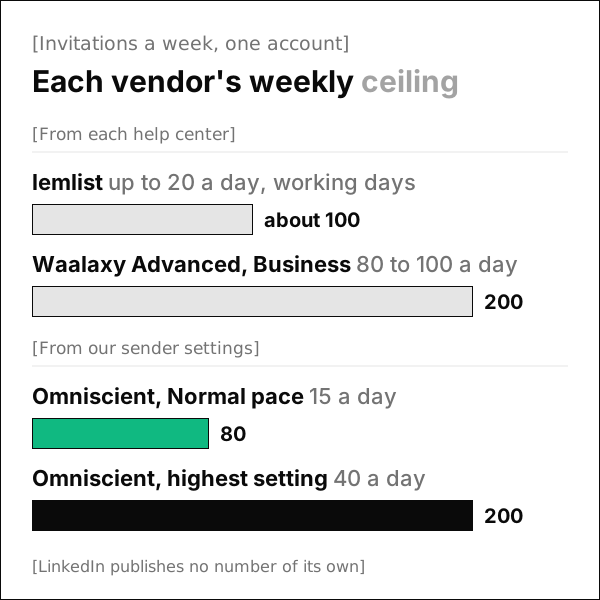
Surprisingly, the two vendors read LinkedIn's unpublished limit quite differently. Waalaxy's help center says LinkedIn allows 200 invitations a week, while lemlist's says roughly 100 a rolling week and warns that LinkedIn will restrict an account that goes well past it.
Both numbers are readings of a limit LinkedIn keeps to itself, so we'd treat the lower one as the safer guide whichever tool you pick. We set our own default below both, at 15 a day and 80 a week, because a restriction usually costs a full week of outreach. Our guide to the LinkedIn connection request limit explains how we picked those numbers.
The shape of the day mattered to us as much as the total, so an Omniscient sender also does this on its own:
- It sends only inside your working hours, with a lunch break of 30 to 60 minutes near the middle of the day.
- It waits a random 3 to 12 minutes between actions at the Normal pace.
- Each day's total lands between 80% and 100% of your limit, which Waalaxy's help center says it does too.
- It views a profile 1 to 4 hours before sending that person an invitation.
- It halves its pace for 3 days when LinkedIn rate limits the account, or when fewer than 20% of last week's invitations were accepted.
 Connect LinkedIn
Leo BrandtLast sent 6 min ago
Connected
Invitations
6 of 10
Messages
11 of 19
Profile views
9 of 27
Likes
3 of 18
Withdrawals
0 of 33
[Pace]
All this costs you some speed at the start, since a new account in Omniscient sends 5 invitations on its first day and reaches the Normal pace of 15 on its sixth.
Email and other channels
Thankfully, this part is easy to call, because lemlist does far more with email than Waalaxy does. Its homepage and pricing page list:
- lemwarm, lemlist's email warmup and deliverability tool, included in every plan.
- A database of 650M+ leads, with an email and phone number finder.
- Calls through a built in dialer and SMS, with WhatsApp as an extra on Multichannel.
- AI agents for signals, enrichment and messaging, plus lemAgent.
Its help center is careful with volume, too. It recommends starting a warmed up mailbox at 10 to 15 cold emails a day, then adding 5 a week up to 25 to 30.
Waalaxy keeps email for its top plan, so cold email sequences come only with Business. Its Email Finder gives you 25 credits a month on Pro and Advanced, or 500 on Business. If you send cold email every day, lemlist is the better fit.
Where your LinkedIn replies end up
Once someone replies, the conversation needs a place your whole team can see. Here's where each tool puts it:
- In Waalaxy, every plan lists smart reply detection, and the Inbox for working through replies is an optional extra at €20 a month. Prospects and replies sync to HubSpot or Pipedrive, or to other tools through Make, Zapier and n8n.
- In lemlist, replies from every channel share one unified inbox, and the integrations send leads to HubSpot, Salesforce, Pipedrive or Attio.
In both cases, your CRM stays a separate app with its own login, and usually its own bill.
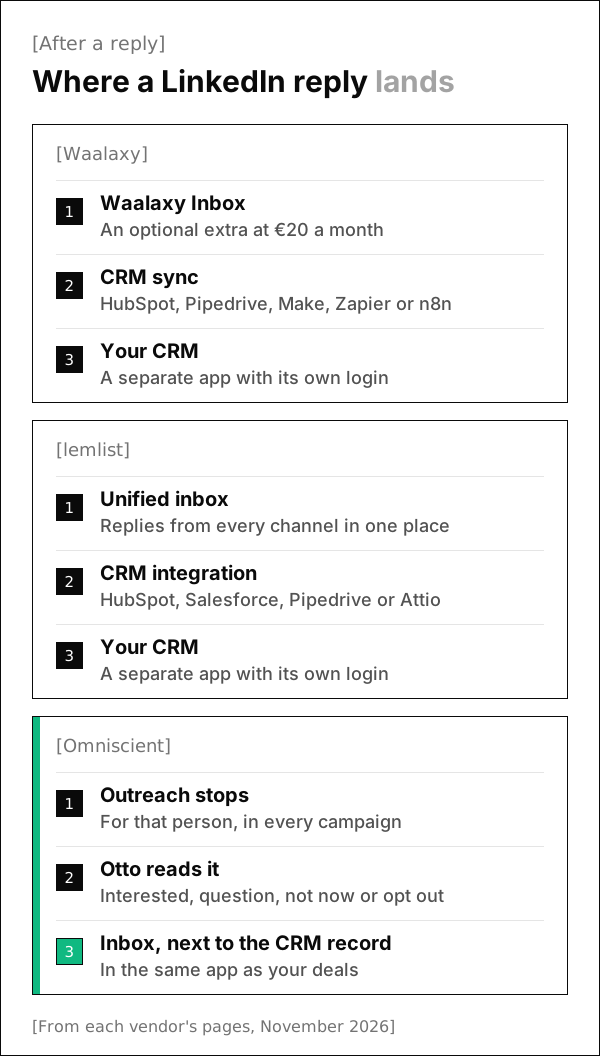
Personally, this was the part we cared about most when we built Omniscient's Inbox. When replies live in one tool and deals in another, someone has to copy them across, and the CRM falls behind on the busiest days.
Which one fits your team
Look at where your last ten meetings came from, because that usually settles this comparison:
- Choose Waalaxy if you're a founder or a small team doing outreach mostly on LinkedIn, and you'd like low prices and ready sequences.
- Choose Waalaxy Business if LinkedIn leads your outreach and you want an email step in the same campaign.
- Choose lemlist if email books most of your meetings, or you want calls, SMS, a lead database and lemwarm in one place.
- Look further if you want LinkedIn replies inside your CRM, or someone to approve each lead's messages before they go.
If neither one feels right, our lists of Waalaxy alternatives and lemlist alternatives match other tools to the reason you're looking.
Omniscient for LinkedIn outreach inside your CRM
Omniscient is a CRM and LinkedIn outreach software that drafts each lead's messages and sends them only after your team approves. Replies land in an Inbox next to the person's CRM record, and the CRM fills itself in from your email and calendar.
Here's how LinkedIn outreach works in Omniscient:
- Scout finds people from a sentence and shows why each one fits, such as a company hiring SDRs or someone new in their role.
- Otto, our agent, drafts each person's messages, and you can edit any of them before approving.
- You approve each person's messages one by one, or let going live approve everyone who's ready, and a message edited after approval needs approving again.
- A reply stops that person's outreach in every campaign, and you can create an opportunity from the Inbox thread.
Plans start at $19 per seat a month, billed yearly, and teammates who only view or log data are free, per our pricing.
Admittedly, Omniscient sends on LinkedIn only, with no email, call or SMS steps. If email books most of your meetings, lemlist will suit you better.
Questions about Waalaxy vs lemlist
Is Waalaxy cheaper than lemlist?
For LinkedIn alone, yes. Waalaxy Pro costs €19 per user a month on the yearly tab, and lemlist's LinkedIn automation starts on Multichannel at $87 per user a month billed yearly. For LinkedIn and email together, Waalaxy Business costs €69 against the same $87 lemlist plan.
Does lemlist's Email plan include LinkedIn automation?
No. The Email plan covers email only. LinkedIn automation comes with the Multichannel and Enterprise plans.
Does Waalaxy still need a Chrome extension?
No. In a help article dated July 1, 2026, Waalaxy says it now runs 100% in the cloud and that its extension has left the Chrome Web Store. An optional extension, Alien Copilot, speeds up imports, and you still need your own LinkedIn account.
Which one is safer for my LinkedIn account?
No tool can promise safety, because LinkedIn publishes no safe number and prohibits unauthorized automation. lemlist's guidance is the more careful one, at up to 20 invitations a day and about 100 a week, while Waalaxy gives LinkedIn's limit as 200 a week. Whichever you choose, start below the ceiling and let a new account warm up.
Can Waalaxy and lemlist send leads to my CRM?
Yes. Waalaxy syncs with HubSpot and Pipedrive and reaches other tools through Make, Zapier and n8n. lemlist integrates with HubSpot, Salesforce and Pipedrive, and its homepage names Attio too.