Best CRM for LinkedIn Prospecting in 2026
On this page
- What a CRM for LinkedIn prospecting needs to do
- Four ways a CRM connects to LinkedIn
- The 7 best CRMs for LinkedIn prospecting in 2026
- Best CRM for LinkedIn compared
- Sales Navigator and your CRM
- What we learned joining LinkedIn to a CRM
- When to keep your CRM and add a LinkedIn connector
- How to choose a CRM for LinkedIn prospecting
- Questions about CRMs for LinkedIn
When your deals start with a LinkedIn invitation, the most useful part of each conversation happens on a site your CRM can't see. The best CRM for LinkedIn prospecting brings those conversations onto the right record, so your team copies as little as possible by hand.
We build Omniscient, a CRM with LinkedIn outreach inside it. Joining our sending engine to the CRM taught us which details decide whether a reply lands on the right person. This guide compares seven CRMs on how each one connects to LinkedIn and what it costs in November 2026.
Our short answer, by how your team prospects:
- Pick Omniscient if you want LinkedIn outreach your team approves inside a CRM that fills itself in from email and calendar.
- Pick HubSpot or Salesforce if you already pay for Sales Navigator Advanced Plus and want LinkedIn's own CRM Sync.
- Pick Zoho CRM if you want a free plan for 3 users, with Sales Navigator on your records later.
- Pick folk or Salesflare if you want your CRM in a browser extension while you work in LinkedIn.
- Pick Breakcold if you send every LinkedIn message yourself and want each thread on the deal.
| Tool | What it is | Starting price | Best for |
|---|---|---|---|
 Omniscient | A CRM with LinkedIn outreach your team approves | $19 per seat a month, billed yearly | Small B2B teams that prospect on LinkedIn |
 HubSpot | A customer platform on LinkedIn's CRM Sync list | Free for up to 2 users | Teams on Sales Navigator Advanced Plus |
 Salesforce | A CRM platform on LinkedIn's CRM Sync list | Free for up to 2 users | Larger teams with a Salesforce admin |
| A sales CRM with a Sales Navigator extension | Free for 3 users | Teams that want a free plan to start | |
| A simple CRM with the folkX LinkedIn extension | $24 per member a month, billed yearly | Founders who save profiles as they browse | |
| A CRM that syncs LinkedIn conversations | $99 a month, billed monthly | Sellers who send every message themselves | |
| A B2B CRM with a LinkedIn sidebar | $29 per user a month, billed yearly | Small teams that follow up by email |
What a CRM for LinkedIn prospecting needs to do
LinkedIn prospecting runs in a loop: you find someone, reach out, wait for an answer and follow up. A good CRM puts each turn of that loop on one record without anyone pasting it in, so we'd check these first:
- Saving a profile adds one person, matched to anyone already in your CRM.
- A LinkedIn reply shows up on that person's record, or right next to it.
- A reply stops any follow up still scheduled for that person.
- Email and meetings join the same record once the buyer moves off LinkedIn.
- Someone on your team decides what goes out from their LinkedIn account.
Honestly, vendors' pages say a lot about the first check and little about the rest, so we start with how each CRM connects.
Four ways a CRM connects to LinkedIn
Side by side, the vendors' pages show four kinds of connection, and Omniscient uses two of them.
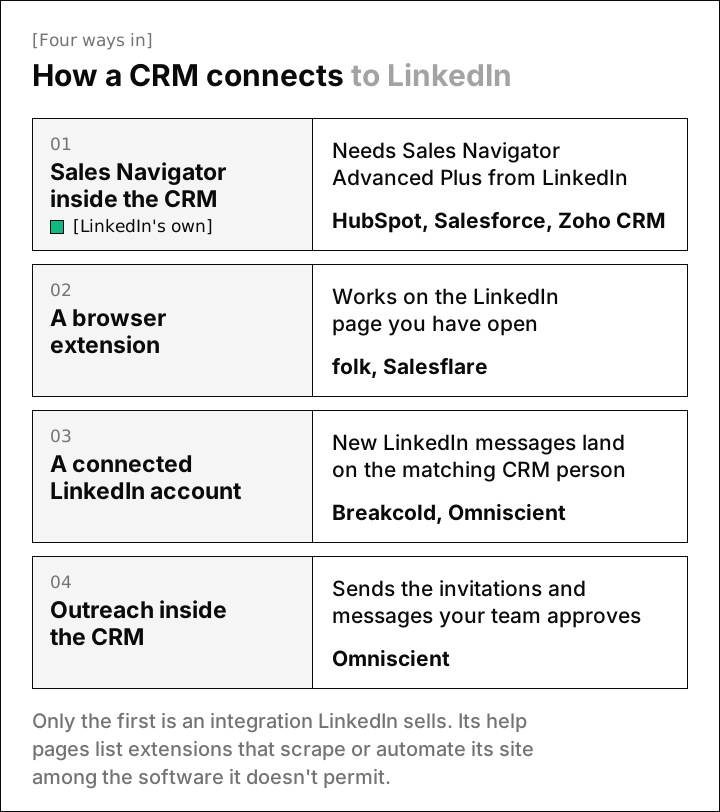
- LinkedIn sells Sales Navigator CRM Sync itself on the Advanced Plus plan, and its plan guide says it can "Log InMails, messages, notes, and Smart Links back to CRM."
- A browser extension works on the LinkedIn page you have open: folkX saves the profile to your CRM, and Salesflare adds a CRM sidebar.
- A connected LinkedIn account sends new LinkedIn messages to the matching CRM person, as in Breakcold and Omniscient.
- Outreach inside the CRM means it runs invitation and message sequences itself, which only Omniscient does among these seven.
Only the first is an integration LinkedIn sells. Its prohibited software page lists "browser extensions that scrape, modify the appearance of, or automate activity on LinkedIn's website" among the tools it doesn't permit. Members who use them, it says, "risk having their accounts restricted or shut down."
LinkedIn names no products there, but the risk applies to the last three groups, Omniscient included, so weigh it against the time each tool saves you.
The 7 best CRMs for LinkedIn prospecting in 2026
1. Omniscient
Omniscient is a sales CRM that runs LinkedIn outreach your team approves and fills in its records from your email and calendar. Otto, our AI agent, writes each person's messages and drafts your replies.
We built outreach and the CRM as one loop, so a lead's reply and the deal stay on the same person:
- Scout turns a sentence into a lead list and scores each lead out of 100, with up to 60 points for fit and 40 for signals like hiring.
- You approve messages one person at a time or all at once at launch, and editing an approved message sends it back for approval.
- Replies from every connected sender land in the Inbox, matched to the CRM person by LinkedIn member ID or profile address.
- A reply stops that person's outreach in every campaign, and you can create an opportunity from the thread at the stage you pick.
 Amara KofiHead of RevOps, Northpine
Sending follows the pacing we describe in how to automate LinkedIn outreach without getting restricted:
- Each sender keeps working hours in its own time zone, with a lunch break, and waits 3 to 12 minutes between actions at normal pace.
- By default, a profile view comes 1 to 4 hours before each invitation.
- A new account starts at 5 invitations a day and adds 2 a day, and each day's total lands between 80% and 100% of your limit.
- A LinkedIn rate limit halves the pace for 3 days, and the next 3 days ease it back to normal.
- A week with at least 20 invitations and under 1 in 5 accepted slows the sender the same way.
LinkedIn's help page on invitation limits doesn't publish a number, and our guide to the LinkedIn connection request limit explains the defaults we chose.
On the CRM side, Omniscient builds people and companies from Gmail or Outlook and your calendar, and Otto writes meeting notes from your call transcripts. The CRM page and the LinkedIn Outbound page show both halves.
Paid seats start at $19 per seat a month, billed yearly, and Pro adds the pipeline board and forecast at $49. Monthly billing costs 20% more, and the 14 day trial needs no credit card.
Admittedly, Omniscient isn't on LinkedIn's CRM Sync list and has no browser extension for saving profiles as you browse. Teams that live in Sales Navigator Advanced Plus will get more from HubSpot or Salesforce. If you follow up with email sequences, Salesflare fits better, since our campaigns run on LinkedIn only.
2. HubSpot
HubSpot is a customer platform that runs marketing, sales and service from one CRM, and it's one of the four CRMs on LinkedIn's CRM Sync list.
- The free CRM covers up to 2 users and 1,000 contacts.
- Sales Hub Starter says it starts at $7 per seat a month, shown next to $20, with discounts for new customers only.
- Professional starts at $90 per seat a month, plus a required one time onboarding fee of $1,500.
- The LinkedIn CRM Sync app needs a Sales Hub Professional or Enterprise seat and Sales Navigator Advanced Plus.
With the app, you can create HubSpot contacts from Sales Navigator, and your Sales Navigator activity logs to HubSpot on its own.
LinkedIn steps in HubSpot sequences are reminders, since the sequences guide describes tasks to send a connection request or InMail manually. HubSpot fits a team that already pays for Advanced Plus and runs marketing in the same system.
3. Salesforce
Salesforce is a CRM platform that scales from a free two user suite to large enterprise editions, and it's on LinkedIn's CRM Sync list.
- Free Suite covers up to 2 users, as long as you log in at least once every 60 days.
- Starter Suite costs $25 per user a month, Pro Suite costs $100 billed yearly, and Core costs $195 billed yearly.
- LinkedIn's CRM Sync guide for Salesforce lists Enterprise, Unlimited, Developer, Performance, or Professional with API access enabled.
The same guide says a LinkedIn account representative turns CRM Sync on, and a Salesforce administrator installs the app. Salesforce now sells suites while LinkedIn's guide names editions, so ask Salesforce which suite qualifies before you buy.
Personally, we'd pick Salesforce for LinkedIn prospecting only when an admin can own both sides of the sync.
4. Zoho CRM
Zoho CRM is a cloud CRM that helps sales teams run their pipeline, with a free plan for 3 users and an extension for LinkedIn Sales Navigator.
- The Free plan is free forever for 3 users, with no credit card.
- Standard costs $14 per user a month billed yearly, or $20 monthly, and Professional costs $23, or $35 monthly.
- Zoho's Sales Navigator help page lists Sales Navigator Advanced Plus, and only an administrator can install it.
Once it's installed, leads, contacts, accounts and deals show a Sales Navigator section. You can send an invitation or start an InMail from the record, one person at a time.
The help page doesn't name the Zoho CRM edition it needs, so confirm that with Zoho during your trial.
5. folk
folk is a CRM for small teams that captures contacts from LinkedIn and Sales Navigator with its folkX Chrome extension.
- Standard costs $24 per member a month billed yearly, or $30 monthly, with the LinkedIn extension and LinkedIn and Gmail templates.
- Email sequences start on Premium, at $48 per member a month billed yearly.
- The trial lasts 2 weeks, includes every premium feature and needs no credit card.
The folkX help page says your folk message templates appear inside LinkedIn. Interestingly, neither that page nor folk's pricing page says whether LinkedIn message history syncs into folk, so test it during the trial.
6. Breakcold
Breakcold is a CRM that syncs LinkedIn, email, WhatsApp and Telegram conversations into one inbox and pipeline.
- Its LinkedIn CRM page says LinkedIn DMs, InMails, connection requests and Sales Navigator threads sync on their own and land on the right record.
- You can reply from Breakcold, and a feed of your prospects' posts lets you comment and message from the deal.
- X1 costs $99 a month, billed monthly, for 1 seat and 2 connected accounts, and each extra seat or account costs $10 a month.
Its pricing page lists a 14 day trial with a card up front and a tasks queue where "you approve every send." We didn't find automated invitation sequences there, so Breakcold suits a seller who sends LinkedIn messages one at a time.
7. Salesflare
Salesflare is a CRM for B2B teams that fills itself in from your inbox, email signatures and calendar, with a sidebar that works inside LinkedIn.
- Growth costs $29 per user a month billed yearly, or $39 monthly, with the LinkedIn sidebar, an email sidebar and the mobile app.
- Growth sends personalized email campaigns, and workflows of several emails start on Pro at $49 billed yearly.
- The trial lasts 30 days with no credit card.
Luckily for teams that prospect on LinkedIn and follow up by email, Salesflare keeps both in one place. Its pricing page doesn't say whether LinkedIn messages sync, so check before you rely on it.
Best CRM for LinkedIn compared
"Not listed" means we didn't find it on the vendor's own site in November 2026, so ask during the trial.
| CRM | How it connects to LinkedIn | Sends invitations for you | LinkedIn messages in the CRM | Free plan or trial |
|---|---|---|---|---|
| Omniscient | Connected LinkedIn account | Yes, after approval | In the Inbox, linked to the person | 14 day trial, no card |
| HubSpot | Sales Navigator CRM Sync | No, sequence steps are reminders | Logged by CRM Sync on Advanced Plus | Free CRM for 2 users |
| Salesforce | Sales Navigator CRM Sync | Not listed | Logged by CRM Sync on Advanced Plus | Free Suite for 2 users |
| Zoho CRM | Sales Navigator extension | By hand, from the record | Not listed | Free plan for 3 users |
| folk | folkX Chrome extension | Not listed | Not listed | 2 weeks, no card |
| Breakcold | Connected LinkedIn account | Not listed | Yes, synced to the record | 14 days, card required |
| Salesflare | LinkedIn sidebar | Not listed | Not listed | 30 days, no card |
Thankfully, every CRM here has a free plan or a trial, so you can run the checks below before paying for a seat.
Sales Navigator and your CRM
Sales Navigator is LinkedIn's paid prospecting tool, and only its top plan connects to a CRM. LinkedIn's help center puts it directly: "Integration between Sales Navigator and your CRM is only available for Sales Navigator Advanced Plus users."

Here's what each plan costs per license on LinkedIn's compare plans page, which calls these prices estimates that may leave out VAT or GST:
- Core costs US$119.99 a month or US$1,079.88 a year, and LinkedIn says it's best for individual sellers.
- Advanced costs US$159.99 a month or US$1,799.88 a year, and adds shared lists, Buyer Intent and Smart Links.
- Advanced Plus has no public price, and you buy it through LinkedIn's sales team.
Advanced Plus pays off when your team wants Sales Navigator to mark which leads are already in your CRM and keep both sides up to date. If you only need search, Core or Advanced next to a CRM with an extension or a connected account can cover the rest.
What we learned joining LinkedIn to a CRM
When we joined our sending engine to the CRM, many of the rules we wrote were about records. A message goes out once, while a wrong record stays in front of your team until someone fixes it.
Each rule makes a fair question for any CRM you try:
- A search result stays a search result until you save it to a list or campaign, and unsaved results are deleted after 30 days.
- A person is matched first by LinkedIn member ID and then by profile address, because two people can share a name.
- A company is created only when its web domain is known, and it's never matched by name.
- New data fills empty fields and leaves anything a teammate typed exactly as it was.
- LinkedIn photo links expire, so we keep our own copy of each photo, with initials as the fallback.
- A send that times out is marked uncertain and never retried on its own, since we'd rather let the thread settle it than invite someone twice.
LinkedIn's CRM Sync makes a similar call. Its Salesforce guide says each LinkedIn profile links to a single CRM record, so when you keep duplicates, it picks the best scoring match. Frankly, that's a good reason to merge duplicates before you turn on any LinkedIn connection.
When to keep your CRM and add a LinkedIn connector
If Pipedrive or Attio already runs your pipeline, a connector from its marketplace can bring LinkedIn in without a switch:
- Surfe's Pipedrive listing says it can "Sync LinkedIn messages into Pipedrive" and add LinkedIn contacts in one click.
- HeyReach's Attio listing logs connection requests, messages and replies in Attio, and matches leads "on email address and then LinkedIn URL."
Before you launch, check that a reply lands on the person you already have and stops their sequence. Our guide to LinkedIn outreach tools with a CRM compares tools that bring their own pipeline.
How to choose a CRM for LinkedIn prospecting
Start from how your team prospects today, then use the trial to test where LinkedIn meets the record.

- 01List your senders
Write down who sends LinkedIn invitations today and whether each person will connect their own account.
- 02Decide on Sales Navigator
Check whether you'll pay for Advanced Plus, since only that plan includes CRM Sync.
- 03Save ten real profiles
Include people already in your CRM and count how many duplicates appear.
- 04Reply from a second account
Answer one message and confirm the reply reaches the right record and stops any follow up.
- 05Move one lead to email
Send an email and book a call, then check that both sit next to the LinkedIn history.
Happily, all five checks fit inside the shortest trial here.
Questions about CRMs for LinkedIn
What is the best CRM for LinkedIn prospecting?
For small B2B teams that prospect on LinkedIn, we'd start with Omniscient. Teams on Sales Navigator Advanced Plus should look at HubSpot or Salesforce, and sellers who work in LinkedIn by hand can try folk or Salesflare.
Which CRMs integrate with LinkedIn Sales Navigator?
LinkedIn lists CRM Sync for HubSpot, Microsoft Dynamics 365, Oracle Sales and Salesforce, and it needs Sales Navigator Advanced Plus. Zoho CRM also has a Sales Navigator extension, which its help page ties to Advanced Plus.
Can a CRM sync my LinkedIn messages?
Sales Navigator Advanced Plus logs InMails and messages to the four CRMs LinkedIn supports. Breakcold syncs LinkedIn conversations through a connected account, and Omniscient puts replies in its Inbox, linked to the CRM person.
Is it safe to connect a CRM to LinkedIn?
CRM Sync on Sales Navigator Advanced Plus is the integration LinkedIn sells itself. LinkedIn's help pages say third party tools that scrape or automate its site put accounts at risk of restriction. Omniscient paces every send to lower that risk, and no pacing removes it.
Do I need Sales Navigator to use a CRM with LinkedIn?
You need Advanced Plus for LinkedIn's own CRM Sync and for Zoho's Sales Navigator extension. Other extensions, connected accounts and CRMs with outreach built in can work from a regular LinkedIn account.