Best folk CRM Alternatives in 2026
On this page
folk is an AI CRM software that keeps a team's contacts and pipelines in one place, with a Chrome extension that saves LinkedIn profiles as you browse. If you're comparing folk CRM alternatives, you've probably hit a plan limit, or you want a CRM that also sends your LinkedIn invitations and messages.
We build Omniscient, a CRM that sends LinkedIn invitations and messages at a human pace, which is the part folk leaves to you. This list starts from folk's own pricing and help pages and gives you the eight alternatives we'd shortlist, sorted by the reason you're leaving.
Our short answer, by the reason you're leaving:
- Pick Omniscient if you want LinkedIn invitations and messages sent for you, with replies on a CRM record that fills itself in.
- Pick Attio if you want to design your own objects.
- Pick HubSpot if you want a free CRM now and marketing tools later.
- Pick Salesflare if you want automatic data entry with a LinkedIn sidebar and email workflows.
- Pick Pipedrive if your team plans its week around pipeline stages.
- Pick Copper if your agency works inside Google Workspace.
- Pick Nimble if you want one simple plan with room for 25,000 contacts.
- Pick Dex if folk was mostly where you kept up with your own network.
| Tool | What it is | Starting price | Best for |
|---|---|---|---|
 Omniscient | A CRM that fills itself in, with LinkedIn outreach you approve | $19 per seat a month, billed yearly | Small B2B teams that sell through LinkedIn |
 Attio | A CRM with records built from your inbox and a data model you shape | Free for up to 3 seats | Teams that want their own objects |
 HubSpot | A CRM platform with marketing, sales and service tools | Free for up to 2 users | Teams that want marketing and sales in one place |
| A B2B CRM that fills itself in, with a LinkedIn sidebar | $29 per user a month, billed yearly | Small teams that follow up by email | |
 Pipedrive | A sales pipeline CRM with an AI sales assistant | See site | Teams that work by pipeline stage |
| A CRM for service businesses, built to work inside Google Workspace | $23 per seat a month, billed yearly | Agencies that live in Gmail | |
| A relationship CRM for small teams on Microsoft 365 or Google | $24.90 per seat a month, billed yearly | Small teams that want one plan | |
| A personal CRM that syncs your LinkedIn connections | $12 a month, billed yearly | Founders keeping up with their network |
What folk does well
folk still fits plenty of teams, so it helps to know what you'd give up. Its homepage calls it "the only AI CRM your team needs to close deals and find your next clients." Here's what its pricing page and product pages list today:
- Its extension, folkX, imports single people or whole lists from LinkedIn and Sales Navigator, and it also works on Gmail, WhatsApp, Instagram and X.
- Standard costs $24 per member a month billed yearly, or $30 monthly, with pipelines, email campaigns, enrichment and AI fields that folk calls magic fields.
- Email, calendar and WhatsApp sync come on Standard, and no plan caps how many members you add.
- folk now has a mobile app for iOS and Android, and its homepage marks phone call recording as new.
- The trial lasts 2 weeks with Premium features and no credit card.
Honestly, we like folk's design so much that Omniscient's square, black and white look takes after it. If your deals come from people you already know, folk may still be the right home for them.
Why teams look for a folk alternative
The reasons we found sit on folk's own pricing page and in its help center:
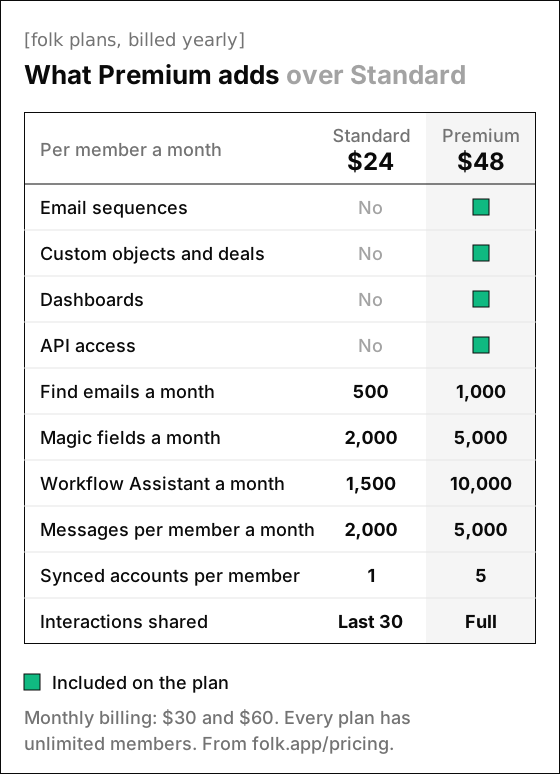
- Email sequences, custom objects, dashboards and API access start on Premium, at $48 per member a month billed yearly, or $60 monthly.
- Sequences send email only, with up to 10 steps, and folk's sequence help article says replies land in your own email inbox, outside folk's messaging inbox.
- A sequence needs credits for every step before it starts, so folk's own example of 3 steps to 200 contacts takes 600 credits.
- folkX saves profiles, adds notes and tasks, syncs LinkedIn conversations into folk and fills in your message templates on LinkedIn. We didn't find automated invitations or LinkedIn steps in sequences on its pages, its plans or its help center.
- Standard syncs 1 account per member and shares only the last 30 interactions with teammates, while Premium shares the full history.
The 8 best folk CRM alternatives in 2026
Each pick below matches one reason for leaving.

1. Omniscient
Omniscient is a CRM and LinkedIn outreach software that fills in your records from email, calendar and call transcripts, and sends only the messages your team approves. Otto, our AI agent, drafts those messages and the follow up emails you send after a call.
Where folkX saves a profile for you to write to later, an Omniscient campaign does the sending. You arrange its LinkedIn steps yourself:
- A connection request goes out with or without a note, and you can withdraw one that isn't accepted within the days you set.
- Messages go only to people who are already connections, with as many days as you choose between them.
- A step can also view the person's profile or like their latest post.
You approve each person's messages, or the whole campaign at launch, and editing a message after approval clears it. Scout finds people from a sentence that describes who you want. It scores each one out of 100, with up to 60 for fit and up to 40 for signals that now is a good time.
LinkedIn's invitation limit page says a restriction "typically lasts one week" but gives no number for the limit itself. So at the Normal pace, which aims for 15 invitations a day and 80 a week, each sender works like this:
- A new sender starts at 5 invitations a day and adds 2 a day until it reaches the limit.
- Each day's total lands somewhere between 80% and 100% of that limit.
- It sends inside the sender's working hours, with a lunch break and random gaps of 3 to 12 minutes.
- By default, it views the profile 1 to 4 hours before sending the invitation.
- It drops to half pace when LinkedIn rate limits the account, or when fewer than 1 in 5 of a week's 20 or more invitations are accepted. After 3 days, it eases back to full pace over 3 more.
The tradeoff we accepted is speed, since a brand new sender sends 5 invitations on its first day and only reaches 15 on its sixth.
Replies land in one Inbox with the person's CRM record beside each thread, and a reply stops that person's outreach in every campaign. For email, each inbox owner picks what teammates see: everything, only that a conversation happened, or nothing.
Fields filled with proof start on Pro, where Otto proposes each value with its quote. An automatic field fills itself only when it's empty and he's at least 85% sure, and a value your team typed is never changed.
Admittedly, Omniscient is narrower than folk in a few places. We have no mobile app or browser extension like folkX, and our campaigns send on LinkedIn only, with no email steps. If you save profiles by hand and follow up mostly by email, folk Premium or Salesflare Pro will suit you better.
Paid seats start at $19 per seat a month billed yearly, Pro costs $49, and teammates who only view or log data are free. The trial lasts 14 days with no credit card, and the Outbound LinkedIn page and the CRM page show the rest.
2. Attio
Attio is a CRM software that builds records from your email and calendar and lets you shape the data model around how your business works. Its homepage also lists a web agent that researches for you and enrichment for every record.
- Free covers up to 3 seats, with 3 objects and 200 emails a month.
- Plus costs $35 per user a month billed yearly, or $44 monthly, for up to 10 seats and 5 objects.
- Pro costs $79, or $99 monthly, and adds sequences and Call Intelligence with up to 12 objects.
- The trial gives you 14 days of Pro, and eligible startups can get up to 80% off.
Attio suits a team whose data no longer fits people and deals, like an agency that tracks projects or a fund that tracks investors. If email sequences are why you're leaving folk, plan on Pro, and our Attio alternatives guide shows where its other limits sit.
3. HubSpot
HubSpot is a customer platform software that puts marketing, sales and service tools on one CRM. Its free plan covers up to 2 users with no credit card.
- Sales Hub Starter starts at $7 per seat a month with 500 HubSpot Credits. The page also shows $20 and doesn't say which billing each price is for.
- Sequences start on Professional, according to HubSpot's send limits article, and a Professional seat can send up to 500 sequence emails a day.
- Professional starts at $90 per seat a month with 3,000 HubSpot Credits, plus a required $1,500 onboarding fee you pay once.
Thankfully, you can try the free plan with a copy of your folk contacts before you pay for anything.
4. Salesflare
Salesflare is a CRM software for B2B teams that fills itself in from your inbox, email signatures and calendar. Fittingly, its headline reads "The CRM that keeps itself up to date."
- Growth costs $29 per user a month billed yearly, or $39 monthly, with a LinkedIn sidebar, an email sidebar and the mobile app.
- Growth also sends personalized email campaigns and tracks emails and website visits.
- Workflows of several emails start on Pro, at $49 billed yearly or $64 monthly, along with permissions and custom dashboards.
- The trial lasts 30 days with no credit card.
Salesflare is the closest swap for a folk user who wants automatic data capture and email follow ups from one tool. Its pricing page doesn't say whether LinkedIn messages sync into the CRM, so test that during the trial.
5. Pipedrive
Pipedrive is a sales pipeline CRM software that helps small businesses track leads and close deals. Its AI Sales Assistant predicts which deals you're likely to win or lose and suggests which leads to pursue.
- Nova, its meeting intelligence, writes a brief before each call, records and transcribes it, and drafts CRM updates for you to approve.
- The homepage says Nova "is included in all plans, at no additional cost."
- The plans are Lite, Growth, Premium and Ultimate, according to Pipedrive's pricing help article.
- The free trial lasts 14 days with no credit card.
- Its pricing page didn't load for us on November 3, so check today's prices there.
Pipedrive suits a team that wants its week organized by deal stages more than by relationships. Interestingly, Nova's CRM updates wait for your approval, which is the same choice we made for the values Otto suggests in Omniscient.
6. Copper
Copper is a CRM software for service businesses that sell through relationships, built to work inside Google Workspace. You can add leads, track conversations, find files and manage tasks from Gmail and Google Calendar.
- Basic costs $23 per seat a month billed yearly, or $29 monthly, with up to 2,500 contacts, pipelines and contact enrichment.
- Professional costs $59, or $69 monthly, with 15,000 contacts, workflow automation, bulk email and reporting.
- Email series start on Business, at $99 billed yearly or $134 monthly, with unlimited contacts.
- You can start free with no credit card.
Copper names agencies and consulting firms among the businesses it's built for. Watch the 2,500 contact limit on Basic if your folk workspace holds a big network.
7. Nimble
Nimble is a relationship CRM software for small teams that syncs your email, contacts and calendars from Microsoft or Google. Its homepage says "AI does the busywork," and its Prospector finds and enriches leads on LinkedIn and other websites.
- The one plan costs $24.90 per seat a month billed yearly, or $29.90 monthly, with 25,000 contact records for the account.
- Another 10,000 records cost $10 a month, and email marketing is a $15 monthly upgrade for the whole company.
- The trial lasts 14 days with no credit card, for up to 5 licenses.
Luckily for a small budget, Nimble has a single plan, so everyone on the team gets the same features. It also lists email sequences sent from your own address, but the pricing page doesn't say whether the plan includes them.
8. Dex
Dex is a personal CRM software that helps you organize your contacts and stay in touch with the people you know. It pulls contacts from more than 15 sources into one list, and its reminders tell you when to get back in touch.
- Premium costs $12 a month billed yearly, or $20 monthly, and syncs up to 2,500 LinkedIn connections.
- Professional costs $20, or $34 monthly, syncs up to 9,000 connections and adds mail merge and the Outlook integration.
- Team costs $40 per user a month billed monthly, and adds CRM integrations and SAML SSO.
- The trial on Premium and Professional lasts 6 days, and Dex asks for a card up front.
Personally, we'd point a founder to Dex when folk was mostly a place to remember investors and advisors. For a pipeline with deals and stages, one of the CRMs above will fit better.
folk alternatives compared
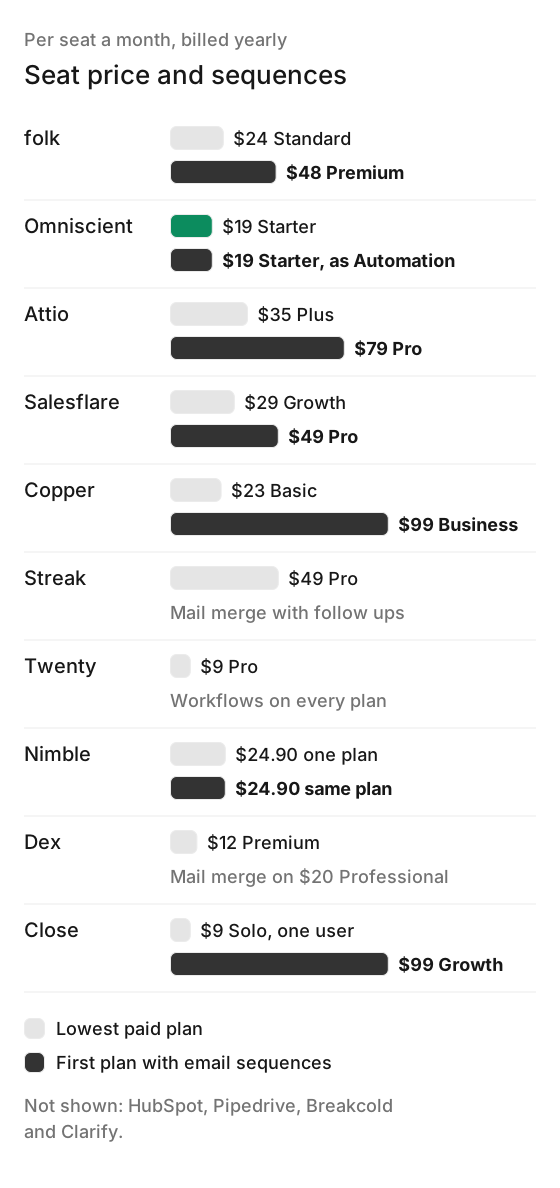
For each tool with a yearly price per seat, the chart shows the lowest paid plan and the first plan with email sequences.
Past the seat price, these differences sort the list fastest:
| CRM | Free plan | Free trial | Email sequences start on |
|---|---|---|---|
| folk | Not listed | 2 weeks, no card | Premium |
| Omniscient | No, but teammates who view or log data are free | 14 days, no card | No email sequences |
| Attio | Up to 3 seats | 14 days of Pro | Pro |
| HubSpot | Up to 2 users | Not listed, use the free plan | Professional |
| Salesflare | Not listed | 30 days, no card | Pro |
| Pipedrive | check | 14 days, no card | check |
| Copper | Not listed | Start free, no card | Business |
| Nimble | Not listed | 14 days, no card | check |
| Dex | Not listed | 6 days, card needed | Not listed |
How to move from folk to another CRM
folk's export help article says you export one group at a time, with "Export view as CSV" under the three dots by the view name. Each export is a zip with a contacts file and a notes file. Interactions, tasks and a few fields stay behind, so read the article's list before you start.
Here's the order we'd follow, with Omniscient as the example:
- 01Show every column first
folk's export follows the columns and filters in the view, so display every field you want before you export each group.
- 02Connect your inbox and calendar
Add Gmail or Outlook to the new CRM while folk keeps running, so the timeline starts filling.
- 03Import companies first
Bring them in with their domains, so Omniscient can put each imported person on the company that matches their email domain.
- 04Import people
Match each CSV column to a field, and keep in mind that rows without a valid email address are skipped.
- 05Rebuild open deals
Recreate them as opportunities, and keep folk's notes file next to them for reference.
- 06Give LinkedIn a slow start
A new Omniscient sender begins at 5 invitations a day and adds 2 a day, and a request waits up to 14 days for acceptance by default, so give your first campaign two weeks before you judge it.
Omniscient's CSV import takes people or companies, where people need an email address and companies need a domain. Fortunately, a record already in your workspace is matched on those and filled in, without overwriting anything your team set.
Existing records with the same email get filled in. Nothing you set gets overwritten.
312 rows found. Match each column to a field:
If none of these eight fit, our guide to the best CRM for LinkedIn covers a few more. Our post on the LinkedIn connection request limit compares what LinkedIn's help pages say with the caps we chose for our own sending engine.
Questions about folk alternatives
What is the best folk CRM alternative?
That depends on why you're leaving folk. Omniscient fits teams that want LinkedIn outreach sent for them, Salesflare fits teams that want email workflows, and Attio fits teams that want to design their own objects.
Is there a cheaper alternative to folk?
Yes, folk Standard costs $24 per member a month billed yearly, and several tools start lower. Dex starts at $12 a month, Omniscient at $19 per seat and Copper at $23 per seat, all billed yearly, and HubSpot and Attio have free plans.
Does folk automate LinkedIn outreach?
folkX saves LinkedIn profiles and lists, syncs LinkedIn conversations into folk and fills in message templates on LinkedIn. Its sequences send email only, and we didn't find automated LinkedIn invitations on its pricing page, folkX page or help center.
Which folk plan includes email sequences?
Premium, at $48 per member a month billed yearly or $60 monthly. Premium also adds custom objects, dashboards and API access.
Can I move my contacts from folk to Omniscient?
Yes. Export each folk group as a CSV, then import it as people in Omniscient, where each row is matched on its email address.