Best LinkedIn Helper Alternatives in 2026
On this page
- What Linked Helper does well
- Why people look for a Linked Helper alternative
- Desktop or cloud: the choice behind every Linked Helper alternative
- Linked Helper's safety settings next to ours
- The 7 best Linked Helper alternatives in 2026
- LinkedIn Helper alternatives compared
- How to switch from Linked Helper without risking your account
- Questions about Linked Helper alternatives
Linked Helper is a LinkedIn automation software that runs as a desktop app on your own computer, or on a server you rent. Plenty of people search for it as "LinkedIn Helper," so if you're comparing LinkedIn Helper alternatives, this guide covers the same tool.
You probably like its low price per account and its long list of LinkedIn actions. You might be looking anyway because the computer has to stay on, or because your team has outgrown one person's desktop.
We build the LinkedIn sending engine inside Omniscient, so we had to decide where our own sending runs. This guide sorts every alternative by that same choice, with Linked Helper's own pages open next to our engine's settings.
| Tool | What it is | Starting price | Best for |
|---|---|---|---|
 Omniscient | LinkedIn outreach you approve, inside a CRM that fills itself in | $19 per seat a month, billed yearly | Small B2B teams that want outreach and CRM together |
| LinkedIn automation as a desktop app or in the cloud | $55 per seat a month | Linked Helper users who want a cloud option | |
| Simple cloud LinkedIn outreach with monthly invitation quotas | €19 per user a month, billed yearly | Founders doing outreach on their own | |
| Cloud drip campaigns with LinkedIn and email steps | $79 per user a month | Small teams that want email in the same sequence | |
| Cloud LinkedIn sequences with a dedicated IP in your country | $99 a month | Teams that want the warmup done for them | |
| LinkedIn outreach from many accounts with one unified inbox | $79 per sender a month | Agencies with many client senders | |
| Multichannel sequences on LinkedIn, email, calls and X | €60 per identity a month, billed yearly | Reps who call as often as they message |
What Linked Helper does well
Here's what Linked Helper's pricing page and homepage list today, which is what you'd leave behind:
- Standard with local data storage costs $15 per LinkedIn account a month on a monthly term, and a 12 month term takes 45% off.
- It covers InMails, endorsements and invitations to events, groups and company pages, on free accounts as well as Sales Navigator and Recruiter.
- A built in CRM keeps tags, notes and custom fields on each contact, and native integrations include HubSpot, Salesforce, Pipedrive, Zoho CRM and Close.
- Its AI drafts wait in a queue so you can review and edit them before they send.
- The trial gives 14 days of full Pro access with no card, and nothing renews on its own.
Honestly, that's a lot of tool for $15 per account a month. If your computer is on all day anyway and one person runs outreach, staying with Linked Helper is a fair choice.
Why people look for a Linked Helper alternative
Each reason below comes from Linked Helper's own pages:
- The machine has to be on with the app running to send, and its FAQ says that's true "on either version." For sending around the clock, it suggests renting a VPS, which you pay for separately.
- Local storage keeps your data on one device, so a teammate or a second laptop needs Cloud storage, listed from $16.50 a month against $8.25 for Local. An existing workspace can't move between the two yet.
- Standard caps advanced actions such as event invitations and sending contacts to your CRM at 20 a day, and a Standard license can move to Pro only after it expires.
- We didn't find email steps on its pages, and its email finder hands addresses to a cold email tool such as Instantly.
- Safety setup is left to you, including binding a proxy to each profile and ramping up a new account by hand.
Desktop or cloud: the choice behind every Linked Helper alternative
Linked Helper and STACKED Local send from a machine you keep on, and the rest, ours included, send from the vendor's servers.
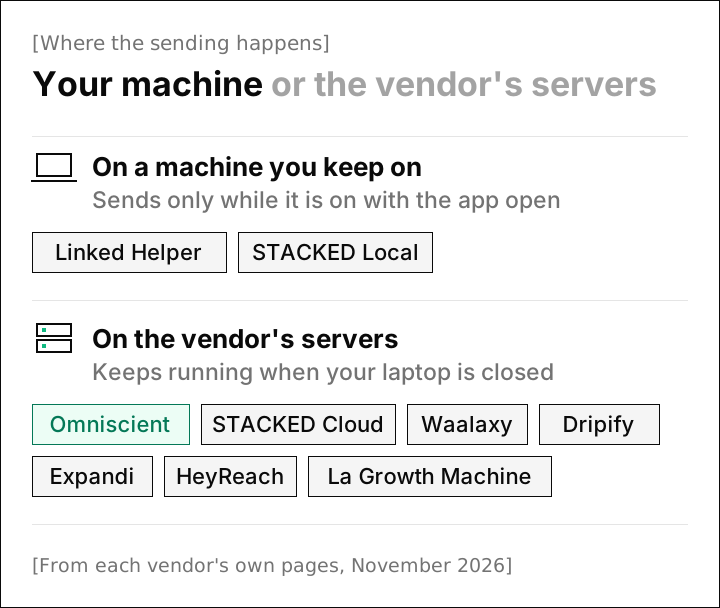
We see the trade like this:
| On your machine | On the vendor's servers | |
|---|---|---|
| Sends with your laptop closed | Only from a VPS you rent and keep running | Yes |
| The network LinkedIn sees | Your own connection, or a proxy you bind to each profile | The vendor's, such as a dedicated IP on Dripify and Expandi |
| Where your LinkedIn session lives | On your machine, and Linked Helper says "never on our servers" | With the vendor, since it acts for you |
| Who keeps it running | You, including restarts and updates | The vendor |
For us, the first row settled it, because our engine sends inside your working hours with a lunch break and random gaps between actions. A laptop asleep in a bag can't keep that plan, so our engine runs in the cloud.
The trade we accepted is the network: desktop tools send from your own connection, while Omniscient sends from the cloud without a dedicated IP. If keeping every action on your own network matters most to you, Linked Helper or STACKED Local is the closer fit.
Linked Helper's safety settings next to ours
Thankfully, Linked Helper's safety kit page gives its defaults as real numbers, so we could set them next to our engine's:
| Setting | Linked Helper, from its own pages | Omniscient, from our engine |
|---|---|---|
| Daily ceiling | 150 actions over a rolling 24 hours by default, with separate limits for each action | 15 invitations a day at the Normal pace, with settings that stop at 40 a day and 200 a week |
| Between actions | Hourly caps you set, such as 6 actions an hour, plus random pauses inside every step | Random gaps of 3 to 12 minutes at the Normal pace |
| Day to day totals | Varied on their own, like 36, 40 and 32 invites on three days | Between 80% and 100% of your limit, drawn fresh each day |
| Working hours | Your target time zone's business hours, plus random offsets you add to launch times | Your hours, with the start and end moving by up to 20 minutes each day and a 30 to 60 minute lunch |
| A new account | 10 to 15 actions a day for two weeks, then 5 to 10 more every 10 to 14 days | Starts at 5 invitations a day and adds 2 a day, and starts over after a reconnect or a restriction |
| Slowing down | After a warning, rest the account by hand for a few days, then send about 10 connection requests a day | Half pace for 3 days after a LinkedIn rate limit, or when under 20% of a week's invitations are accepted once 20 have gone out, then back to full over 3 days |
Interestingly, the two columns agree more than they differ, and the biggest gap is who does the work: Linked Helper hands you clear guidance, and our engine applies similar rules by itself.
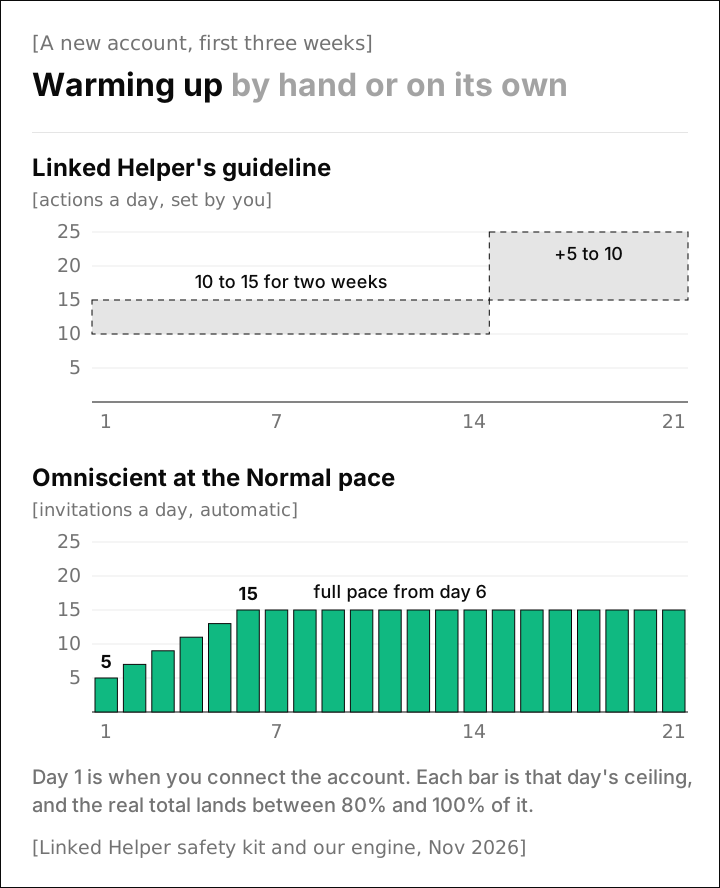
Linked Helper's guideline counts all actions and ours counts invitations, so compare the shape of each ramp.
LinkedIn doesn't publish an exact invitation limit. Its help page says only that an account that reaches it "may be temporarily restricted from sending invitations," and that this "typically lasts one week." Every number above is a vendor's own ceiling, ours included, and our guide to the LinkedIn connection request limit explains where the common ones come from.
The 7 best Linked Helper alternatives in 2026
1. Omniscient
Omniscient is a CRM and LinkedIn outreach software that drafts a message for each lead and sends only what your team approves. It keeps sending with your laptop closed, and each CRM record fills in from your email and calendar. A LinkedIn reply then sits beside your emails and meetings with that person.
Every campaign follows these rules:
- A new account warms up from 5 invitations a day, and a profile view goes out 1 to 4 hours before each invitation unless you switch it off.
- A reply stops that person's outreach in every campaign, and a person can be in only one live campaign at a time.
- You approve each person's messages, or everyone ready at once when you go live, and editing a message after approval clears that approval.
- Otto, our agent, writes versions of your own pitch and holds any version that adds a claim you didn't make, such as a number or a result.
 Your LinkedIn accountSends from this account
Connected
Admittedly, Omniscient covers far fewer actions than Linked Helper: sequences use connection requests, messages, profile views and likes, with no InMails, groups, events or email steps. If you need those, Linked Helper or STACKED will suit you better.
With one LinkedIn account per campaign and no white label, an agency running many client senders is better served by HeyReach.
Paid seats start at $19 per seat a month, billed yearly, and monthly billing costs 20% more. The free trial lasts 14 days with no credit card, and the LinkedIn Outbound and CRM pages cover the rest.
2. STACKED by Dux-Soup
STACKED is a LinkedIn automation software, powered by Dux-Soup, that runs either as a desktop app on your own machine or on its own servers. Its pricing page calls it "One product, two ways to run it," which makes it the closest match to Linked Helper on this list.
- Local costs $55 per seat a month, or $41.25 billed yearly, and runs as a desktop app for Mac and Windows.
- Cloud costs $99 per seat a month, or $74.17 billed yearly, and "runs continuously, no need to keep a machine on."
- Both include unlimited concurrent campaigns with up to 12 actions, such as InMails and endorsements, and reply detection that pauses a campaign.
- Native integrations include Salesforce, Pipedrive, HubSpot and Slack, with Zapier and Make libraries.
A STACKED seat costs more than a Linked Helper license, so it fits when running in the cloud matters more to you than the lowest price. Its pricing page doesn't state a trial length, so ask before you plan a test.
3. Waalaxy
Waalaxy is a LinkedIn outreach software that sends invitations and follow ups from the cloud, with monthly invitation quotas on every plan. Pro costs €19 per user a month, billed yearly, for 300 invitations a month, and Advanced costs €49 for 800.
- Business, at €69, adds cold email sequences and 500 email finder credits a month.
- Its inbox is an optional add-on at €20 a month.
- Every plan lists CRM sync and a 14 day free trial.
- Its help center says Waalaxy is "now 100% cloud" and the Chrome extension is gone.
Happily, a fixed monthly quota keeps a beginner's volume modest from the first day. If Linked Helper's settings felt like more than you need, Waalaxy is the simplest cloud tool here, though email waits for Business.
4. Dripify
Dripify is a LinkedIn automation software that runs drip campaigns of LinkedIn and email steps on its own servers. Pro costs $79 per user a month, or $59 billed yearly, and Advanced costs $99, or $79 billed yearly.
- Every plan includes email steps and 100 email finder credits a month, so a found address stays in the same sequence.
- Its FAQ lists a dedicated IP "tied to your account, in your location," and says nothing depends on "your machine being on."
- Each seat connects one LinkedIn account, and Pro lists a HubSpot integration.
- The free trial lasts 7 days with no card.
Email in the same sequence is the main reason to pick Dripify over Linked Helper. Its plans allow up to 75 connection requests a day, so we'd keep your daily setting well below that.
5. Expandi
Expandi is a LinkedIn automation software that runs outreach sequences on its own servers, with a dedicated IP address based in your country. Business costs $99 a month, or $79 billed yearly, and includes an automatic profile warmup.
- Sequences mix connection requests, messages and email follow ups, with If/Action conditions.
- Its integrations page lists native HubSpot, Salesforce and Pipedrive integrations, plus webhooks, Zapier and an API.
- The Agency plan starts at 10 seats, is priced through sales and adds white label use.
- The free trial lasts 7 days.
Expandi suits you if you want the warmup and a dedicated IP handled for you, with no server to rent.
6. HeyReach
HeyReach is a LinkedIn automation software that runs outreach from many LinkedIn accounts at once, with every reply in one unified inbox. Growth costs $79 per sender a month, or $64 billed yearly, and its FAQ says the per sender plan gives each sender a dedicated residential proxy.
- Agency costs $999 a month for 25 senders, adds white label and asks you to bring your own proxies.
- Email runs through native Instantly and Smartlead integrations.
- The free trial lasts 14 days with no card and up to 3 LinkedIn accounts.
For an agency, one flat price covers 25 cloud senders, and our guide to LinkedIn automation tools for agencies compares the agency plans.
7. La Growth Machine
La Growth Machine is a sales automation software that runs multichannel sequences on LinkedIn, email, calls and X. Billed yearly, Basic costs €60 per identity a month for LinkedIn and email, and Pro at €120 adds calls and one inbox for both.
- An identity is one profile running campaigns, and you don't need one to answer replies.
- The Ultimate plan adds X and a native HubSpot and Pipedrive sync.
- The free trial lasts 14 days with no card and covers 1 identity.
Frankly, we'd look here first if your reps call as often as they message, since Linked Helper's sequences stay on LinkedIn.
LinkedIn Helper alternatives compared
Side by side, this is where each tool sends from and what it bills for:
| Tool | Sends from | Billed per | Steps besides LinkedIn |
|---|---|---|---|
| Linked Helper | Your computer, or a VPS you rent | LinkedIn account | None found (emails go to another tool) |
| Omniscient | Cloud | Seat | None |
| STACKED by Dux-Soup | Your computer, or its cloud | Seat | None listed |
| Waalaxy | Cloud | User | Email on Business |
| Dripify | Cloud, with a dedicated IP | User, one LinkedIn account each | |
| Expandi | Cloud, with a dedicated IP in your country | Seat | |
| HeyReach | Cloud, with a residential proxy on Growth | Sender, or flat on Agency | Email through Instantly or Smartlead |
| La Growth Machine | Cloud | Identity | Email, plus calls on Pro and X on Ultimate |
Your reason for leaving narrows the list quickly:
- If the computer that has to stay on is the problem, STACKED Cloud is the nearest like for like, and Expandi or Dripify add a dedicated IP.
- If your team needs replies and deals in one shared place, Omniscient keeps the outreach inside the CRM.
- If you want email in the same sequence, Dripify includes it on every plan, and La Growth Machine adds calls.
- If you run outreach for clients, HeyReach's Agency plan covers 25 senders with white label.
How to switch from Linked Helper without risking your account
Your LinkedIn account carries its pending invitations and recent activity into the new tool, so the first week needs the most care. Here's the order we'd follow:
- 01Close Linked Helper before the new tool starts
Its safety page says LinkedIn flags a session used "from multiple locations" at once, so never run both on one account.
- 02Export what you've built
Download your contacts to CSV, plus your messaging history if you're on Pro, so the new tool can skip people who already heard from you.
- 03Load your do not contact list
Add current customers and anyone who asked not to hear from you before the first campaign.
- 04Withdraw only invitations you've given up on
LinkedIn says you can't invite the same person again for up to three weeks after a withdrawal.
- 05Restart slower than you ended
Treat the first week like a warmup even on an old account, and raise limits only while acceptance stays above 20%, the line where our own engine slows down.
- 06Test the reply path
Ask a colleague to answer a test message and check that it lands where your team works.
Fortunately, our engine covers part of step 2 on its own. It checks the relationship on LinkedIn before every invitation, so someone still holding your old Linked Helper invitation isn't sent a second one.
LinkedIn's page on invitation restrictions names invitations "ignored, left pending, or marked as spam" as one cause and suspected automation as another, which applies to every tool here, ours included. Our guide to the safest LinkedIn automation tools covers what else to check.
Questions about Linked Helper alternatives
What is the best alternative to Linked Helper?
It depends on why you're leaving. Omniscient fits small teams that want outreach and a CRM together, and HeyReach suits agencies with many senders. STACKED by Dux-Soup is the closest match if you'd like a desktop and a cloud option.
Is LinkedIn Helper the same as Linked Helper?
Yes. The product's name is Linked Helper, and many people search for it as LinkedIn Helper. Its site also says it "is neither an official product of LinkedIn nor affiliated with LinkedIn Corporation."
Is there a cheaper alternative to Linked Helper?
Not among the tools in this guide, since Linked Helper's Standard plan starts at $15 per LinkedIn account a month. The cheapest cloud tools here start at €19 per user a month for Waalaxy and $19 per seat a month for Omniscient, both billed yearly.
Is Linked Helper safe to use?
Linked Helper keeps your session on your own machine and lets you set limits, hourly pacing and a proxy for each profile. Its homepage also says these measures "cannot eliminate the risk of LinkedIn restrictions," which holds for every tool here, ours included.