Best CRM With LinkedIn Integration in 2026
On this page
- What a CRM with LinkedIn integration does
- How we compared these CRMs
- What we learned connecting LinkedIn to a CRM
- The 8 best CRMs with LinkedIn integration in 2026
- Sales Navigator plans for CRM integration
- CRMs with LinkedIn integration compared
- Adding LinkedIn to Pipedrive or Attio
- How to choose a CRM with LinkedIn integration
- Questions about CRMs with LinkedIn integration
You want the people you talk to on LinkedIn to show up in your CRM with the conversation attached, so your team stops copying replies into notes. Every vendor below sells a CRM with LinkedIn integration, and the phrase means something different in each one.
We build Omniscient, a CRM with LinkedIn outreach inside it, so we had to decide how LinkedIn messages reach CRM records. Below are the eight CRMs we'd compare in 2026, with today's prices and the LinkedIn plan each one needs.
If you're short on time, here's where we'd start:
- Pick Omniscient if you want LinkedIn conversations and outreach you approve in a CRM that fills itself in.
- Pick HubSpot or Salesforce if your reps work in Sales Navigator Advanced Plus and you want that activity logged.
- Pick Microsoft Dynamics 365 Sales if you'd rather buy the CRM and Sales Navigator together.
- Pick Zoho CRM if you pay for Advanced Plus and want a low CRM price.
- Pick Breakcold if you write LinkedIn messages yourself and want every thread on the deal.
- Pick folk if you mainly save LinkedIn profiles and lists into a simple CRM.
- Pick NetHunt CRM if you sell from Gmail and want email and LinkedIn steps in one sequence.
| Tool | What it is | Starting price | Best for |
|---|---|---|---|
 Omniscient | A CRM that fills itself in, with a LinkedIn inbox and approved outreach | $19 per seat a month, billed yearly | Small B2B teams that sell on LinkedIn |
 HubSpot | A CRM platform with two apps for Sales Navigator | From $90 per seat a month on Sales Hub Professional | HubSpot teams with Advanced Plus seats |
 Salesforce | A CRM platform that syncs with Sales Navigator | $25 per user a month, though LinkedIn's sync needs a higher edition | Larger teams with a Salesforce admin |
| Microsoft's sales CRM, also sold bundled with Sales Navigator | $65 per user a month, billed yearly | Companies that run on Microsoft | |
| A sales CRM with a Sales Navigator extension for its records | $14 per user a month, billed yearly | Budget teams with Advanced Plus | |
| A CRM that syncs LinkedIn threads to each deal | $99 a month | Founders who write LinkedIn messages themselves | |
| A simple CRM whose folkX extension saves LinkedIn profiles and lists | $24 per member a month, billed yearly | Small teams that prospect by hand | |
| A CRM inside Gmail with email and LinkedIn steps in one sequence | $60 per user a month on Business | Teams that sell from Gmail |
What a CRM with LinkedIn integration does
A CRM with LinkedIn integration brings LinkedIn people, profiles or conversations into your CRM records. Reading the vendors' pages side by side, we found four kinds, which differ in what reaches the record and which LinkedIn plan you need.
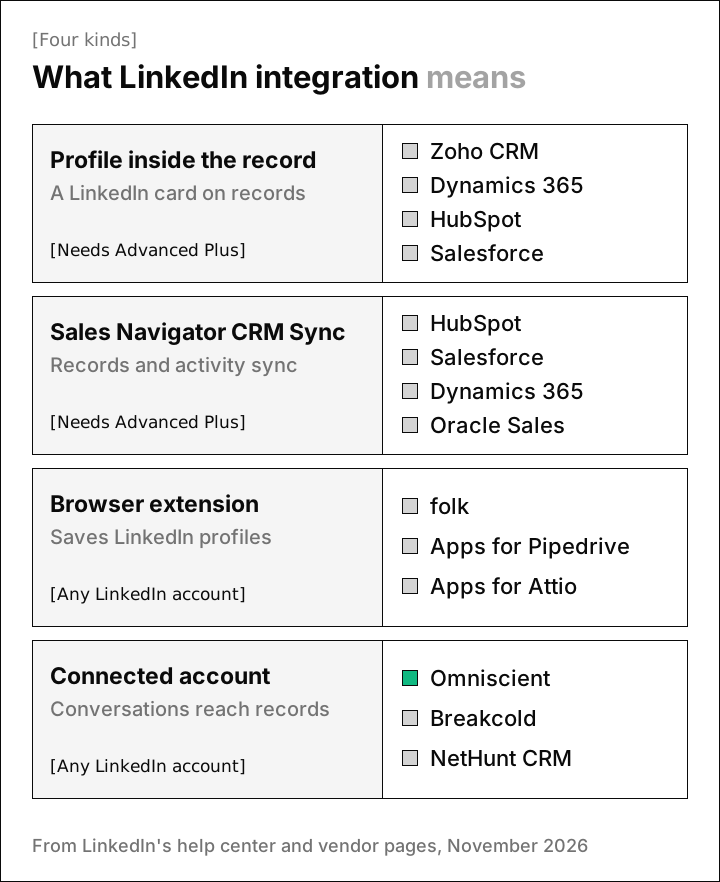
- A profile inside the record puts a Sales Navigator card with the person's headline and shared connections on the record, and you still write messages in Sales Navigator.
- Sales Navigator CRM Sync shows your CRM's accounts, contacts and leads in Sales Navigator and writes the activity you choose back to the CRM.
- A browser extension adds a button to LinkedIn profiles that saves the person to your CRM, while the conversation usually stays in LinkedIn.
- With a connected LinkedIn account, you sign in once and the CRM reads your conversations onto records. Some of these CRMs can also send for you.
The first two need Sales Navigator Advanced Plus, LinkedIn's top plan, which is priced by quote. The other two work with an ordinary LinkedIn account, and both rely on software from outside LinkedIn, which LinkedIn's rules restrict.
How we compared these CRMs
We read each CRM's pricing and help pages, plus LinkedIn's help center, and asked the questions we had to answer when we connected LinkedIn to our own CRM:
- Does a LinkedIn contact become one record, or a second copy of someone you already have?
- Do the messages you send and receive reach the record on their own?
- Can the CRM send invitations and messages, and who approves what goes out?
- Which LinkedIn plan does the integration need?
Honestly, any tool that touches your LinkedIn account from outside LinkedIn carries some risk, ours included. LinkedIn's prohibited software page rules out third party "browser extensions that scrape, modify the appearance of, or automate activity on LinkedIn's website." It says members who use such tools risk having their accounts restricted or shut down.
What we learned connecting LinkedIn to a CRM
The kind of integration decides where a LinkedIn reply ends up. A reply that stays in LinkedIn has to be copied by someone, and a synced reply has to find the right record on its own.
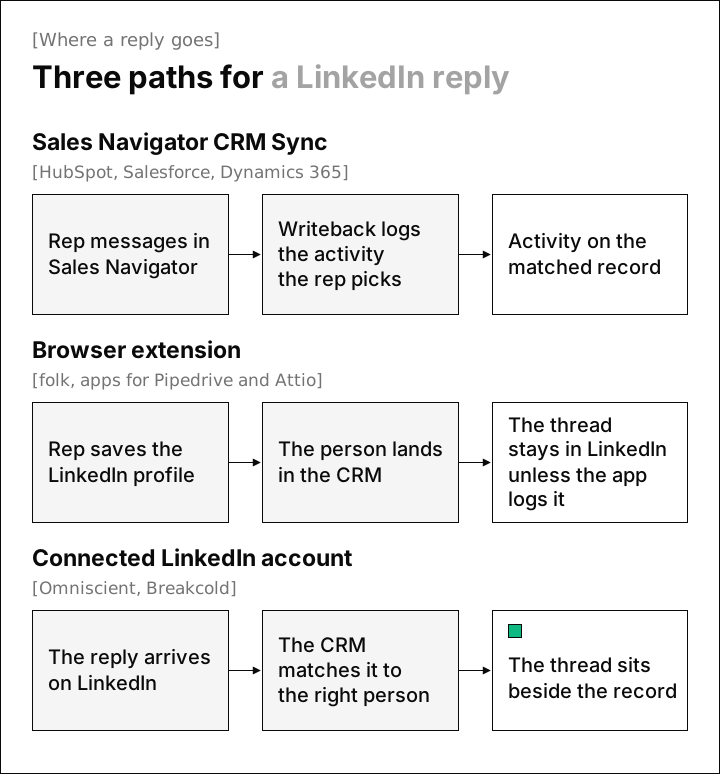
In Omniscient, most of the hard decisions were about which record each message belongs to. Here are the rules we settled on, which make good questions for any vendor:
- A message is matched to a person by LinkedIn member ID or by LinkedIn address. We check both because members can change their custom profile URL.
- We never match people by name, since two people can share one.
- A thread with no match still shows in the Inbox, marked "Not linked to a CRM person yet," and it never creates a CRM person on its own.
- Messages you type on LinkedIn itself are saved to the same thread, so the conversation keeps both sides.
- A reply stops that person's outreach in every campaign, and a reply Otto reads as not interested or an opt out keeps them out of later campaigns.
Surprisingly, the hardest call was what to do with messages from people who aren't in the CRM at all. Every LinkedIn inbox also holds notes from friends and former colleagues, and a CRM that turns each one into a contact gets harder to trust.
The 8 best CRMs with LinkedIn integration in 2026
1. Omniscient
Omniscient is a sales CRM that fills each record in from your email and calendar and keeps your LinkedIn messages in an Inbox beside those records. You click Connect LinkedIn and sign in to LinkedIn once, with no browser extension to install.
 LinkedIn senders
 Rina SatoCo-founder & CEO, Pallet Cloud
- Every message on a connected account lands in the Inbox, matched to the CRM person by LinkedIn member ID or address.
- The details panel shows the person's company, the Scout search that found them, their campaign progress and their company's opportunities.
- Suggest a reply has Otto, our AI agent, write an answer into the box, and nothing goes out until you press Send reply.
- Create opportunity turns a reply into a deal at the stage you pick.
On the outreach side, Scout builds lead lists from a sentence you type, and Otto drafts each person's messages. Your team approves them one person at a time or all at once when the campaign goes live. Sending runs inside working hours with random gaps and a warm up from 5 invitations a day, as we describe in how to automate LinkedIn outreach without getting restricted.
Admittedly, Omniscient isn't one of LinkedIn's Sales Navigator partners, so it has no Sales Navigator card or CRM Sync. A team built around Advanced Plus will get more from HubSpot, Salesforce or Dynamics 365, and a team that needs email sequences should look at NetHunt CRM.
Paid seats start at $19 per seat a month, billed yearly, and Pro, at $49, adds the pipeline board and forecast. Teammates who only view or log data are free, and the trial lasts 14 days with no credit card. The CRM and LinkedIn Outbound pages show both halves.
2. HubSpot
HubSpot is a CRM platform whose Sales Hub has two LinkedIn apps for teams on Sales Navigator. Both need a Sales Hub Professional or Enterprise seat and a Sales Navigator Advanced Plus account for each user.
- The Sales Navigator integration adds a LinkedIn card to contact and company records.
- You can send InMail from a record, though HubSpot says "the conversation will not automatically save to the record's timeline."
- Sequences can remind a rep to send an InMail or connection request on LinkedIn.
- The LinkedIn CRM Sync app logs Sales Navigator activity to HubSpot and creates or updates contacts from Sales Navigator.
HubSpot's free CRM covers up to 2 users without these apps, and Sales Hub Professional starts at $90 per seat a month plus a one time $1,500 onboarding fee. Thankfully, both apps work on the records reps already use, so HubSpot fits best when Advanced Plus seats are paid for.
3. Salesforce
Salesforce is a CRM platform that brings customer data and AI agents together. LinkedIn's integration overview lists it for CRM Sync, embedded profiles and embedded experiences, all on Advanced Plus.
- CRM Sync brings your Salesforce records into Sales Navigator, and optional writeback sends selected activity back.
- LinkedIn's admin guide names the Enterprise, Performance, Unlimited and Developer editions, and says Professional needs API Access and Chatter turned on, which might cost extra.
Starter Suite costs $25 per user a month, Pro Suite costs $100 billed yearly, and Sales Cloud's Core edition costs $195 billed yearly. Salesforce's pricing page names its plans differently from LinkedIn's guide, so ask Salesforce which one meets LinkedIn's list before you buy seats.
Salesforce suits a team with an admin, since someone has to install LinkedIn's app package and give each rep a permission set.
4. Microsoft Dynamics 365 Sales
Microsoft Dynamics 365 Sales is a sales CRM from Microsoft, which owns LinkedIn, and it's the only CRM here sold in a bundle with Sales Navigator. That bundle, Microsoft Relationship Sales, combines Sales Enterprise with Sales Navigator Advanced Plus.
- Microsoft's setup docs say you need Relationship Sales or an Advanced Plus license to use Sales Navigator inside Dynamics 365.
- A Lead control on any form shows the person's top card, icebreakers, mutual connections and related leads.
- Features that add records to the CRM, such as Add to CRM, need CRM Sync turned on.
Sales Professional costs $65 per user a month, billed yearly, and Relationship Sales is priced by quote with a 10 seat minimum. Fortunately, Microsoft's docs say the Sales Navigator solution also works in the Sales Professional app, though each rep still needs Advanced Plus.
5. Zoho CRM
Zoho CRM is a sales CRM that helps teams manage leads and pipelines, and its Sales Navigator extension puts LinkedIn profiles on Zoho records.
- Profiles show on the pages of leads, contacts, accounts and deals.
- You can push records to Sales Navigator, and the Connect option sends an invitation from Zoho.
- The Message option opens Sales Navigator's inbox, and Zoho's help page doesn't say the InMail is saved to the record.
- Zoho's help article lists Advanced Plus as the edition it needs, and only administrators can install it.
The Free plan covers 3 users, and Standard costs $14 per user a month billed yearly or $20 monthly. LinkedIn's overview doesn't list Zoho, so ask Zoho which edition the extension needs before you buy Advanced Plus seats.
6. Breakcold
Breakcold is a sales CRM that brings LinkedIn, email, WhatsApp and Telegram conversations into one inbox and pipeline. Its LinkedIn page says "LinkedIn DMs, InMails, connection requests and Sales Navigator threads all sync on their own and land on the right record."
- You reply from Breakcold, and the prospect sees the message in LinkedIn.
- X1 costs $99 a month for 1 seat, and each extra seat or connected account costs $10 a month.
- Every plan includes a tasks queue where "you approve every send," and the pricing page says the 14 day trial needs a card.
Its pricing page doesn't list automated invitation sequences. Breakcold fits a founder who writes LinkedIn messages by hand and wants every thread on the deal.
7. folk
folk is a simple CRM that imports people from LinkedIn and Sales Navigator with its folkX Chrome extension. The folkX page says you can import single profiles or whole lists and add people to your pipeline without leaving LinkedIn.
- Every plan includes LinkedIn and Gmail message templates.
- The pricing page lists email, calendar and WhatsApp sync, and no LinkedIn message sync.
- Standard costs $24 per member a month billed yearly, or $30 monthly, with a 2 week trial and no credit card.
folk suits a team that finds people on LinkedIn and keeps the conversation there.
8. NetHunt CRM
NetHunt CRM is a sales CRM that works inside Gmail and runs sequences that mix email with LinkedIn steps. Its sequences page lists connecting with prospects on the "Professional Network" and sending and receiving messages from the CRM.
- The Professional Network integration starts on Business, at $60 per user a month billed monthly, with yearly pricing on request.
- Basic costs $24 per user a month billed yearly and leaves the LinkedIn features out.
- The 14 day free trial has no limit on users.
Interestingly, NetHunt's pages say "Professional Network" where you'd expect LinkedIn, so confirm in the trial which steps run on their own. It fits a team that lives in Gmail and wants both channels in one sequence.
Sales Navigator plans for CRM integration
Four of the eight CRMs above reach LinkedIn through Sales Navigator, so your LinkedIn plan matters as much as your CRM plan. LinkedIn's plan guide says only Advanced Plus includes CRM sync.
| Sales Navigator plan | Price on LinkedIn's page | CRM sync |
|---|---|---|
| Core | $119.99 a month, billed monthly | No |
| Advanced | $159.99 a month, billed monthly | No |
| Advanced Plus | Custom quote | Yes, with HubSpot, Microsoft Dynamics 365, Oracle Sales and Salesforce |
With HubSpot, Salesforce, Dynamics 365 or Zoho CRM, you pay for the CRM plan with the LinkedIn features and for an Advanced Plus seat per rep.
CRMs with LinkedIn integration compared
"Not listed" means we didn't find the feature on the vendor's site, so ask about it in the trial.
| CRM | Kind of integration | LinkedIn plan needed | LinkedIn messages on the record | Sends invitations |
|---|---|---|---|---|
| Omniscient | Connected account | Any LinkedIn account | Every thread on a connected account | Yes, after approval |
| HubSpot | Profile card and CRM Sync | Advanced Plus | Sales Navigator activity, through CRM Sync | Sequence tasks a rep completes |
| Salesforce | Profile card and CRM Sync | Advanced Plus | Sales Navigator activity you write back | Steps in Salesforce Engagement cadences |
| Dynamics 365 Sales | Profile controls and CRM Sync | Advanced Plus | Sales Navigator activity, through CRM Sync | Not listed |
| Zoho CRM | Profile card | Advanced Plus | Not listed | One at a time, from the record |
| Breakcold | Connected account | Any LinkedIn account | DMs, InMails and Sales Navigator threads | Not listed |
| folk | Browser extension | Any LinkedIn account | Not listed | No, templates only |
| NetHunt CRM | Connected account, in sequences | Any LinkedIn account | Sent and received from the CRM | Yes, on Business |
Adding LinkedIn to Pipedrive or Attio
If you already run Pipedrive or Attio, you can add LinkedIn with a marketplace app. Neither appears in LinkedIn's list of Sales Navigator partner CRMs, and Attio's Chrome extension help page doesn't mention LinkedIn.
- LinkMatch for Pipedrive imports LinkedIn people and companies into Pipedrive, and its listing says it syncs LinkedIn messages.
- SuperLinkIn saves one to one conversations from its own Chrome extension to an Attio person as a note.
Each app is another vendor with access to your LinkedIn activity, so check how it connects. Our Omniscient vs Attio comparison covers how each one handles LinkedIn.
How to choose a CRM with LinkedIn integration
Start with where your reps write to buyers, since that decides which kind of integration catches their conversations.
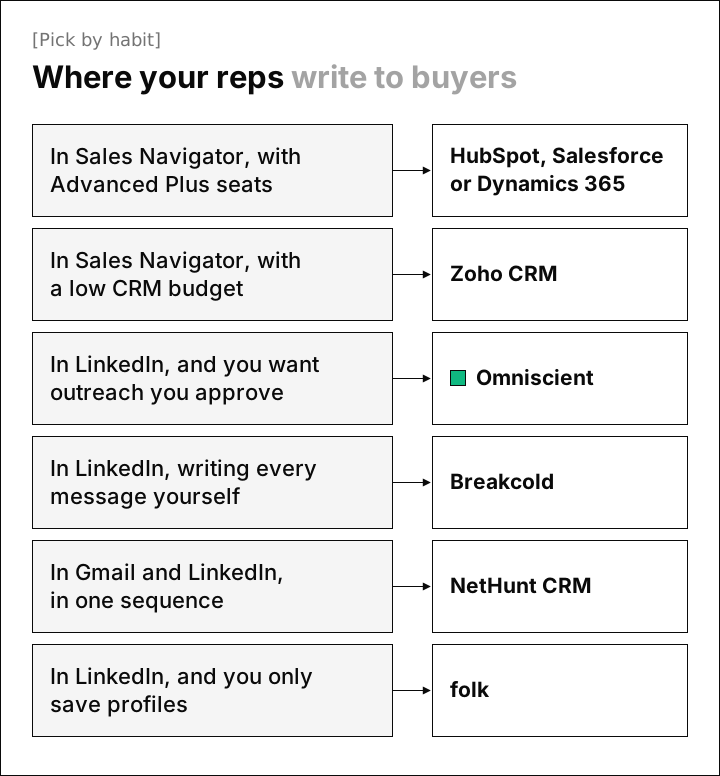
Then test where LinkedIn meets the record during the trial:
- 01Check your LinkedIn plan
If the CRM connects through Sales Navigator, confirm your reps have Advanced Plus first.
- 02Message a known contact
Trade messages with someone already in your CRM and see whether they land on that record.
- 03Reply from both inboxes
Answer once from LinkedIn and once from Sales Navigator, and see which one reaches the CRM.
- 04Hear from someone new
Ask a colleague outside the CRM to message you, and see whether a record appears.
- 05Turn a reply into a deal
Create an opportunity from the conversation and check its stage in your pipeline.
Luckily, a handful of test contacts in the first week of a trial covers all five checks. If sending matters more to you than the CRM side, our guide to LinkedIn outreach tools with a CRM compares the tools built for outreach.
Questions about CRMs with LinkedIn integration
Which CRMs integrate with LinkedIn Sales Navigator?
LinkedIn lists HubSpot, Microsoft Dynamics, Oracle Sales and Salesforce for CRM Sync, plus embedded profiles in Pega, SAP and SugarCRM. Zoho CRM has its own extension, and all of them need Sales Navigator Advanced Plus.
Does HubSpot sync LinkedIn messages?
HubSpot's LinkedIn CRM Sync app logs Sales Navigator activity, and both of its LinkedIn apps need Sales Hub Professional or Enterprise plus Advanced Plus. An InMail sent from a record doesn't save to the timeline on its own, HubSpot says.
Can a CRM log LinkedIn messages without Sales Navigator?
Yes, CRMs that connect to your LinkedIn account, such as Omniscient and Breakcold, bring in conversations from a regular account. They work outside LinkedIn's Sales Navigator program, so read LinkedIn's rules on outside software first.
What is the cheapest CRM with LinkedIn integration?
Zoho CRM Standard lists at $14 per user a month billed yearly, though its extension needs Advanced Plus. With a regular LinkedIn account, Omniscient starts at $19 per seat a month billed yearly and folk at $24 per member.