Best Pipedrive Alternatives in 2026
On this page
Pipedrive is a sales CRM software that helps small businesses track leads and move deals through a visual pipeline. If you're reading about Pipedrive alternatives, something in that setup has stopped fitting your team, like a plan limit or a channel Pipedrive leaves to a Marketplace app.
We build Omniscient, a CRM that runs LinkedIn outreach too. Writing our Pipedrive importer meant reading organizations, people, pipelines, deals and notes through Pipedrive's API, so we've seen how an account fits together. Below are the eight we'd shortlist in 2026, each matched to a reason for leaving.
If you only have a minute, match your reason to a tool:
- Pick Omniscient if you prospect on LinkedIn and want replies on a CRM record that fills itself in.
- Pick HubSpot if you want a free CRM today and room for its marketing tools later.
- Pick Zoho CRM if you want a free plan for up to 3 users.
- Pick Close if your reps spend most of the day on the phone.
- Pick Freshsales if you want calls and email in the CRM on its lowest plan.
- Pick monday CRM if your other teams already plan their work in monday boards.
- Pick folk if your deals start in your own network and on LinkedIn.
- Pick Attio if your data no longer fits a single deal pipeline.
| Tool | What it is | Starting price | Best for |
|---|---|---|---|
 Omniscient | A CRM that fills itself in, with LinkedIn outreach you approve | $19 per seat a month, billed yearly | Small B2B teams that sell through LinkedIn |
 HubSpot | A CRM platform with marketing, sales and service tools | Free for up to 2 users | Teams that want marketing and sales in one place |
| A cloud CRM with a free edition and Zia AI agents | See site | Teams of three that want a free plan | |
| A sales CRM with calling, SMS and email built in | From $9 a month for one user | Teams that sell by phone | |
| An AI sales CRM with phone, email and chat in one place | $9 per user a month, billed annually | Small teams that want calls in the CRM | |
| A CRM built on monday boards, with AI agents | $12 per seat a month, from 3 seats | Teams already working in monday | |
| A light AI CRM with a LinkedIn extension and email sequences | $24 per member a month, billed yearly | Founders and agencies selling through their network | |
 Attio | A CRM with a flexible data model and AI agents | Free for up to 3 seats | Teams whose data outgrew one pipeline |
What Pipedrive does well
Before you switch, list what Pipedrive does for you today, since you'd be giving it up. Its homepage puts these parts up front:
- Nova, its meeting assistant, writes a brief before each call, records and transcribes it, then drafts CRM updates you approve in one click.
- Nova is included in all plans, "at no additional cost."
- The AI Sales Assistant predicts which deals you're most likely to win or lose.
- The free trial lasts 14 days with no credit card.
Honestly, if your team plans its week around a pipeline board and sells mostly by email, Pipedrive is a calm, simple place to work.
Why teams look for a Pipedrive alternative
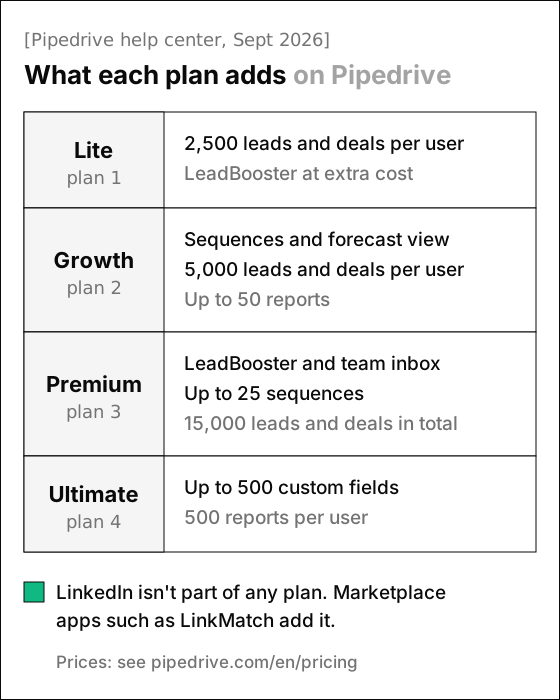
Pipedrive's plans are now Lite, Growth, Premium and Ultimate, and its help center article on the new plans, updated September 3, 2026, lists these limits worth checking:
- Lite allows 2,500 leads and deals per user, and Growth allows 5,000.
- Sequences and the forecast view start on Growth, so a Lite team has neither.
- LeadBooster, with a chatbot, live chat, Prospector and web forms, comes with Premium and is an add-on for Lite and Growth.
- Premium allows up to 25 sequences, and Ultimate caps custom fields at 500, where the old Enterprise plan had no cap.
- Changing plans moves your account onto Pipedrive's latest list pricing, which matters if you signed up at an older price.
LinkedIn doesn't come up in the text of Pipedrive's homepage or its plans article. Teams that prospect there add a Marketplace app such as LinkMatch, a Chrome extension from Logical Pure Minds that imports LinkedIn profiles and syncs LinkedIn messages into Pipedrive.
The 8 best Pipedrive alternatives in 2026
1. Omniscient
Omniscient is a CRM and LinkedIn outreach software that fills in your records from email, calendar and call transcripts, and sends only the LinkedIn messages your team approves. Otto, our AI agent, drafts those messages and your follow-up emails after a call, and he suggests deal updates with the quote behind each one.
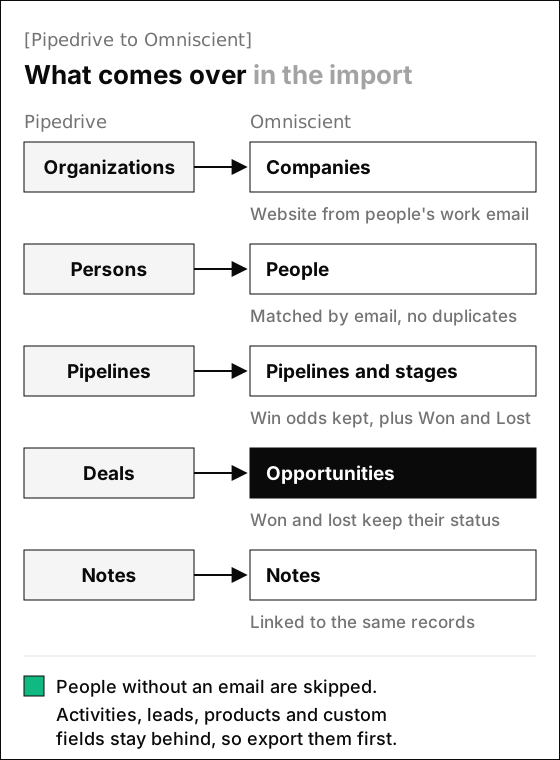
Our pipeline board and the field rules below come with Pro, at $49 per seat a month billed yearly. Our importer keeps each stage's win probability, so weighted amounts use the odds you set in Pipedrive.
The hardest call we made was deciding when Otto may change a deal without asking you, and we settled on these rules:
- You set every field to off, suggest or auto.
- A value with no quote behind it, or one Otto is less than 60% sure of, is dropped before you see it.
- An auto field fills itself only when it's empty and Otto is at least 85% sure.
- A value someone on your team typed is never changed.
- Everything else waits for you to accept or skip, like an amount that moved on a call.
Interestingly, Pipedrive's Nova also drafts CRM updates after a call for you to approve, so your team may know the idea already. Our guide to the CRM with automatic data entry shows how other CRMs handle the same choice.
 From Pipedrive
On the LinkedIn side, Scout finds leads from a sentence describing who you want and scores each one out of 100. Up to 60 points come from fit and up to 40 from timing signals, such as the company hiring for a role you sell to.
LinkedIn's invitation limit page gives no exact number, only that an account that reaches it may be restricted from inviting, usually for a week. So when we built our sending engine this year, we made each sender pace itself:
- A new sender starts at 5 invitations a day and adds 2 a day until it reaches the limit you set, and one coming back from a restriction warms up again.
- Each day's total lands between 80% and 100% of that limit, with random gaps of 3 to 12 minutes inside working hours, around a lunch break.
- By default, the sender views a profile 1 to 4 hours before inviting that person.
- When LinkedIn rate limits the account, or fewer than 1 in 5 of the last week's invitations are accepted, the sender drops to half pace for 3 days and then eases back over 3 more.
Replies land in one Inbox, with the person's CRM record beside each thread, and a reply stops that person's outreach in every campaign.
Admittedly, Omniscient covers less ground than Pipedrive in a few places. We have no mobile app and no dialer, and we don't send email sequences, since each email Otto drafts goes out only when you send it. A team that runs email cadences or sells by phone will do better with Pipedrive Growth or Close.
Teammates who only view or log data are free, and paid seats start at $19 per seat a month billed yearly. The trial lasts 14 days with no credit card, and the CRM page and the Outbound LinkedIn page cover the rest.
2. HubSpot
HubSpot is a customer platform software that puts marketing, sales and service tools on one CRM. Its free CRM is "100% free with no expiration date" for up to 2 users and 1,000 contacts, and it includes Breeze Assistant, which researches companies and helps you prepare for sales calls.
- Sales Hub Starter shows $7 per seat a month as its "starts at" price, with $20 beside it, and the page says discounts are for new customers only.
- The plan comparison lists sequences under Professional and Enterprise.
- Professional starts at $90 per seat a month, plus a $1,500 onboarding fee you pay once.
Thankfully, the free plan has no end date, so you can rebuild a small pipeline there and test it before you pay. For LinkedIn, HubSpot's Sales Navigator sync needs a Sales Hub Professional or Enterprise seat and LinkedIn's Sales Navigator Advanced Plus plan.
3. Zoho CRM
Zoho CRM is a cloud CRM software that helps sales teams respond to leads and run their pipeline, with AI agents from its Zia Agent Store. Its edition comparison lists these limits:
- The Free edition is free for 3 users, with one standard pipeline.
- Standard adds multiple pipelines, 5 forecasts and cadences, Zoho's name for sequences, with up to 10 active at a time per module.
- Process management, which Zoho calls Blueprint, starts on Professional.
- The pages showed us prices in Indian rupees, so check the price in your currency.
Luckily for a team of three, the free edition lets you rebuild one Pipedrive pipeline at no cost. Once you need a second pipeline or cadences, plan on Standard.
4. Close
Close is a sales CRM software built for teams that sell by phone, with calling and SMS next to email in one place. Its AI assistant, Chloe, answers questions about your pipeline, meetings and calls from your own data.
- Solo shows $9 or $19 a month and is limited to 1 user, and Essentials shows $35 or $49 per user, without saying which price is yearly.
- Workflows and the Power Dialer start on Growth, which shows $99 or $109 per user.
- The trial lasts 14 days with no credit card and includes $5 of calling and enrichment credits.
Personally, Close is the CRM we'd hand a team that lives on the phone, and we say that as builders of a CRM with no dialer. Once you hit dial on a list, its homepage says, "Close moves through the list on its own, connecting you the moment someone picks up."
5. Freshsales
Freshsales is an AI sales CRM software from Freshworks that helps teams capture and qualify leads with Freddy AI. Freddy gives intent scores so you can focus on the most valuable leads, and it makes recommendations on deals.
- Growth costs $9 per user a month, billed annually, with a Kanban view, chat, email and phone, and basic workflows.
- Sales sequences, contact scoring and deal insights start on Pro, at $39.
- Forecasting insights start on Enterprise, at $59.
- The Freddy AI Agent is sold separately at $49 per 100 sessions, and paid plans get 500 trial sessions once.
- The trial lasts 21 days with no credit card.
Freshsales suits a small team that wants calls and email in one CRM. If AI is part of why you're switching, budget for the Freddy AI Agent too.
6. monday CRM
monday CRM is a CRM software built on monday.com's boards that helps revenue teams manage their pipelines. Its homepage says calls, emails and meetings fill the right CRM fields automatically, and it names agents for lead sourcing, calling, pipeline monitoring and meeting prep.
- Basic shows $12 per seat a month, next to a crossed out $18, with 1,000 active contacts and deals.
- Standard shows $17 and adds 250 automations a month and 10,000 contacts and deals.
- Email sequences and mass emails start on Pro, which shows $28.
- AI agents come with separate AI plans that include AI credits.
- Plans start from 3 seats, and the trial lasts 14 days.
Happily, a team that already runs projects or marketing in monday keeps its deals on the same boards. A sales team on its own should price in the 3 seat minimum and the separate AI plans.
7. folk
folk is an AI CRM software that helps small sales teams and agencies keep their contacts and deals in shared pipelines. Its Chrome extension, folkX, imports people and lists from LinkedIn and Sales Navigator, and its homepage names Pipedrive among the tools its pipelines replace.
- Standard costs $24 per member a month billed yearly, or $30 monthly, with pipelines, email campaigns and folkX.
- Email sequences, custom objects and dashboards start on Premium, at $48, or $60 monthly.
- No plan caps the number of members, and the 2 week trial needs no credit card.
folk fits founders whose pipeline is mostly people they already know or meet on LinkedIn. Our list of the best CRM for LinkedIn compares how folk and the others connect to LinkedIn.
8. Attio
Attio is a CRM software that sets itself up around your business once you connect your inbox and calendar, with a data model you can reshape as you grow. Its homepage opens with "Welcome to agentic revenue" and describes agents that pick up leads at 2am and catch renewals before they slip.
- Free covers up to 3 seats and 3 objects, and Plus costs $35 per user a month billed yearly, or $44 monthly, for up to 10 seats.
- Sequences and Call Intelligence start on Pro, at $79 billed yearly, or $99 monthly.
- The trial gives you 14 days of Pro, and eligible startups can get up to 80% off.
Attio fits when your records have outgrown deals and stages, like partners or product usage tracked next to the pipeline. Our Attio alternatives guide covers the trip in the other direction.
Pipedrive alternatives compared
Past the seat price, two questions sort this list fastest: where sequences start, and how each CRM reaches LinkedIn.
| CRM | Free plan | Free trial | Sequences start on | |
|---|---|---|---|---|
| Pipedrive | Not listed | 14 days, no card | Growth | Marketplace apps |
| Omniscient | Free seats for teammates who view or log data | 14 days, no card | LinkedIn only, no email sequences | Outreach you approve, inside the CRM |
| HubSpot | Up to 2 users | Free plan, no end date | Professional | Sales Navigator sync from Professional |
| Zoho CRM | Up to 3 users | Length not stated | Standard | Sales Navigator integration listed |
| Close | Not listed | 14 days, no card | Growth, as workflows | Not on its homepage |
| Freshsales | Not listed | 21 days, no card | Pro | Not on its sales page |
| monday CRM | Not listed | 14 days | Pro | Not on its CRM page |
| folk | Not listed | 2 weeks, no card | Premium | folkX Chrome extension |
| Attio | Up to 3 seats | 14 days of Pro | Pro | No LinkedIn feature on its homepage |
If most of your conversations start on LinkedIn, read the last column first. Otherwise, compare prices on the plan where sequences start, since that's where you'll land once follow-ups run on a schedule.
How to move from Pipedrive to another CRM
We'd run both CRMs side by side for the length of a trial, about two weeks, in this order:
- 01Connect your inbox first
Add Gmail or Outlook and your calendar to the new CRM while Pipedrive keeps running.
- 02Add missing email addresses
Our importer skips people without one and matches everyone else by email, so give an address to each person you plan to keep.
- 03Export what won't come over
Save anything the new importer skips as spreadsheets. Ours leaves activities, products, Leads Inbox items and custom fields behind.
- 04Import, then spot check
Move organizations, people, deals and notes, and open a few deals to confirm each kept its stage, amount and owner.
- 05Rebuild automations last
Recreate workflows and sequences once the data settles, so nothing fires on a half imported deal.
In Omniscient, each imported pipeline keeps its stages and their win probabilities, and Won and Lost stages are added where they're missing. A few more rules decide how your records land:
- Won and lost deals keep their status, and each owner is matched to a teammate by email.
- People already in your workspace are matched by email, and running the import again matches records by their Pipedrive ID, so nothing doubles up.
- Pipedrive organizations come over without a website, so each company takes its domain from its people's work emails, skipping personal addresses like Gmail.
Omniscient has no task list, so write each open deal's next activity into its Next step field once the import finishes. If you turn on that field's rule, Otto suggests updates to it from your meetings and emails.
If you'd rather not run the import yourself, send us an export and we map your fields, move your companies, contacts, deals and notes, and check the result with you.
Questions about Pipedrive alternatives
What is the best alternative to Pipedrive?
It depends on why you're leaving. Omniscient fits small teams that prospect on LinkedIn, Close fits teams that sell by phone, and HubSpot fits teams that want a free CRM with room for marketing.
Is there a free alternative to Pipedrive?
Yes. HubSpot's free CRM covers up to 2 users and 1,000 contacts, Zoho CRM's free edition covers 3 users, and Attio's free plan covers up to 3 seats.
Is there a cheaper alternative to Pipedrive?
Freshsales Growth costs $9 per user a month billed annually, and Close Solo shows $9 or $19 a month for one user. Compare them with Pipedrive on the plan your team would need.
Does Pipedrive have LinkedIn automation?
Pipedrive's homepage and its plans article don't mention LinkedIn. Teams add apps from its Marketplace, such as LinkMatch, or move to a CRM that sends on LinkedIn, like Omniscient.
Can I move my data from Pipedrive to Omniscient?
Yes. Our importer brings over organizations, people, pipelines, deals and notes, or we migrate them for you from an export. Save activities, leads and custom fields as spreadsheets first.