Best Salesforce Alternatives for Startups
On this page
Salesforce's Free Suite covers two users, so a pair of founders can run their first deals on it at no cost. The search for Salesforce alternatives for startups often starts a little later, when a third person joins or the team wants a forecast.
We build Omniscient, a CRM with LinkedIn outreach for small B2B teams, and we wrote our own Salesforce importer. Reading Salesforce data through its API showed us where a startup's sales history sits, and below are the eight alternatives we'd shortlist.
Here's where we'd look first, by what you want instead:
| What you want instead | Where we'd look first |
|---|---|
| A CRM that fills itself in from email, meetings and LinkedIn | Omniscient |
| Marketing and sales in one place, with a startup discount | HubSpot |
| Custom objects like Salesforce's, with less setup | Attio |
| A simple pipeline for your first sales hire | Pipedrive |
| A low seat price and help moving off Salesforce | Zoho CRM |
| A CRM for deals that start in your own network | folk |
| Calling and texting built into the CRM | Close |
| An open source CRM you can host yourself | Twenty |
| Tool | What it is | Starting price | Best for |
|---|---|---|---|
 Omniscient | A CRM that fills itself in, with LinkedIn outreach you approve | $19 per seat a month, billed yearly | Small B2B teams selling through email, meetings and LinkedIn |
 HubSpot | A customer platform with a free CRM and paid sales tools | Free for up to 2 users | Startups that run marketing and sales together |
 Attio | A CRM you shape around your own objects and fields | Free for up to 3 seats | Teams that liked Salesforce's custom objects |
 Pipedrive | A sales pipeline CRM with meeting intelligence on every plan | See site | A first sales hire who works by stage |
| A sales CRM with a free edition and AI agents from Zia | Free for 3 users | Startups that want a low seat price and migration help | |
| An AI CRM with a LinkedIn extension and email campaigns | $24 per member a month, billed yearly | Founders who sell through their network | |
| A CRM with calling, email and SMS built in | From $9 a month for one user | Teams that sell by phone | |
| An open source CRM you host yourself or run in its cloud | $9 per user a month, billed yearly | Technical teams that want to own their CRM |
Why startups look for a Salesforce alternative
Salesforce sells six Sales Cloud editions, and here's what its Sales Cloud pricing page and free CRM page say today:
- The Free Suite covers up to 2 users with no end date, as long as someone logs in at least once every 60 days, and it sends up to 100 emails a month.
- Starter Suite costs $25 per user a month, and it's the only edition you can pay for month by month.
- Pro Suite costs $100 per user a month, billed yearly, and it's where sales quoting and forecasting start.
- Core, Advanced and Max cost $195, $395 and $550 per user a month, all billed yearly.
- Agentforce for Sales is an add on from $125 per user a month, and the page says AI can be added to Core and above.
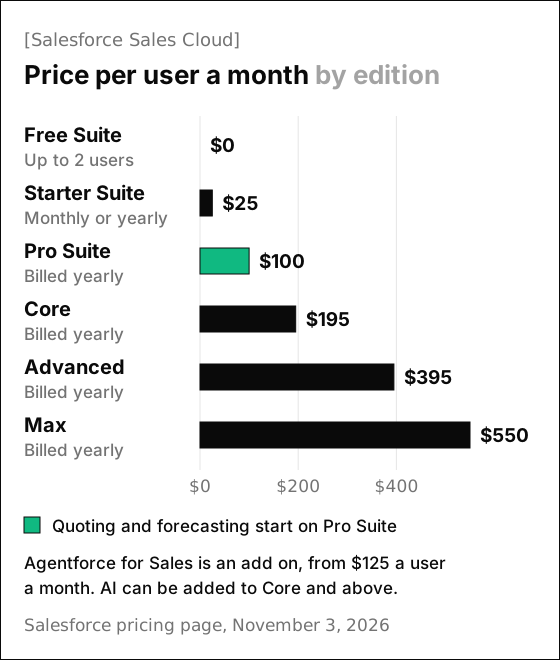
Honestly, Starter Suite at $25 is a fair price for a small team that only needs leads, accounts and a pipeline. The bigger step is Pro Suite, where forecasting and quotes start and monthly billing is no longer on offer.
Building our importer, we also saw how Salesforce spreads a startup's history across separate objects. Leads and contacts live apart, and every custom field someone added is one more thing to carry over or leave behind.
If you're venture backed, ask about Salesforce Launchpad before you leave. Salesforce says it adds discounts and implementation support to Starter and Pro Suite, but the page doesn't say how much, so ask for the terms.
When staying on Salesforce makes sense
A startup whose Salesforce setup already works has less to gain from a move. We'd stay on Salesforce and revisit it at renewal in these cases:
- You sell to large companies with several sales processes, territories or approval steps.
- Someone on your team already runs Salesforce well, so the setup work is done.
- A Launchpad discount covers the next year or two at a price you're happy with.
- Your team uses custom objects and automations you built in Salesforce every day.
The 8 best Salesforce alternatives for startups
1. Omniscient
Omniscient is an AI CRM that fills in its records from the email, calendar and call transcripts you connect, with LinkedIn outreach in the same app. Otto, our AI agent, writes your meeting notes and proposes field values, each with the quote that backs it.
For a startup coming from Salesforce, the big change is who does the typing. Each email and meeting lands on the right company and person on its own, so records stay current in the weeks you're busiest with buyers.
Our plans line up like this:
- Starter costs $19 per seat a month billed yearly, with record pages, meeting notes from transcripts, follow up email drafts, Ask Omniscient and a daily digest.
- Pro costs $49 and adds the pipeline board and forecast, custom fields, fields filled with proof, meeting prep briefs and Slack alerts.
- Business costs $99 and adds a manager view with call coaching, MEDDICC and BANT from calls, and dashboards from a sentence.
- Teammates who only view or log data are free, monthly billing costs 20% more, and the 14 day trial needs no card.
We chose one rule for fields on purpose, because a wrong amount in a forecast costs more than an empty one. For a field set to fill itself, Otto writes a value only when the field is empty, he's at least 85% sure and he can show the quote. Everything else waits as a suggestion to accept or skip, and he never changes a value someone on your team typed.
On the LinkedIn side, Scout finds people who match a buyer you describe in a sentence, and Otto drafts each message for a teammate to approve. LinkedIn's invitation limit page doesn't publish an exact number, so a new sender starts low, at 5 invitations a day, and adds 2 a day. Actions go out inside working hours, with random gaps of 3 to 12 minutes at the default pace.
Admittedly, Omniscient covers less ground than Salesforce in a few places. We don't send marketing emails or email sequences, and there's no dialer.
Our importer also leaves custom objects and custom fields in Salesforce, so a team that built a lot there has more to rebuild. Everything else Omniscient does is on the CRM page.
2. HubSpot
HubSpot is a customer platform that runs marketing, sales and service teams from one shared CRM, with Breeze Assistant as its AI helper.
- The free CRM covers up to 2 users and 1,000 contacts, with no expiration date.
- Sales Hub Starter shows $20 per seat a month next to a "starts at" price of $7, which HubSpot marks as a discount for new customers only.
- Sequences and forecasting start on Professional, from $90 per seat a month, plus a required one time onboarding fee of $1,500.
- HubSpot for Startups lists 90% off year one, 50% off year two and 25% off year three on new Professional or Enterprise products, for startups funded up to Series A.
HubSpot fits a startup that wants marketing and sales to share one system. Luckily for two founders, the free CRM has no end date, so you can wait to pay until your first hire.
HubSpot's startup FAQ calls the discount period "typically two years" and asks for a yearly commitment, so confirm the third year before you plan around it. Our list of HubSpot CRM alternatives covers where its plans step up.
3. Attio
Attio is a CRM that builds pipeline and advances deals with AI agents, on objects and fields you shape around your business. Its homepage lists custom agents, plus a Web Agent that researches the web for you.
- The Free plan covers up to 3 seats, 3 objects and 50,000 records.
- Plus costs $35 per seat a month billed yearly, or $44 monthly, for up to 10 seats and 5 objects.
- Pro costs $79 billed yearly, or $99 monthly, and adds sequences, Call Intelligence and up to 12 objects.
- Attio for Startups takes 80% off the yearly Pro plan and credits in year one, and 30% in year two, for venture backed workspaces of up to 10 seats.
- The FAQ lists a 14 day trial of Pro, and you can start without a credit card.
If your team relied on Salesforce's custom objects, Attio is the one we'd look at first. Its site also links to a guide for moving data from Salesforce.
Apply for the startup offer early, since its 90 day window opens the day you create the workspace. Our Omniscient vs Attio comparison puts the two side by side.
4. Pipedrive
Pipedrive is a sales pipeline CRM that tracks every deal by stage and helps you manage leads. Its AI Sales Assistant predicts which deals you're most likely to win or lose.
- Nova, its meeting intelligence, writes a brief before each call, records and transcribes it, and drafts CRM updates for you to approve.
- The homepage says Nova comes with all plans at no extra cost, and Pipedrive offers a 14 day free trial with no credit card.
- Its help center lists four plans, Lite, Growth, Premium and Ultimate, and bills every seat whether or not anyone is assigned to it.
- Its pricing page didn't load for us on November 3, so check prices there.
Pipedrive suits a startup whose first sales hire plans the week by pipeline stage. Since empty seats are billed too, remove leftover seats before each renewal.
5. Zoho CRM
Zoho CRM is a sales CRM that helps teams answer leads faster and run leaner sales operations, with AI agents from its assistant, Zia.
- The Free edition is free forever for 3 users, with contact management, workflow automation and up to 10 email templates.
- Standard costs $14 per user a month billed yearly, or $20 monthly, and includes sales forecasting, custom modules and several pipelines.
- Professional costs $23 billed yearly, or $35 monthly, and adds AI agents and quoting tools (CPQ).
- For teams switching from Salesforce or HubSpot, the homepage offers "free migration assistance, and if you're locked mid-contract, Zoho CRM is on us for 6 months."
Interestingly, Zoho includes sales forecasting on Standard, while Salesforce keeps it for Pro Suite. If you're partway through a Salesforce contract, read the terms of Zoho's six month offer before you sign anything.
6. folk
folk is an AI CRM that helps teams close deals and find new clients, with a Chrome extension that adds people from LinkedIn and Sales Navigator. Its assistants score leads against your ideal customer and add company details from the web.
- Standard costs $24 per member a month billed yearly, or $30 monthly, with the LinkedIn extension, email campaigns and AI magic fields.
- Premium costs $48, or $60 monthly, and adds email sequences, custom objects, dashboards and API access.
- The 2 week trial includes every premium feature and needs no credit card.
folk fits a founder whose deals start on LinkedIn or through warm introductions, where a tidy contact list matters more than stages and forecasts. If you used custom objects in Salesforce, price Premium, since that's where folk's custom objects start.
7. Close
Close is a sales CRM that lets teams call, text and email their leads from one place, with automation and AI built in. Chloe, its AI assistant, answers questions about your pipeline, meetings and calls from your own data.
- Solo shows $9 or $19 a month for one user, depending on billing, with up to 10,000 leads.
- Essentials shows $35 or $49 per user with unlimited contacts, and every plan includes calling and SMS.
- Growth shows $99 or $109 per user and adds workflows and the Power Dialer.
- The 14 day trial needs no credit card and includes $5 of calling and enrichment credits, and paid plans come with a 30 day money back guarantee.
Happily, a founder who sells by phone can start on Solo and move to Essentials once the first rep joins. If your reps spend most of the day on calls, Close is the one we'd send you to, since Omniscient has no dialer.
8. Twenty
Twenty is an open source CRM that you can host on your own servers or run on its managed cloud. Its homepage calls it "the #1 Open Source CRM on GitHub," and every cloud workspace comes with an MCP server for AI tools.
- Cloud Pro costs $9 per user a month billed yearly, with email and calendar sync, a custom data model and workflows.
- Organization costs $39 billed yearly and adds custom roles, SSO and audit logs.
- The cloud trial lasts 30 days with no credit card.
- To move off Salesforce, the homepage points to CSV import, its API for larger imports, or partners who run the whole migration.
We'd pick Twenty for a startup with engineers who want to own the CRM's code and data. Fortunately, the open source core itself is free, though you then pay for your own servers and someone has to look after the upgrades.
Salesforce alternatives compared
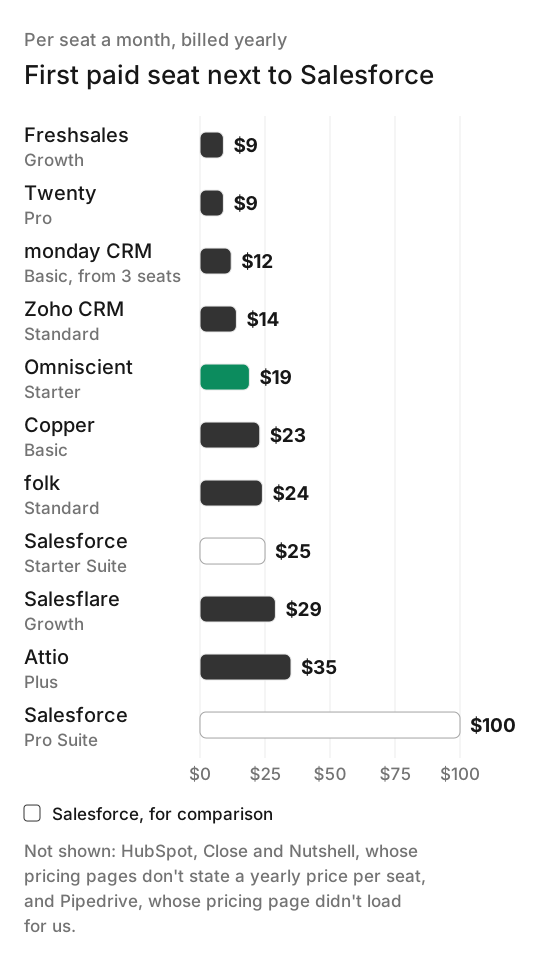
First paid plans include different features, so check these next to the reviews above:
| CRM | Free plan | Free trial | First paid plan |
|---|---|---|---|
| Salesforce | Free Suite, up to 2 users | 30 days of Starter Suite | Starter Suite, $25 monthly or yearly |
| Omniscient | Free seats for teammates who view or log data | 14 days, no card | Starter, $19 yearly, 20% more monthly |
| HubSpot | 2 users, 1,000 contacts | check | Starter, $20 listed, from $7 for new customers |
| Attio | Up to 3 seats | 14 days of Pro | Plus, $35 yearly or $44 monthly |
| Pipedrive | check | 14 days, no card | Lite, check |
| Zoho CRM | 3 users | Length not stated | Standard, $14 yearly or $20 monthly |
| folk | None listed | 2 weeks, no card | Standard, $24 yearly or $30 monthly |
| Close | None listed | 14 days, no card | Solo, $9 or $19 for one user |
| Twenty | Free to host yourself | 30 days, no card | Pro, $9 yearly |
How to move from Salesforce to another CRM
We built Omniscient's Salesforce importer ourselves, and most of what we learned applies whichever CRM you pick. You sign in with Salesforce, the importer only reads, and it deletes its saved Salesforce login once the import finishes.
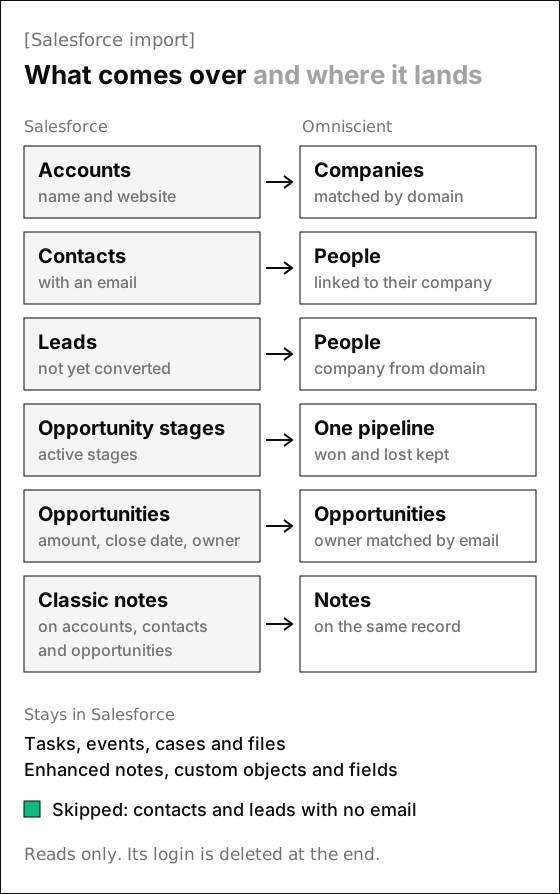
These details shaped our importer, and they're worth checking in any CRM's import:
- Leads and contacts are separate in Salesforce, so check that unconverted leads come over too. Ours brings them in as people and links each one to a company when its website or work email gives a domain.
- Contacts and leads without an email address are skipped, so export them first if you want to keep them.
- Every active opportunity stage lands in one pipeline called Sales, so split it into pipelines afterwards if you run more than one sales process.
- Salesforce has two note tools, and its help article says a note opens only in the tool that made it. Ours reads classic notes, so check which kind your team writes.
- Opportunity owners are matched to teammates by email, and running the import again updates each opportunity's stage, amount and close date.
Thankfully, a read only import leaves Salesforce as it was, so you can run both side by side until the numbers match. We'd switch in this order:
- 01Check your renewal date
Pro Suite and the editions above it are billed yearly, so time the switch to the end of your contract.
- 02Save what won't move
Export tasks, cases, files and custom objects, and write down your flows and alerts.
- 03Connect your inbox and calendar
Add Gmail or Outlook first, so new activity lands in the new CRM.
- 04Invite your team
Use the email addresses they use in Salesforce, so opportunity owners match.
- 05Run the import
Bring everything over, then check five opportunities by hand for stage, amount and owner.
- 06Rebuild automations last
Recreate flows once the data settles, so nothing fires on a half imported record.
Accounts, contacts, opportunities with their stages, and notes. Records already here are matched and filled in.
HubSpot
 Salesforce
Attio
Pipedrive
Connect Salesforce
SalesforceOpportunities, 840 accounts, 2,210 contacts, 390 leadsRunningHubSpot21d ago, 112 accounts, 305 contactsDone
If you'd rather not run it yourself, we migrate your companies, contacts, deals and notes from Salesforce for you. Our guide to the best CRM for startups compares a few more options, including Salesforce's own free plan.
Questions about Salesforce alternatives for startups
What is the best Salesforce alternative for a startup?
Omniscient is our pick for B2B startups that sell through email, meetings and LinkedIn and want the CRM to fill itself in. If you need custom objects like Salesforce's, look at Attio first, and if your team sells by phone, Close is the stronger fit. HubSpot suits teams that run marketing and sales together.
Is Salesforce free for startups?
Salesforce's Free Suite covers up to 2 users, as long as someone logs in at least once every 60 days. From three users you move to Starter Suite at $25 per user a month, and venture backed startups can ask Salesforce about Launchpad discounts.
Can I move my data from Salesforce to another CRM?
Yes. Omniscient's importer signs in with Salesforce and brings over accounts, contacts, leads, opportunities with their stages and classic notes, or we can migrate them for you.
Which Salesforce alternatives have startup discounts?
HubSpot for Startups lists up to 90% off new Professional or Enterprise products in year one, and Attio for Startups takes 80% off its yearly Pro plan in year one. Both are for venture backed startups or startups that work with one of their approved partners.